Free Blocky Lakeside Starting Soon Screen With a Creeper and Progress Bar
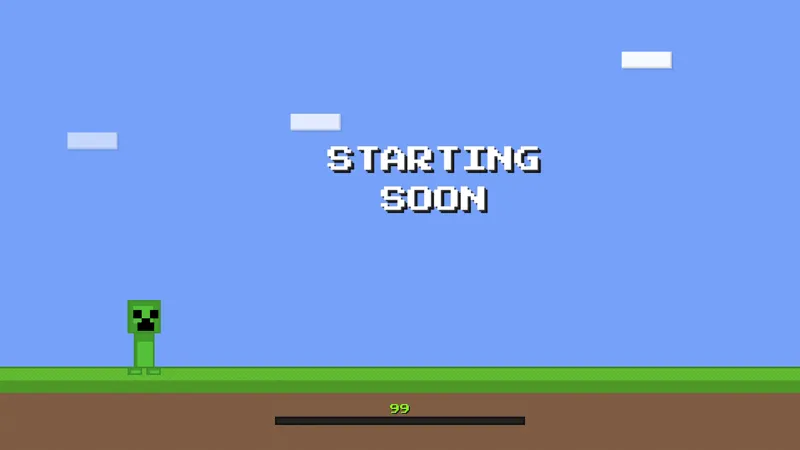
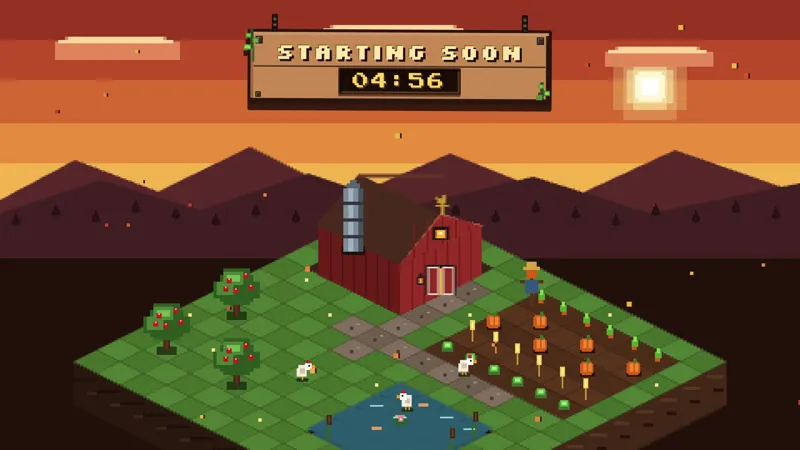
A blocky Minecraft lakeside with a Creeper in the corner and a progress bar that fills while your viewers wait for you to go live.
By Meld
Get Minecraft Creeper Starting Soon free
Included with Meld Studio. Or stay in OBS with Spark Plug.
Viewers who arrive early want to know one thing: how long until you start. A static image does not answer that, and a blank scene makes them wonder if the stream is working at all. The Minecraft Creeper Starting Soon scene answers it with a progress bar that fills while they wait.
It is free with Meld Studio. No watermark, no paywall, no setup fee.
What is on screen
The scene is a blocky lakeside in a pixel art style, the kind of chunky, cube-built landscape Minecraft players recognize on sight. A Creeper-inspired character stands in the corner of the frame, watching the water. Across the scene, the progress bar fills as your go-live moment gets closer.
That is the whole idea. There is no chat feed to manage and nothing for viewers to type. The scene does one job: it fills the waiting room with something worth looking at and shows them the wait is shrinking.
When to use it
Put it on before any stream where the audience expects a Minecraft session. A survival world, a build showcase, a modded run or a community server night all start better when the first thing viewers see matches what is coming.
It also works as a reset scene. When you step away for a long pause and come back, switch to it so returning viewers see motion and a filling bar instead of a frozen frame.
The scene plays the same on Twitch, YouTube Live, Kick, and TikTok Live. If you multistream, every audience sees the same backdrop and the same bar, with nothing extra to set up per platform.
Who this is for
Minecraft streamers of any size, builders who like to set the mood before a session, and anyone who wants a pixel art starting soon screen that feels like a game world instead of a plain card. It suits small channels that want a polished open and larger ones that want a consistent pre-stream look.
The Creeper design is Minecraft-style, not official. It borrows the blocky visual language that fans love without being a product of the game’s makers.
Adding it to your stream
Download Meld Studio and add the scene to your layout. Switch to it a few minutes before you go live, then cut to your gameplay scene when the bar is full. If you already run OBS and would rather stay there, the free Spark Plug for OBS plugin brings the same scene into your existing setup. Either way, it works across Twitch, YouTube Live, Kick, and TikTok Live from one sign-in.
Use cases
-
Opening a survival or building stream
Early arrivals land on your channel a few minutes before you start, and a blank scene gives them no reason to wait. The blocky lakeside tells a Minecraft crowd what the session is about before you say a word, and the bar shows them you are almost ready.
-
Reopening the scene after a break
Run it again when you come back from a long pause mid-stream. Viewers who stepped away can glance at the screen and see the bar filling, so they know how long until you return without asking in chat.
-
Streaming to several platforms at once
If you multistream, the same scene plays for every audience. Someone watching on YouTube Live and someone on Kick both see one progress bar moving toward the same go-live moment.
Frequently asked questions
Is this Minecraft starting soon screen free?
Yes. The Minecraft Creeper Starting Soon scene is free to use with Meld Studio. Add it to a scene and it is ready to run before you go live.
Which streaming platforms does it work on?
It works on Twitch, YouTube Live, Kick, and TikTok Live. The scene is a visual backdrop, so it plays the same wherever you stream, including when you multistream to more than one platform at once.
Does it work with OBS Studio?
Yes. Spark Plug for OBS brings this scene into your existing OBS setup, so you can use it as it is and customize it with help from Meld Spark in seconds. You do not have to leave OBS to get it.
Is this an official Minecraft overlay?
No. It is a Minecraft-style scene made by Meld, with a blocky lakeside and a Creeper-inspired character. It is not made by or affiliated with the makers of the game.
What does the progress bar show?
The bar fills while your viewers wait for you to go live, so they can see at a glance that the stream is getting closer to starting. It gives a waiting room a sense of movement instead of a static image.