Sign in to Kick.
Everything else is ready.
Meld Studio connects to your Kick account directly, so there is no stream key to hunt down and no server to configure. Scenes, a full audio mixer, overlays that react to your chat and 1080p60 are all waiting the moment you open it. Free on Windows and macOS.
Looking for Windows? Get it here
Looking for macOS? Get it here
Meld Studio runs on Windows and macOS
It can't be installed on a Chromebook. It isn't available for Linux. It can't be installed on a phone or tablet. Meld Spark works in any browser, so you can build overlays, alerts and widgets for your stream right here.
Open Meld Spark Download for another computerMeld Studio runs on Windows and macOS. Choose your computer:
Native Kick output
Log in once and the setup is done.
1080p60, ready
Recommended settings applied out of the box.
One chat panel
Kick, Twitch and YouTube in the same feed.
Meld Studio talks to Kick directly
Most streaming software makes you dig a stream key out of a dashboard, paste an ingest URL, and hope you picked the right server. Meld Studio talks to Kick directly. Add the output, sign in, and the stream server and key are handled for you.
Nothing to rotate, nothing to leak, nothing to re-paste when you switch machines.


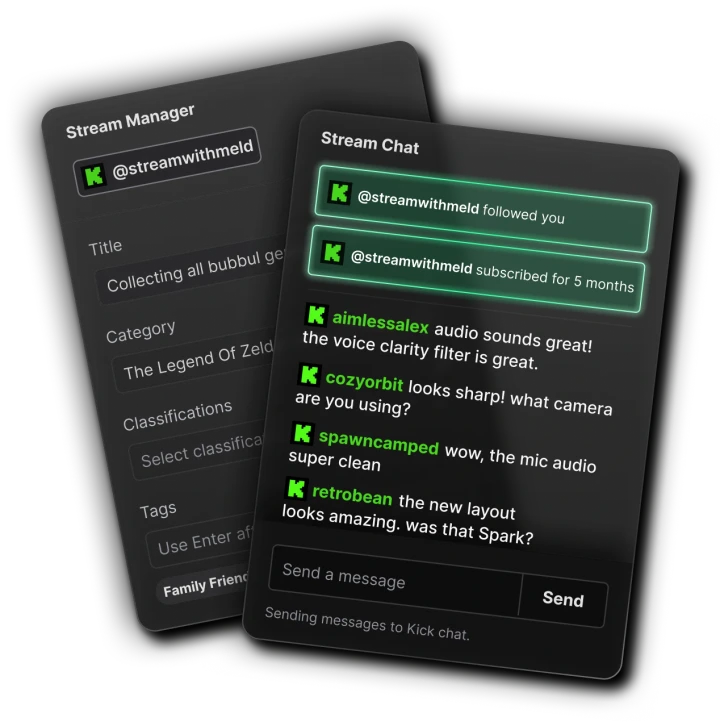
Kick chat, without the second monitor
Your Kick chat lands in the chat dock inside Meld Studio, so you can read and reply without alt-tabbing to a browser mid-game. Follows and subscriptions come through too, and the built-in Chat, Activity Feed and Goal widgets react to them on screen.
The Stream Manager sits next to it, so your title, category and tags are one click away instead of one dashboard away. Add Twitch or YouTube later and their messages join the same panel, each tagged by platform.
Vertical clips from your Kick stream
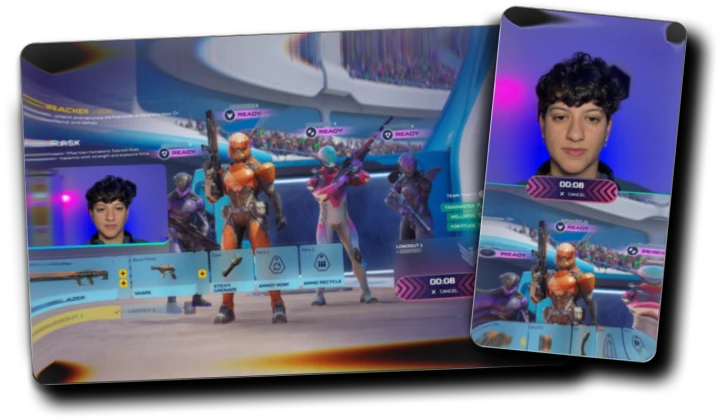
Kick is a landscape-first platform, so Meld gives you the second shape for free. Turn on Multi Canvas and every scene gains a portrait canvas at 1080 × 1920, with its own layer stack, built from the same show you are already running.
Clips pulled from that canvas land at 1080 × 1920, ready for a short-form feed without cropping or reframing. You can also assign the Kick output itself to the Portrait canvas and stream vertical straight to Kick.
Meld Spark
Describe an overlay. It goes live already reacting to chat.
Meld Spark is built into Meld Studio. Say what you want in one sentence and it writes the overlay, drops it straight into your scene, and connects it to your live Kick events. No code, no third-party alert service, no browser source URL to paste anywhere.
Add a follower goal bar along the bottom with a neon green glow, and pop confetti the moment we hit the goal.
Already listening to your Kick events
- Chat messages
- Chat commands
- Follows
- Subs
- Gifted subs
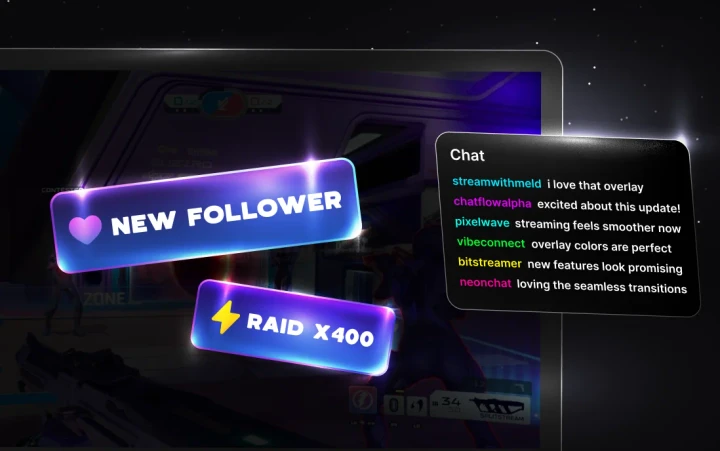
Meld Spark writes real code, not a static image, which is why its overlays animate at 60fps and can respond to live events. Which events are available depends on each platform's API. See how Meld Spark works.
How to stream to Kick
Five steps from a fresh install to live on Kick.com. No stream key, no RTMP URL, no plugins.
-
Download and open Meld Studio
Meld Studio is free on Windows and macOS, with no watermark and no per-stream limits.
-
Add Kick as an output
Open the Outputs panel in the top-right corner, click the plus icon and select Kick from the list of available outputs.
-
Log in to Kick
Click Login in the Kick output settings. Your browser opens, you sign in with your Kick credentials, and Meld Studio fills in the stream server and key for you.
-
Build your scene
Add your game capture, camera and mic, then drop in overlays, alerts and a chat box. Meld Spark can build custom ones from a sentence.
-
Click Go Live
Meld Studio starts broadcasting to Kick and confirms once the stream is live and stable. Your Kick chat appears in the chat dock.
Go live everywhere else too
Multistreaming is built into Meld Studio, so every platform below can be running from the same broadcast. Pick another destination and set it up the same way.
You're in good company
Thousands of creators already use Meld every day.
Meld is going to be a game changer. Everything you love about OBS with Adobe like effects, it's free, it will eventually have add ons. And it's faster, less resources.

@Italianclownz
after using @streamwithmeld for the past few streams, I am beyond impressed!!! It may still be in BETA but the response from my community has been amazing!

@BillyGoatTTV
@streamwithmeld is a game changer. yall need to get in on that IMMEDIATELY!

@comfiebeetv
With OBS, I had a scene for every single game and so many plugins. Meld? One scene captures every game without manually changing it. It worked straight from install.

@Riley_McKenna1
I switched from OBS to Meld, and I haven't looked back. I enjoy it so much.

@CodyDaltonSID
Meld is going to be a game changer. Everything you love about OBS with Adobe like effects, it's free, it will eventually have add ons. And it's faster, less resources.
@Italianclownz
after using @streamwithmeld for the past few streams, I am beyond impressed!!! It may still be in BETA but the response from my community has been amazing!
@BillyGoatTTV
@streamwithmeld is a game changer. yall need to get in on that IMMEDIATELY!
@comfiebeetv
With OBS, I had a scene for every single game and so many plugins. Meld? One scene captures every game without manually changing it. It worked straight from install.
@Riley_McKenna1
I switched from OBS to Meld, and I haven't looked back. I enjoy it so much.
@CodyDaltonSID
Creators and live streamers - keep tabs on @streamwithmeld. This is a new broadcasting software alternative to OBS that's in development, and they are doing some really cool things.

@Naaackers
Got to check out Meld Studio today, and this looks very promising. 👀

@_Smirky
As someone who has been part of the beta, I highly recommend giving Meld a chance. It is really unique and awesome to try out new options in the streaming space!

@noctisnexusttv
Switched from OBS Studio to Meld a few weeks ago, and my oh my! How easy it is to set everything up. No more having to download plugins for simple transitions.

@WeeScottishMark
I am in love with Meld Studio! It has made my live streaming so much easier than it was with OBS.

@OldNerdReviews
Creators and live streamers - keep tabs on @streamwithmeld. This is a new broadcasting software alternative to OBS that's in development, and they are doing some really cool things.
@Naaackers
Got to check out Meld Studio today, and this looks very promising. 👀
@_Smirky
As someone who has been part of the beta, I highly recommend giving Meld a chance. It is really unique and awesome to try out new options in the streaming space!
@noctisnexusttv
Switched from OBS Studio to Meld a few weeks ago, and my oh my! How easy it is to set everything up. No more having to download plugins for simple transitions.
@WeeScottishMark
I am in love with Meld Studio! It has made my live streaming so much easier than it was with OBS.
@OldNerdReviews
I mean those who love to tinker with options and apply a creative twist to the mundane elements of a stream production. there's a lot of options, filters and all round cool features within Meld.

@NathanOrDie
You don't always need plugins to create cool effects. @streamwithmeld is great software for content creators. And definitely worth a look.

@Mecky_79
I love @streamwithmeld! Why? Because not only do they have an amazing OBS alternative software to stream with, an outstanding community, constantly communicating with us!

@isagesen
I recently switched to Meld Studio from OBS and it's been the best decision! I highly recommend it. Plus the community and support is amazing.

@nadia_html
I've recently switched to Meld and honestly it's been great.

@Jordsyx
I mean those who love to tinker with options and apply a creative twist to the mundane elements of a stream production. there's a lot of options, filters and all round cool features within Meld.
@NathanOrDie
You don't always need plugins to create cool effects. @streamwithmeld is great software for content creators. And definitely worth a look.
@Mecky_79
I love @streamwithmeld! Why? Because not only do they have an amazing OBS alternative software to stream with, an outstanding community, constantly communicating with us!
@isagesen
I recently switched to Meld Studio from OBS and it's been the best decision! I highly recommend it. Plus the community and support is amazing.
@nadia_html
I've recently switched to Meld and honestly it's been great.
@Jordsyx
FAQ
Streaming to Kick with Meld Studio
How do I stream to Kick with Meld Studio?
Open the Outputs panel in Meld Studio, click the plus icon and select Kick. Click Login, sign in with your Kick account in the browser window that opens, then click Go Live. Meld Studio handles the stream server and key for you.
Do I need a stream key to go live on Kick?
No. Meld Studio uses Kick’s native login integration, so there is no stream key to copy and no RTMP URL to paste. Log in once and the output is configured.
What are the recommended stream settings for Kick?
Meld Studio applies sensible defaults when you add the Kick output, so most creators never need to change anything. If you want to tune it yourself, the current recommended resolution, framerate, encoder and bitrate values are kept up to date in the Kick documentation.
Can I stream to Kick and Twitch at the same time?
Yes. Multistreaming is built into Meld Studio, so Kick, Twitch, YouTube, TikTok and any custom RTMP destination can run from the same broadcast. Each output has its own toggle, so you can start one, add another mid-stream, or end one without touching the rest.
Can I stream in portrait format to Kick?
Yes. Enable Multi Canvas and assign your Kick output to the Portrait canvas, which runs at 1080×1920. That is useful for mobile-first layouts, and you can keep a landscape feed running to another platform at the same time.
Is Meld Studio free for Kick streaming?
Yes. Meld Studio is free on Windows and macOS, with no watermark and no limit on how long or how often you stream.
Can I see my Kick chat while I stream?
Yes. Kick chat appears in the built-in chat dock, alongside Twitch and YouTube if you are multistreaming, so you can read and reply to everyone from one panel without a second monitor.
Does Meld Studio work on Mac for Kick?
Yes. Meld Studio is a native app on both macOS and Windows, and the Kick output works the same way on either.