Free Minecraft-Themed Overlay Pack: Camera Border, Activity Feed, and Alerts
Everything you need to build a fully immersive Minecraft themed stream in one pack, including a camera border, activity feed, and animated alerts that bring the block world to life on screen.
By Meld
Get Minecraft Overlay Pack free
Included with Meld Studio. Or stay in OBS with Spark Plug.
Building a Minecraft-themed scene usually means hunting down a camera border, an alert pack, and an activity feed separately and hoping they look like they belong together. This pack ships all three layers in one free download, already matched to the same pixel-art block aesthetic.
The camera border, activity feed, and animated alerts are included with Meld Studio. No subscription, no watermark.
What the pack includes
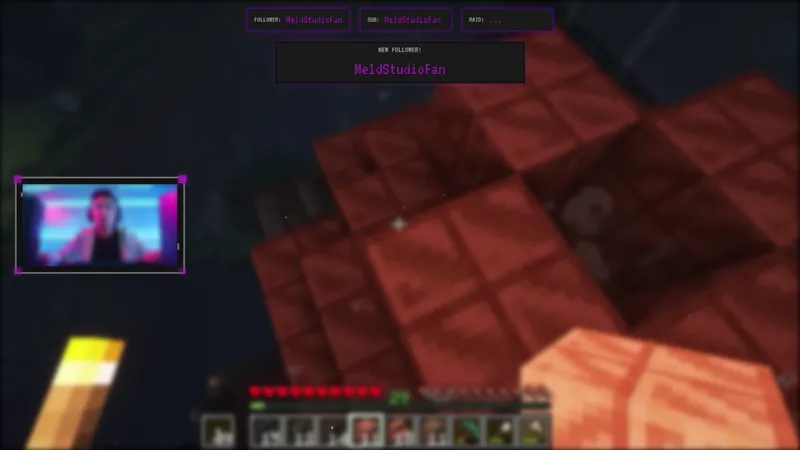
The camera border frames your webcam capture in a Minecraft-styled surround that signals the game before a viewer reads anything else on screen. It layers cleanly on top of a gameplay capture and is sized to keep your face clear at the center.
The activity feed tracks stream events in a block-world design, putting follows, subs, raids, and other moments into a display that fits the visual language of the game. Events surface in the feed as they happen, so the scene stays active even during quiet gameplay stretches.
The animated alerts bring sub, follow, raid, and other event moments to life with pixel-art animations styled after the block world. Each alert fires on its own timing and clears cleanly so it does not crowd your gameplay capture between events.
Before adding the overlay to a scene, replace PLAYER_CAM in the artifact URL with your channel name. That one change connects the label in the camera border to your channel identity across every element in the pack.
Why the pack format matters
Sourcing a camera border, an activity feed, and an alert set from three different places almost always produces a scene where the pieces look like they came from three different places. The color temperatures do not match, the pixel sizes differ, and the animation timing feels inconsistent. A pack built to go together solves that at the source.
For a Minecraft SMP stream, a series premiere, or any session where the game is the whole content plan, a scene that looks intentional from the start is one less thing to fix between streams.
Who this is for
Minecraft streamers running survival, SMP, creative, or challenge runs who want a complete themed scene without assembling it piece by piece. It also suits variety streamers who rotate into Minecraft sessions and want a dedicated scene ready to swap in.
Adding it to your stream
Download Meld Studio and the overlay is one drag away from being live. Replace PLAYER_CAM in the artifact URL with your channel name, add the overlay to your scene, and the camera border, activity feed, and alerts all load together. The platform connections for Twitch, YouTube Live, Kick, and TikTok Live are handled from a single Meld sign-in.
If you already run OBS and want to stay there, the free Spark Plug for OBS plugin brings the full pack into your existing OBS scene as a browser source. Same pixel-art aesthetic, same event connections, no scene rebuild required.
Use cases
-
Survival and SMP streams that want a scene built around the game
When the whole stream is a Minecraft session, the scene should say so before a viewer reads the game title. A pixel-art camera border, a block-world activity feed, and animated alerts that match the aesthetic pull every layer of the layout into one coherent look from the moment the stream goes live.
-
Streamers launching a new Minecraft series or world reset
A world reset or series premiere is the right moment to refresh your scene. Dropping a complete pack means the camera border, the activity feed, and the alert animations all share the same visual language from day one, so the new run looks intentional rather than assembled from separate parts sourced at different times.
Frequently asked questions
Is this Minecraft overlay pack free?
Yes. The pack is included free with Meld Studio. There is no paywall, no watermark, and no per-stream usage cap. Download Meld Studio, add the overlay to your scene, and the camera border, activity feed, and alerts are ready to go.
Which platforms does it work on?
The overlay works on Twitch, YouTube Live, Kick, and TikTok Live. Meld signs you in once and handles all four connections simultaneously, so the same activity feed and alerts fire for events on every platform you stream to.
Does this work with OBS Studio?
Yes. Spark Plug for OBS loads the full overlay pack into your existing OBS scene as a browser source, bringing the camera border, the activity feed, and the animated alerts into OBS without rebuilding your scene layout. Meld Spark can customize the pack to your look in seconds.
How do I set my channel name in the overlay?
Replace PLAYER_CAM in the artifact URL with your own channel name before adding the overlay to a scene. That single substitution connects the label displayed in the camera border to your channel identity across every element in the pack.
What is included in the pack?
The pack includes a Minecraft-styled camera border, an activity feed that surfaces stream events in a block-world design, and animated alerts built to match the pixel-art aesthetic. All three elements share the same visual theme so the scene reads as a complete set rather than separate widgets layered on top of each other.