Multistreaming
Go live everywhere,
all at once.
Stream to Twitch, YouTube, Kick and any custom RTMP at the same time. Multistreaming is built into Meld Studio, so there are no plugins to install and no restreaming service to pay for.
Looking for Windows? Get it here
Looking for macOS? Get it here
Meld Studio runs on Windows and macOS
It can't be installed on a Chromebook. It isn't available for Linux. It can't be installed on a phone or tablet. Meld Spark works in any browser, so you can build overlays, alerts and widgets for your stream right here.
Open Meld Spark Download for another computerMeld Studio runs on Windows and macOS. Choose your computer:
One output panel
Toggle every destination on or off from one place.
Encode once
A single encoding instance feeds every destination.
Every aspect ratio
Send landscape and portrait out at the same time.
One Platform.
Every Destination.
Built-in multistreaming means no juggling multiple tools, windows, or browser uploads. With direct output to Twitch, YouTube, Kick, TikTok, Facebook and custom RTMP, we handle the heavy lifting so you do not have to.
Multiple destinations, one output panel
Broadcast to multiple platforms without increasing your workload. Connect Twitch, YouTube, Kick, and any custom RTMP inside one control panel. Toggle destinations independently to keep your workflow streamlined and consistent.


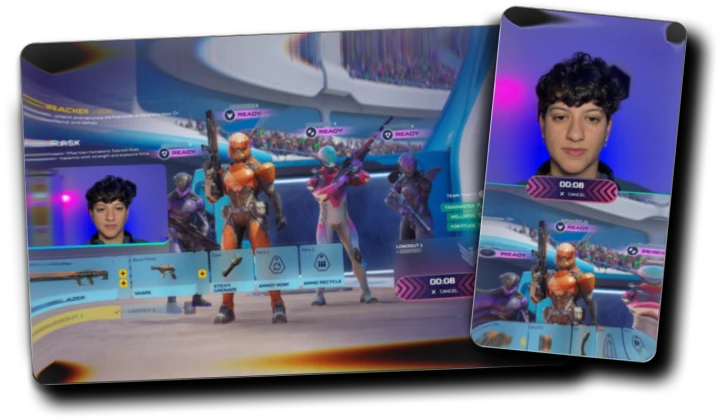
One stream, every shape
Landscape for Twitch and YouTube, portrait for TikTok. Multi Canvas lets you send the right layout to every platform from the same broadcast, and customize each canvas so every output looks like it was made for that feed.
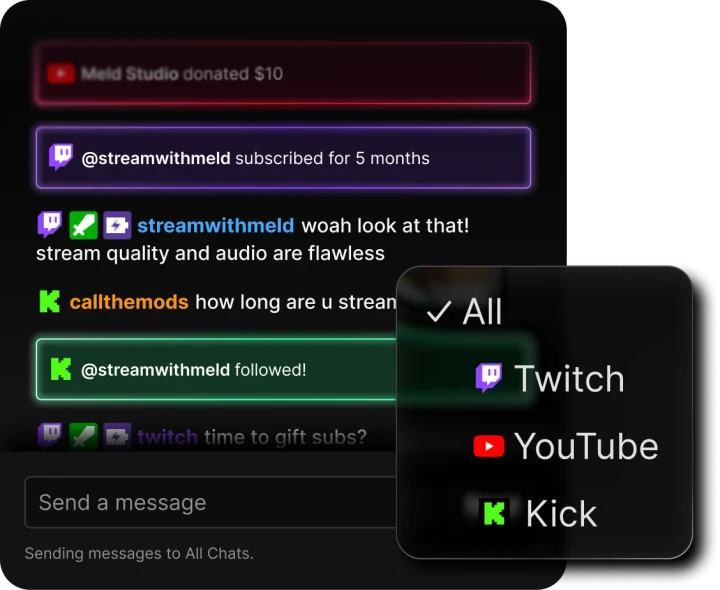
Every chat in one place
Going live in more places usually means more windows to watch. Meld consolidates your Twitch, YouTube and Kick chats into one stream, so you can read and reply to everyone without leaving the app or adding a third-party tool.
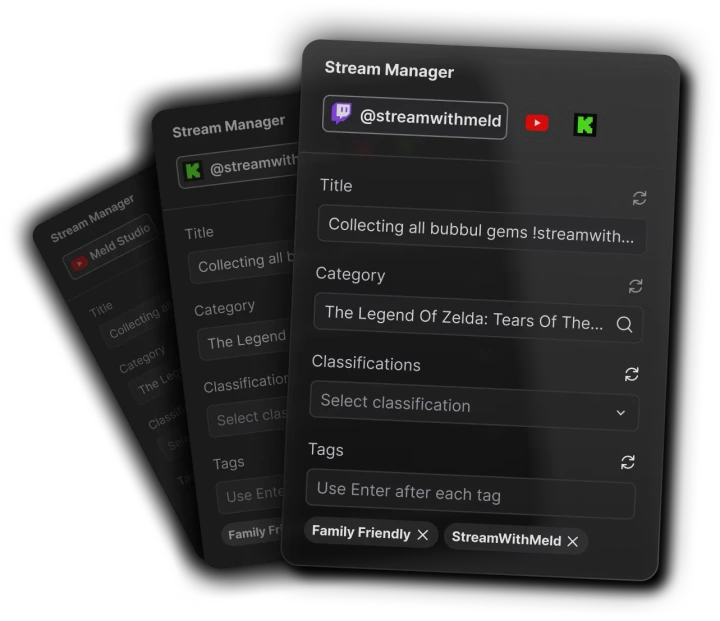
Set it up once, not five times
The Stream Manager is your built-in command center for titles, categories and tags, so you can prepare every destination without opening a single dashboard. Start on one platform, add another mid-stream, or end one while the rest keep running.
Or let the cloud
carry the upload
Streaming direct to several platforms means several uploads leaving your connection. Meld Multi takes one upload instead and distributes it for you, which keeps your bandwidth and your hardware free.
Zero bandwidth impact
Meld Multi sends just one upload from your computer while the cloud handles all the multistreaming for you. No extra bandwidth required.
Minimal resource usage
Because all encoding happens in the cloud, your CPU and GPU stay free for smooth gameplay, clean performance, and stable broadcasts.
Exclusive features
Perks like VOD Track and quick setup come standard when you use Meld Multi exclusively with Meld Studio.
100% FREE with no hidden costs
You're in good company
Thousands of creators already use Meld every day.
Meld is going to be a game changer. Everything you love about OBS with Adobe like effects, it's free, it will eventually have add ons. And it's faster, less resources.

@Italianclownz
after using @streamwithmeld for the past few streams, I am beyond impressed!!! It may still be in BETA but the response from my community has been amazing!

@BillyGoatTTV
@streamwithmeld is a game changer. yall need to get in on that IMMEDIATELY!

@comfiebeetv
With OBS, I had a scene for every single game and so many plugins. Meld? One scene captures every game without manually changing it. It worked straight from install.

@Riley_McKenna1
I switched from OBS to Meld, and I haven't looked back. I enjoy it so much.

@CodyDaltonSID
Meld is going to be a game changer. Everything you love about OBS with Adobe like effects, it's free, it will eventually have add ons. And it's faster, less resources.
@Italianclownz
after using @streamwithmeld for the past few streams, I am beyond impressed!!! It may still be in BETA but the response from my community has been amazing!
@BillyGoatTTV
@streamwithmeld is a game changer. yall need to get in on that IMMEDIATELY!
@comfiebeetv
With OBS, I had a scene for every single game and so many plugins. Meld? One scene captures every game without manually changing it. It worked straight from install.
@Riley_McKenna1
I switched from OBS to Meld, and I haven't looked back. I enjoy it so much.
@CodyDaltonSID
Creators and live streamers - keep tabs on @streamwithmeld. This is a new broadcasting software alternative to OBS that's in development, and they are doing some really cool things.

@Naaackers
Got to check out Meld Studio today, and this looks very promising. 👀

@_Smirky
As someone who has been part of the beta, I highly recommend giving Meld a chance. It is really unique and awesome to try out new options in the streaming space!

@noctisnexusttv
Switched from OBS Studio to Meld a few weeks ago, and my oh my! How easy it is to set everything up. No more having to download plugins for simple transitions.

@WeeScottishMark
I am in love with Meld Studio! It has made my live streaming so much easier than it was with OBS.

@OldNerdReviews
Creators and live streamers - keep tabs on @streamwithmeld. This is a new broadcasting software alternative to OBS that's in development, and they are doing some really cool things.
@Naaackers
Got to check out Meld Studio today, and this looks very promising. 👀
@_Smirky
As someone who has been part of the beta, I highly recommend giving Meld a chance. It is really unique and awesome to try out new options in the streaming space!
@noctisnexusttv
Switched from OBS Studio to Meld a few weeks ago, and my oh my! How easy it is to set everything up. No more having to download plugins for simple transitions.
@WeeScottishMark
I am in love with Meld Studio! It has made my live streaming so much easier than it was with OBS.
@OldNerdReviews
I mean those who love to tinker with options and apply a creative twist to the mundane elements of a stream production. there's a lot of options, filters and all round cool features within Meld.

@NathanOrDie
You don't always need plugins to create cool effects. @streamwithmeld is great software for content creators. And definitely worth a look.

@Mecky_79
I love @streamwithmeld! Why? Because not only do they have an amazing OBS alternative software to stream with, an outstanding community, constantly communicating with us!

@isagesen
I recently switched to Meld Studio from OBS and it's been the best decision! I highly recommend it. Plus the community and support is amazing.

@nadia_html
I've recently switched to Meld and honestly it's been great.

@Jordsyx
I mean those who love to tinker with options and apply a creative twist to the mundane elements of a stream production. there's a lot of options, filters and all round cool features within Meld.
@NathanOrDie
You don't always need plugins to create cool effects. @streamwithmeld is great software for content creators. And definitely worth a look.
@Mecky_79
I love @streamwithmeld! Why? Because not only do they have an amazing OBS alternative software to stream with, an outstanding community, constantly communicating with us!
@isagesen
I recently switched to Meld Studio from OBS and it's been the best decision! I highly recommend it. Plus the community and support is amazing.
@nadia_html
I've recently switched to Meld and honestly it's been great.
@Jordsyx
FAQ
Frequently Asked Questions
Is multistreaming free in Meld Studio?
Yes. Meld Studio is free on Windows and macOS with no watermark, and multistreaming is built in rather than sold as an add-on.
Which platforms can I stream to at the same time?
Twitch, YouTube, Kick, TikTok, Facebook, and X, plus any service that accepts RTMP or RTMPS through a custom output.
Do I need a restreaming service?
No. Meld Studio sends to every destination directly, so there is nothing extra to sign up for. If you would rather keep the load off your own connection, Meld Multi uploads once to the cloud and distributes from there.
Will multistreaming slow down my computer?
Meld encodes once and reuses that instance across your outputs, so the processing cost stays close to a single stream. Your upload does add up, because each active output sends its own copy. Meld Multi removes that by taking a single upload and fanning it out in the cloud.
Can I start and stop platforms independently?
Yes. Every destination has its own toggle. Go live on one platform, add another mid-stream, or end one without touching the rest.