Give Your Stream Chat a Sailor Moon-Inspired Pixel Look
Level up your chat with magical pixel power. This Sailor Moon-inspired 8-bit chat widget brings retro charm to your stream and works with Twitch, Kick, YouTube, X, and TikTok.
By Meld
Get Sailor Moon Chat Widget free
Included with Meld Studio. Or stay in OBS with Spark Plug.
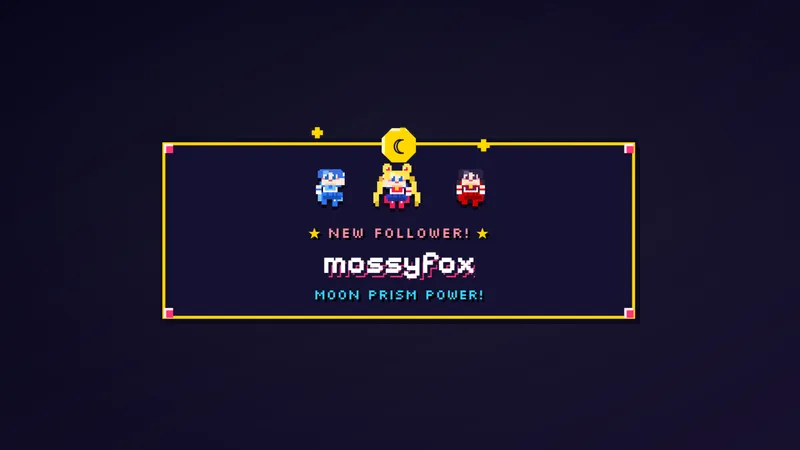
An anime conversation feels more cohesive when the audience’s messages belong to the same visual world as the rest of the scene. This free Sailor Moon-inspired chat widget gives stream chat an 8-bit pixel treatment. The result is a retro direction for the part of your broadcast where viewers contribute their own words.
The widget is a fit for streamers who enjoy magical themes and pixel art but still want chat to remain chat. The appeal is in how the conversation looks on screen. You can keep talking about the game, the episode, or the day’s plans while the message display carries a little of that shared visual taste.
Retro pixels for a live conversation
The defining detail is the Sailor Moon-inspired 8-bit styling. That combination brings an anime reference into a retro presentation, making it relevant to communities that enjoy both. It is a themed broadcast widget, not an official franchise product, and its purpose is displaying chat rather than recreating a game.
Twitch, YouTube Live, Kick, TikTok Live, and X are all supported by this item. That full list matters when your viewers choose different places to watch. The pixel-art direction is not restricted to a Twitch-only scene, and X belongs alongside the four core streaming platforms in the widget’s stated support.
You might choose it for a retro gaming session, an anime discussion, or a relaxed conversation with regulars. In each case, the same idea applies: the audience’s messages become part of the broadcast’s visual character. You do not need to build the entire show around the reference for the chat area to have a theme of its own.
Give the audience a place in the scene
When planning a conversational view, consider chat as content rather than leftover space. Your spoken replies make more sense when viewers can see the discussion that prompted them. A themed message display can help the chat area feel intentional while leaving the subject of the conversation up to you.
For a retro-focused stream, the 8-bit look echoes the visual language you already enjoy. For an anime-focused community, the Sailor Moon inspiration offers a familiar point of reference. Those are reasons to choose the style, not additional behaviors or special viewer commands.
This widget is for the ongoing conversation, which makes it a different choice from an alert box used for a particular event. Download Meld Studio and add the chat widget to a scene. If you are staying with OBS, Spark Plug for OBS is the alternative route into your existing broadcast setup.
Use cases
-
Retro gaming conversation
Pair a discussion of older games with an 8-bit chat presentation. The Sailor Moon-inspired styling gives the audience's messages a visual connection to the retro mood of the broadcast.
-
An anime-focused community scene
Use the pixel-art widget while catching up with viewers about anime. Chat stays part of the scene, with a magical visual reference that suits the subject without turning the display into a separate game.
Frequently asked questions
Does the widget support X chat?
Yes. This chat widget supports Twitch, YouTube Live, Kick, TikTok Live, and X. X is listed for this item alongside the four core streaming platforms, so it belongs in your platform planning too.
What visual style does the chat widget use?
It uses Sailor Moon-inspired 8-bit pixel styling for a retro chat look. This is a themed chat widget for your broadcast, not an assertion that the overlay is an official Sailor Moon product.
Can I use this chat widget in OBS Studio?
Yes. Spark Plug for OBS brings the widget into existing OBS scenes. The free plugin also includes Meld Spark for customization with help from prompts in seconds.