Free Rainbow-Bubble Neon Chat Widget for Arcade-Style Scenes
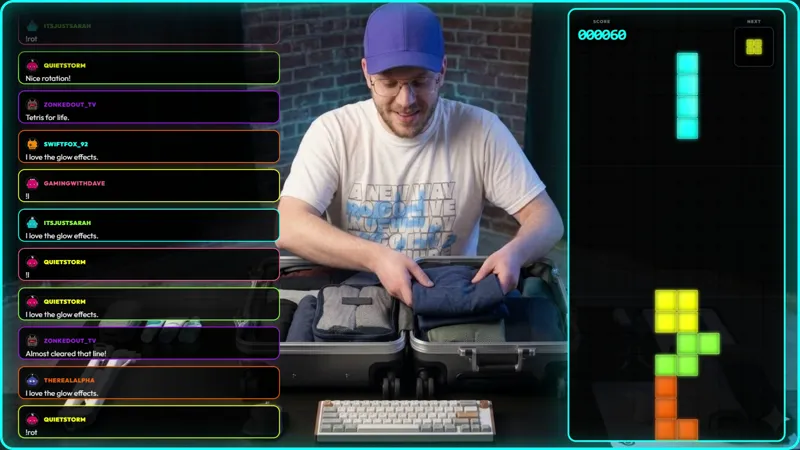
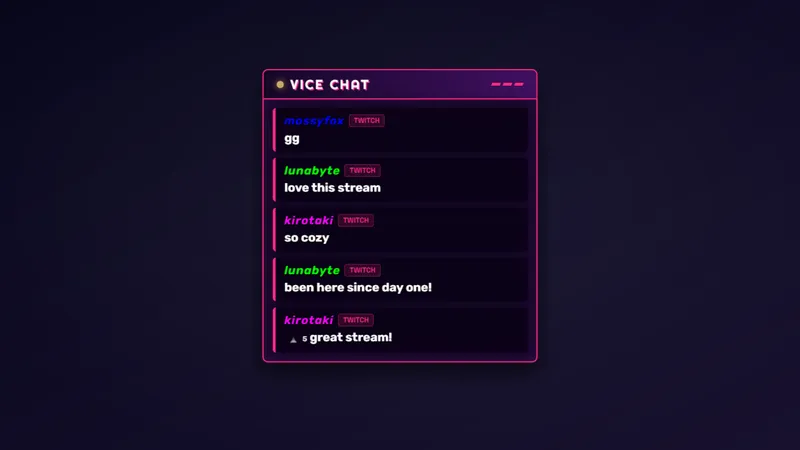
The chat widget that pairs with Neon Tetris. Each message lands in its own rainbow-outlined bubble with a chunky username, keeping chat readable alongside the glowing board.
By Meld
Get Neon Tetris Chat free
Included with Meld Studio. Or stay in OBS with Spark Plug.
Each chat message lands in its own rainbow-outlined bubble with a chunky username above it, glowing in the same neon palette as the Tetris-style board it ships alongside. Neon Tetris Chat is the chat widget half of the arcade scene, built so the chat column reads as part of the layout instead of a separate panel pasted onto the side.
It is free with Meld Studio. No watermark, no per-stream cap, no setup before the first message lands.
How messages render
Every incoming message gets a rainbow-outlined bubble. The username sits above the message body in a chunky, high-contrast typeface that holds up against busy gameplay and bright neon backgrounds. The colors cycle through the same palette as the Neon Tetris board, so a viewer’s eye can sweep from the game on one side of the scene to the chat on the other without the styling shifting under them.
The widget scales with how active chat is. A quiet stretch fills the panel slowly, with each new bubble drawing attention. A busy hype train fills the column in seconds, with bubbles stacking cleanly so the most recent messages stay readable at the top. The chunky usernames are the deliberate detail: a passive scroller catches a name they recognize at a glance, even when chat is moving fast.
Multi-platform chat all flows into the widget. Twitch, YouTube Live, and Kick messages all render in the same bubble style, and Meld pulls TikTok Live chat through the same unified connection. A single sign-in handles every platform you stream to, so a multistreamer sees one chat column reflecting one community instead of four feeds in four panels.
When streamers use it
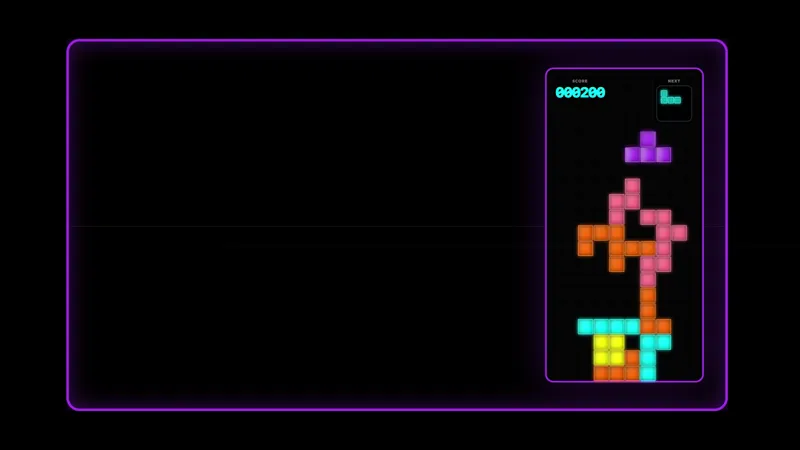
The widget pairs naturally with the Neon Tetris board for a full arcade-styled scene where the game and the chat share one visual identity. It also stands on its own as a chat overlay for any neon-themed, arcade-themed, or retro variety layout. Streamers running themed nights, marathon events with a consistent visual through-line, or scenes that lean on bright color palettes get a chat panel that fits the rest of the layout instead of fighting it.
For first-time viewers, the styling is part of the hook. A polished, themed chat column reads as effort and signals that the channel cares about the look, which is the kind of detail that nudges a casual scroller into following.
Customizing with Meld Spark
The default rainbow palette ships ready to use. Meld Spark, the AI overlay editor inside Meld Studio, lets you reshape it from plain English. A prompt like “Lock bubble colors to pink, purple, and cyan, and add a soft glow outline when someone types !drop, !l, or !r” applies on the spot, locking the palette to your brand and tying message styling to specific commands. You can change bubble shapes, swap the username typeface, or add highlight states for moderators, with the change persisting between sessions.
Adding it to your stream
Download Meld Studio and the widget drops into a scene with no configuration, with chat connections already linked from a single sign-in. If you would rather stay in OBS, the free Spark Plug for OBS plugin loads the same overlay as a browser source inside your existing OBS scene, with the same rainbow bubbles and the same multi-platform chat support.
Use cases
-
Pairing with the Neon Tetris board
The widget is built as the matching chat panel for the Neon Tetris block-stacking game. Same neon palette, same arcade glow, so the chat column reads as part of the same scene rather than a generic box bolted onto the side. Anyone landing on the channel sees one coherent layout instead of two unrelated overlays.
-
Arcade-themed and retro variety streams
For arcade-themed nights, retro variety blocks, or any scene leaning on neon styling, a chat widget that matches the visual language pulls the layout together. The chunky usernames and rainbow-outlined bubbles read clearly against busy backgrounds, and they hold up against bright gameplay without disappearing or fighting for attention.
Frequently asked questions
Is the rainbow neon chat widget free?
Yes. Neon Tetris Chat is included free with Meld Studio. There is no paywall, no watermark, and no per-stream usage cap. Drop it into a scene and messages start landing in their bubbles immediately.
How do messages display?
Each message lands in its own rainbow-outlined bubble with a chunky username above the message body. The styling keeps chat readable alongside the glowing Tetris-style board, and the bubble layout scales naturally with how busy chat is, from a quiet trickle to a full feed.
Which platforms does the widget pull from?
Twitch, YouTube Live, and Kick are all supported, and Meld pulls TikTok Live chat through the same unified connection. A single sign-in handles every platform you stream to, so messages from every chat land in the same widget at the same time.
Does this work with OBS Studio?
Yes. Spark Plug for OBS loads the chat widget into your existing OBS scene as a browser source, and Meld Spark lets you lock the bubble palette to your brand colors, change the bubble shapes, or highlight specific commands from a plain-English prompt in seconds. No code, no migration.
Can I lock the colors to my brand or highlight specific messages?
Yes. Meld Spark, the AI overlay editor included with Meld Studio, handles palette and behavior changes from a single prompt. Something like "Lock bubble colors to pink, purple, and cyan, and add a soft glow outline when someone types !drop, !l, or !r" applies on the spot.
Does it have to pair with the Tetris board?
No. The widget works as a standalone chat overlay for any arcade-styled or neon-themed scene. The visual language pairs naturally with Neon Tetris, but the bubbles, usernames, and multi-platform chat support are useful in any layout that leans on the same look.