Bring Your Chats Together in a GTA 6-Inspired Neon Feed
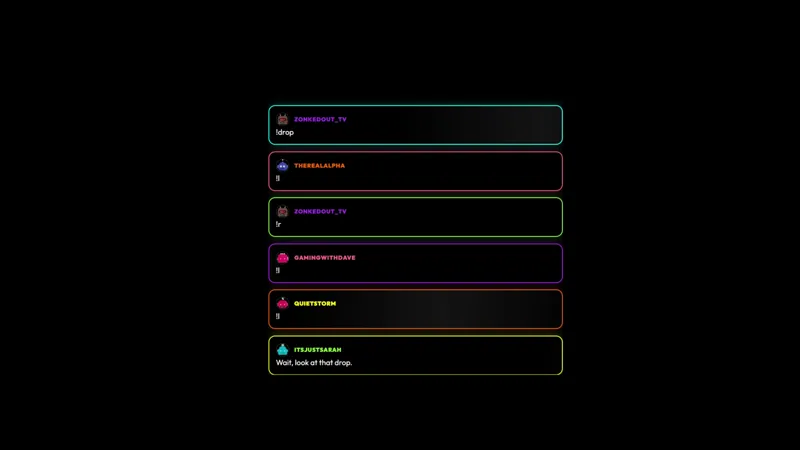
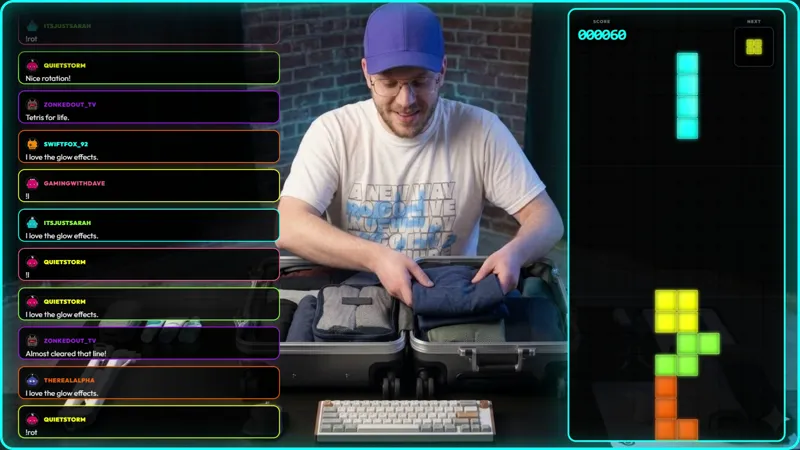
All your chats, one neon feed. This GTA 6-inspired chat widget pulls Twitch, Kick, YouTube, X, and TikTok into a single glowing stream, so no viewer gets lost in the crowd.
By Meld
Get GTA Multi-Chat Widget free
Included with Meld Studio. Or stay in OBS with Spark Plug.
Five chats should not require five separate places in your broadcast layout. This free GTA 6-inspired multi-chat widget brings Twitch, YouTube Live, Kick, TikTok Live, and X into one glowing feed. Viewers can see a shared conversation on stream while the neon presentation gives that conversation a clear visual identity.
For a multistreaming host, the useful part is the combination. A reply from one platform can sit within the same visible conversation as a message from another. You can talk to the room as a whole instead of giving each destination its own piece of screen space. The widget puts the emphasis on what people are saying, with a GTA 6-inspired look around it.
One feed with a neon identity
The visual direction is neon rather than a plain chat box. That makes this a natural choice for a scene built around the bright, city-inspired mood associated with GTA 6. The reference is a styling choice for your broadcast, not a claim that the widget is an official game product.
Its function is equally specific: it pulls the supported chats into a single feed. That distinction matters when choosing an overlay. If you want viewers to read messages together, this is the relevant tool. The attraction is the visible conversation itself, rather than commands, competition, or a separate activity for chat to manage.
X is part of this widget’s platform list, alongside Twitch, YouTube Live, Kick, and TikTok Live. Keeping all five in view is especially useful when your community does not gather on just one service. A shared display gives your spoken replies more context for someone watching from a different destination.
Choosing a scene for conversation
Use it for a gaming discussion where chat is part of the subject, or for a conversational stretch before a play session. The neon styling can carry the theme while you discuss plans, compare impressions, or catch up with regulars. Those are editorial uses for the feed, not extra modes you need to enable.
Think about where viewers will look while you answer them. A chat-focused scene benefits from treating the message area as part of the composition, with enough attention left for your camera or other content. The widget gives that area a distinctive look without asking you to split the audience into separate on-screen groups.
Download Meld Studio and add the multi-chat widget to your scene. Streamers staying with OBS can use Spark Plug for OBS as the alternative, keeping their existing scenes while bringing in the same themed chat overlay.
Use cases
-
One conversation across multiple platforms
Show the audience a shared feed when you stream to several destinations. Messages from Twitch, YouTube Live, Kick, TikTok Live, and X belong together instead of occupying separate areas of the scene.
-
A neon look for gaming discussions
Use the GTA 6-inspired styling for a conversation about open-world games. The glowing chat feed brings the theme into the discussion without requiring the entire scene to be built around game footage.
Frequently asked questions
Does this widget combine chat from X as well?
Yes. The widget brings Twitch, YouTube Live, Kick, TikTok Live, and X chat into a single neon feed. X is included alongside the four core streaming platforms in this item.
Is this a GTA 6-inspired chat display or a game?
It is a free GTA 6-inspired chat widget with a glowing neon presentation. Its listed purpose is combining your chats into one feed, not providing a playable game or in-game integration.
Can I use the widget in OBS Studio?
Yes. Spark Plug for OBS brings the overlay into your existing OBS scenes. The free plugin also includes access to Meld Spark for prompt-assisted customization in seconds.