Free Neon Tetris-Style Block-Stacking Game Driven by Chat
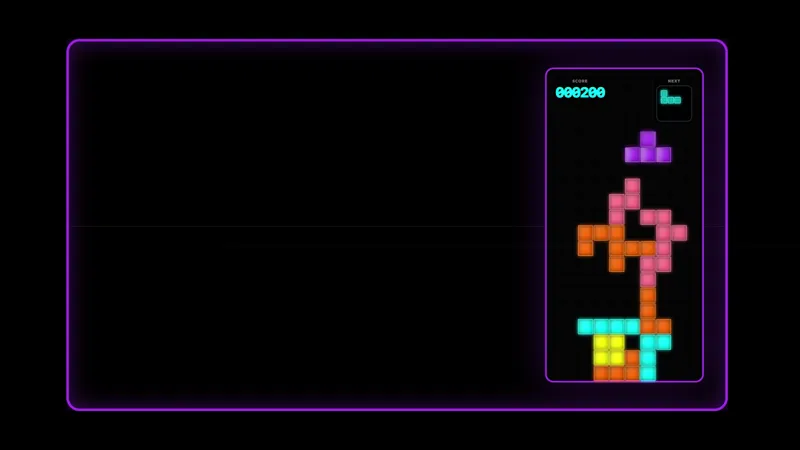
A chat-driven Tetris overlay with glowing neon blocks and a high-contrast purple frame. Viewers steer, rotate, and drop the pieces straight from chat while the score, next-piece preview, and stack stay crisp in 1080p.
By Meld
Get Neon Tetris free
Included with Meld Studio. Or stay in OBS with Spark Plug.
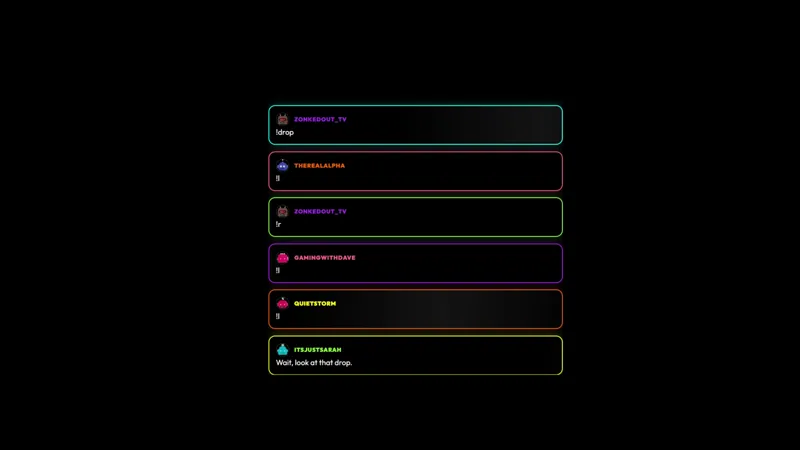
A glowing neon Tetris-style board, a high-contrast purple frame, and chat steering every piece. Viewers type !l, !r, or !drop to move the active block, the score ticks up as lines clear, and the next-piece preview sits in the top right corner so anyone watching can plan the next move with the rest of chat.
It is free with Meld Studio. No watermark, no per-stream cap, no setup steps before the first piece falls.
How the board plays
Chat collaborates on one shared board. Each message nudges the active piece in real time: !l moves it left, !r moves it right, and !drop hard-drops it to the stack. Once a piece locks, the next one spawns, and chat picks up steering again. The collaborative input creates the rhythm of the run. A coordinated chat clears lines fast and racks up combos. A chaotic one watches the stack reach the top in record time. Either way, the board is doing something the audience caused.
The visual layout is built for legibility under stream pressure. The neon block-stacking grid sits inside a high-contrast purple frame that holds up against busy backgrounds and dark gameplay scenes. The score, the next-piece preview, and the stack itself all stay crisp at 1080p, so a viewer landing mid-game sees the full state of the run at a glance.
The single shared board is the social contract. Regulars start to read the queue and call out where the next piece should land, new viewers learn the three-command vocabulary in seconds, and the run becomes a conversation about strategy instead of a passive overlay.
Chat from Twitch, YouTube Live, and Kick all feeds the same board, with TikTok Live chat coming through the same unified connection. A multi-platform audience plays one shared game instead of running four parallel boards.
When to use it
The board fits any scene built around a sustained shared activity. Arcade-themed nights, variety blocks, subathon hours, and community game nights all work because the run scales naturally with how busy chat is. It also pairs well with the Neon Tetris Chat widget for a complete arcade-styled scene, and the Neon Tetris Frame for a matching cam border.
For shorter formats, the overlay works as a stream-opening warm-up where early viewers steer a few rounds while you finish setup. The next-piece preview means anyone arriving mid-run can immediately see what the chat is about to deal with.
Customizing with Meld Spark
The neon palette ships ready to use. Meld Spark, the AI overlay editor inside Meld Studio, lets you retint the glow, rebalance the fall rate, and add new game events from plain English. A prompt like “Match the block glow to my brand pink and teal, speed up the fall rate by 20 percent, and flash a combo callout when chat clears two lines in a row” rewrites the palette, the speed, and the feedback layer at once. Changes persist between sessions.
Adding it to your stream
Download Meld Studio and the board drops into a scene with no configuration, with chat connections already linked from a single sign-in. If you would rather stay in OBS, the free Spark Plug for OBS plugin loads the same overlay as a browser source inside your existing OBS scene, with the same three-command steering and the same shared board.
Use cases
-
A scene-anchor game for arcade-themed nights
A glowing neon Tetris-style board is the centerpiece chat immediately understands. The high-contrast purple frame and the crisp 1080p stack make it readable at a glance, so viewers landing on the channel see the game state, the score, and the next-piece preview without needing to be told what is happening.
-
Subathon hours and community game nights
For long-form blocks where chat needs a sustained shared activity, a collaborative block-stacking game gives the whole audience one board to push toward a high score. The next-piece preview lets regulars plan ahead, and the cooperative steering creates the kind of "we did that together" moment that keeps a subathon hour alive.
Chat commands
Interactive controls
Chat collaborates on one board. Each message nudges the active piece until it locks, then the next one spawns.
Frequently asked questions
Is the Neon Tetris overlay free?
Yes. Neon Tetris is included free with Meld Studio. There is no paywall, no watermark, and no per-stream usage cap. Drop it into a scene and chat can start steering pieces immediately.
How does chat play together on one board?
Chat collaborates on one board. Each message nudges the active piece until it locks, then the next one spawns. !l moves left, !r moves right, and !drop hard-drops to the stack. The score ticks up as lines clear, and the next-piece preview sits in the top right corner.
Which platforms can my viewers play from?
Twitch, YouTube Live, and Kick are all supported, and Meld pulls TikTok Live chat in through the same unified connection. A single sign-in handles every platform you stream to, so steering commands feed the same neon board regardless of which chat the viewer is in.
Does this work with OBS Studio?
Yes. Spark Plug for OBS loads the Tetris-style overlay into your existing OBS scene as a browser source, and Meld Spark lets you recolor the blocks, speed up the fall rate, or add combo callouts from a plain-English prompt in seconds. No code, no migration.
Can I match the block colors to my brand?
Yes. Meld Spark, the AI overlay editor included with Meld Studio, handles palette and balance changes from a single prompt. Something like "Match the block glow to my brand pink and teal, speed up the fall rate by 20 percent, and flash a combo callout when chat clears two lines in a row" applies on the spot.
Does it pair with a matching chat widget?
Yes. The Neon Tetris Chat widget is built to sit alongside the board with rainbow-outlined message bubbles in the same neon style, so the chat panel and the game share one visual identity across the scene.