Free Minimal Cinematic Camera HUD Overlay for Streamers
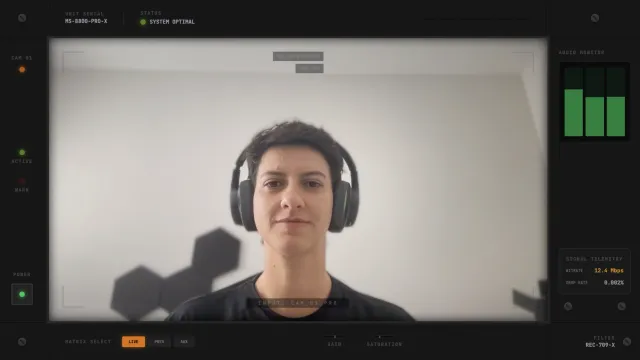
A clean, cinematic camera overlay with a minimal HUD. Displays sensor info, optics data, timecode, and a subtle loading bar. Designed to frame your facecam with a techy, film-like aesthetic.
By Meld
Get Minimal Camera Overlay free
Included with Meld Studio. Or stay in OBS with Spark Plug.
There is a particular look a real camera body has on screen: small text in the corners, a thin loading indicator, a timecode running in the bottom edge. Minimal Camera Overlay borrows that vocabulary and wraps it around your webcam, so a normal facecam tile reads as a film-style camera feed rather than a flat browser source.
It is free with Meld Studio. No watermark, no setup fee, no subscription required.
What sits on the cam
The HUD lives at the corners of the webcam tile and the edges between them. Sensor info and optics data sit in the upper corners, a timecode runs along the bottom edge, and a subtle loading bar fills out the layout as an accent rather than a focal point. The styling is deliberately minimal: thin text, low-contrast accents, and a layout that frames the cam without competing with what is actually inside the tile.
Because the layout is purely visual, the HUD broadcasts identically to Twitch, YouTube Live, Kick, and TikTok Live. Meld signs you in once and the same overlay ships to every platform you stream to, with no platform-specific configuration to manage.
Reshaping it with Meld Spark
Meld Spark, the AI overlay editor built into Meld Studio, lets you change the HUD content without writing a line of code. The gallery tip ships with a starter prompt: “Change the color scheme to green and add a heart rate monitor readout.” Run it and the HUD recolors and grows a new data panel for the heart rate monitor. Use the same shape of prompt to swap in custom telemetry, replace the timecode with a session counter, or strip the HUD down further for an even cleaner look. Changes persist between sessions.
Who this fits
Tech walkthrough creators, photography and editing process streamers, cinematic vloggers, IRL streamers, and anyone whose scene wants the cam tile to read as a real camera capture. The minimal styling is broad enough to fit polished variety streams that do not have a single dominant aesthetic, and it pairs well with neutral, dark, or photography-leaning layouts.
Adding it to your stream
Download Meld Studio and the cam HUD drops on top of your webcam source with no configuration. If you already run OBS and want to keep your existing layout, the free Spark Plug for OBS plugin loads the same overlay as a browser source inside OBS, with the same Meld Spark prompts available for restyling the HUD text and color on the fly.
Use cases
-
Tech, photography, and process streams
A scene that is supposed to read as professional looks weaker when the cam tile is a plain rectangle. The minimal HUD frames your webcam with sensor info, optics data, and a subtle loading bar, so a tech walkthrough or a photography process stream feels like it was captured on a real camera body.
-
Cinematic vlogs and high-end variety streams
For travel vlogs, IRL streams, or polished variety setups, the film-style timecode and HUD readouts give the cam tile production value that a flat overlay cannot match. The styling stays minimal enough that it fits across a wide range of scenes without feeling out of place.
Frequently asked questions
Is the Minimal Camera Overlay free?
Yes. It is included free with Meld Studio. No watermark, no paywall, no per-stream limit. Add it on top of your webcam source in a scene and the HUD draws around the cam tile with no setup steps required.
Which platforms does it support?
Every platform you stream to. The overlay is a visual layer on top of your camera, so it broadcasts the same way to Twitch, YouTube Live, Kick, and TikTok Live. Meld signs you in once and the HUD ships to every platform at once.
Does this work with OBS Studio?
Yes. Spark Plug for OBS loads the cinematic HUD into your existing OBS scene as a browser source, and Meld Spark lets you change the HUD text, recolor the readouts, or add custom data panels from a plain-English prompt in seconds.
Can I change the data shown in the HUD?
Yes. Meld Spark, the AI overlay editor included with Meld Studio, handles HUD changes in plain English. The gallery tip ships with a starter prompt: "Change the color scheme to green and add a heart rate monitor readout." Run it and the HUD updates.
Is this overlay too busy for a typical facecam?
The HUD is intentionally subtle. The sensor and optics text sits at the corners, the loading bar runs as an accent, and the styling stays out of the way of your face. It reads as ambient detail rather than a competing on-screen UI.