Free Pokemon-Themed Starting Soon Screen with Live Chat
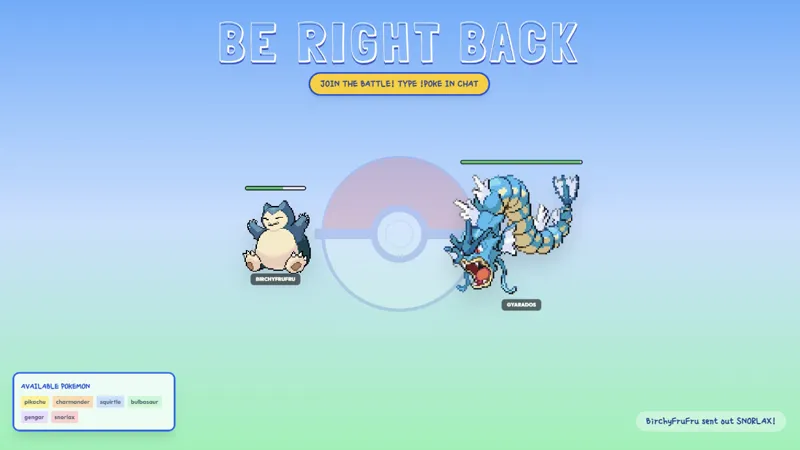
A Pokemon-themed starting soon screen with Pikachu ears, pokeball icons, and a horizontal live chat bar. Bright, colorful, and perfect for gaming streams.
Get Pokemon Starting Soon with Chat free
Included with Meld Studio. Or stay in OBS with Spark Plug.
A starting soon screen that matches your game tells viewers arriving early they are in exactly the right place. This one ships with Pikachu ears, pokeball icons, and a horizontal live chat bar that pulls messages from Twitch, YouTube Live, Kick, and TikTok Live in real time, so your pre-stream looks intentional from the moment the first viewer lands.
It is free with Meld Studio. No watermark, no setup fee, no subscription required.
What is on screen
The overlay fills the scene with bright, colorful Pokemon visuals. Pikachu ears frame the top of the layout, pokeball icons accent the design, and a horizontal chat bar spans the lower portion of the screen. As viewers arrive, their messages appear in the bar from every platform you stream to all at once, so early arrivals have something to interact with while you are still getting ready.
The animation runs continuously while the overlay is active. Viewers joining 2 to 5 minutes before you go live see a polished, moving screen rather than a static countdown or a blank canvas. That matters across Twitch, YouTube, Kick, and TikTok alike, where a viewer who lands during the starting soon window is still deciding whether to follow. A themed, active screen gives them a reason to stay.
Customizing with Meld Spark
The overlay is ready to use as-is for any Pokemon stream. To go further, Meld Spark, the AI overlay editor built into Meld Studio, lets you describe changes in plain English. A prompt like “Change to a Gen 2 Johto theme with Cyndaquil instead of Pikachu” rewrites the visuals without opening a code editor or touching any files.
You can also change the countdown text, adjust the layout, or shift the color palette to fit your channel branding. Changes apply immediately and persist between sessions, so the screen looks exactly the same each time you go live for a run.
Who this fits
Pokemon streamers, Nintendo content creators, and gaming channels that want a starting soon screen that reads as intentional rather than borrowed from a generic template. The live chat bar makes it especially practical for streamers who like to greet early arrivals and let the conversation build before the game starts. Viewers who show up a few minutes ahead have something visible and active to engage with rather than sitting on a static image.
Adding it to your stream
Download Meld Studio and drop the overlay into a scene with no configuration. If you already stream from OBS, the free Spark Plug for OBS plugin brings it into your existing OBS scene as a browser source, so you can keep your setup and still get the themed visuals plus the live multi-platform chat bar.
Use cases
-
Opening a Pokemon playthrough stream
When you go live for a long playthrough, the starting soon screen runs during the gap between launching the stream and getting seated in front of the game. A Pokemon-themed screen tells early arrivals they are in the right place and sets the tone before you say a word.
-
Warming up chat before the game begins
The horizontal live chat bar shows messages from Twitch, YouTube, Kick, and TikTok in real time while you finish setup. Viewers arriving 2 to 5 minutes early have something to read and respond to, which means your chat feels active the moment you switch to your main scene.
Frequently asked questions
Is the Pokemon-themed starting soon screen free?
Yes. It is included free with Meld Studio, no watermark, no paywall, and no usage limit. Add it to your scene and it is ready to broadcast immediately without any setup steps.
Which chat platforms does the live chat bar support?
The chat bar pulls messages from Twitch, YouTube Live, Kick, and TikTok Live. Meld signs you in once and the bar shows chat from all four platforms in a single feed.
Does this work in OBS Studio?
Yes. Spark Plug for OBS drops the overlay into an existing OBS scene as a browser source, and Meld Spark lets you swap generations, retheme the visuals, or rewrite the countdown text from a single prompt in seconds.
Can I change the theme to a different Pokemon generation?
Yes. Meld Spark, the AI overlay editor inside Meld Studio, lets you describe the change in plain English. A prompt like "Change to a Gen 2 Johto theme with Cyndaquil instead of Pikachu" updates the visuals immediately without touching any code.
Can I update the countdown text on the screen?
Yes. Meld Spark handles text changes the same way it handles visual ones. Describe what you want in plain English and the overlay updates in seconds. The change persists between sessions, so it looks the same every time you go live.