Free Video Promo Card Overlay With a 30-Second Display Loop
A polished promo card that cues your latest video right as the 30-second display timer kicks off, so viewers catch the full pitch every time it surfaces.
By Meld
Get Video Promo Card free
Included with Meld Studio. Or stay in OBS with Spark Plug.
A polished promo card cues your latest video on a 30-second display window, sized so viewers catch the full pitch every time it surfaces. The Video Promo Card sits in the same family as the YouTube Promo Widget but goes for a card-style layout: a single composed module that drops onto the canvas, plays its window, and steps back off. It is free with Meld Studio, no watermark, no paywall, no usage limit.
How the card works
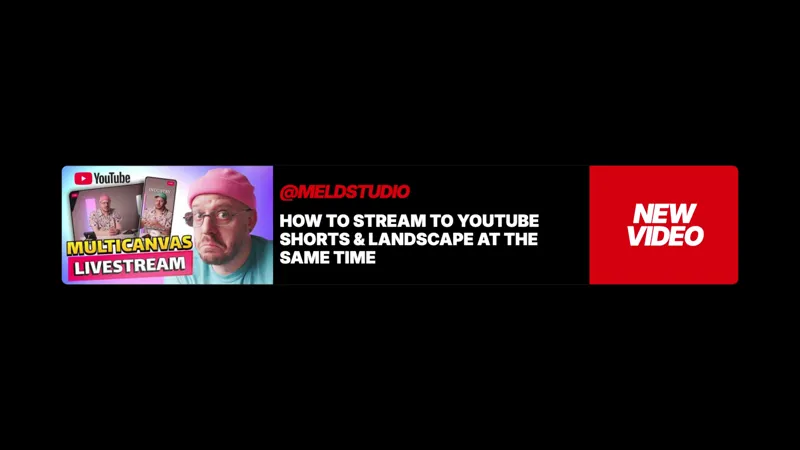
The card composes the video pitch as a single visual unit: thumbnail, title, and channel name laid out in a polished broadcast frame so a viewer registers all three within the first second the card is on screen. The 30-second display timer kicks off the moment the card cues up, giving the pitch enough time to land without overstaying its welcome on the canvas.
When the timer ends the card steps off the screen and the canvas returns to its normal layout. The card cues again on a fixed loop, so a long session surfaces the same video multiple times in front of chat without the streamer remembering to plug it.
When to use it
The highest-leverage moment for driving YouTube views from a live stream is during the live stream itself. The audience watching live is engaged, already in the channel ecosystem, and disposed to click through to other content from the same creator. The card makes that cross-promotion automatic across marathon streams, subathons, and any session that runs long enough to benefit from a recurring promo cue.
It also fits the day a new upload goes live, when the streamer wants the live audience to drive the first wave of views. Drop the card onto the main scene, point it at the new upload, and the timer handles the rest of the broadcast.
Customizing with Meld Spark
Swapping the featured video is a single Meld Spark prompt. “Update my YouTube promo to this URL” with a new link refreshes the thumbnail, title, and channel automatically. Meld Spark, the AI overlay editor built into Meld Studio, also handles styling and timing changes from plain English: retune the display window, recolor the card to match channel branding, or restyle the layout without touching code.
Changes persist between sessions, so the card holds the same configuration the next time you go live.
Adding it to your stream
Download Meld Studio and the card drops onto a scene with no configuration. If you already run OBS, the free Spark Plug for OBS plugin loads the same card into your existing OBS layout as a browser source. Twitch, YouTube Live, Kick, and TikTok Live all render the overlay the same way, so a multi-platform stream cross-promotes the upload to every audience at once.
Use cases
-
Pitching a new upload during a live stream
The audience that catches a stream live is the audience most likely to drive the first wave of views on a fresh YouTube upload. The Video Promo Card surfaces the new video on a 30-second display window so viewers see the full pitch every time it cues up, without the streamer reading the URL out loud.
-
Long streams that need automated cross-promotion
Marathon events, subathons, and four-hour playthroughs all run longer than any reasonable manual promo cadence. The card handles the timing automatically, cueing the upload pitch on a fixed display loop so the promo runs even when the streamer is heads-down on gameplay.
Frequently asked questions
Is the Video Promo Card overlay free?
Yes. The Video Promo Card is included free with Meld Studio. No watermark, no paywall, no usage limit. Drop it onto a scene, point it at a video URL, and it loops on its own.
How long does the card stay on screen?
The card surfaces with the 30-second display timer and shows the full pitch, then steps off until the next cue. Viewers catch the title, thumbnail, and channel every time the card comes up rather than missing the bottom half of a slow slide animation.
Which platforms does it work on?
The overlay renders identically across Twitch, YouTube Live, Kick, and TikTok Live. Meld broadcasts the same card on every platform you stream to, so a multi-platform stream cross-promotes to every audience at once.
Does this work in OBS Studio?
Yes. Spark Plug for OBS loads the card into your existing OBS layout as a browser source, and Meld Spark lets you swap the featured video, retime the cue, or restyle the card from a plain-English prompt in seconds.
How do I update the featured video?
Swap the featured video on the fly with one Meld Spark prompt. "Update my YouTube promo to this URL" with the new link refreshes the thumbnail, title, and channel automatically, and the change persists between sessions so the next stream picks it up.