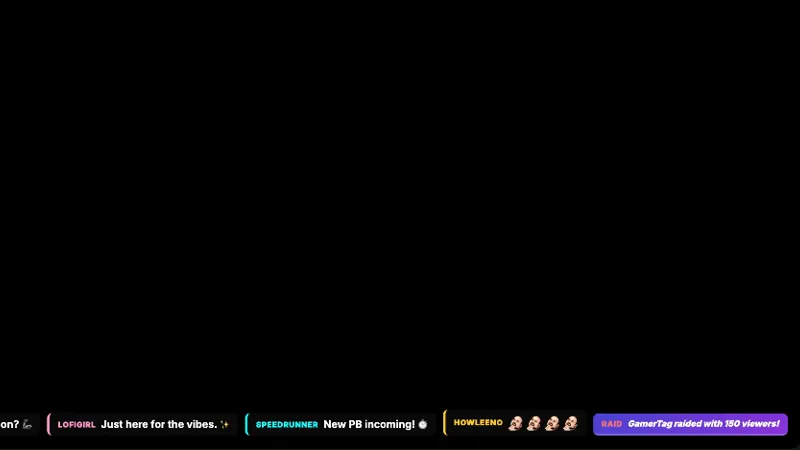
Free Flat Design Chat Widget with Live Event Badges
A clean flat design chat widget that displays live messages and reacts to platform events like raids, gift subs, and follows. Bold username labels with colored event badges make it easy to spot key moments in chat.
Get Flat Design Chat free
Included with Meld Studio. Or stay in OBS with Spark Plug.
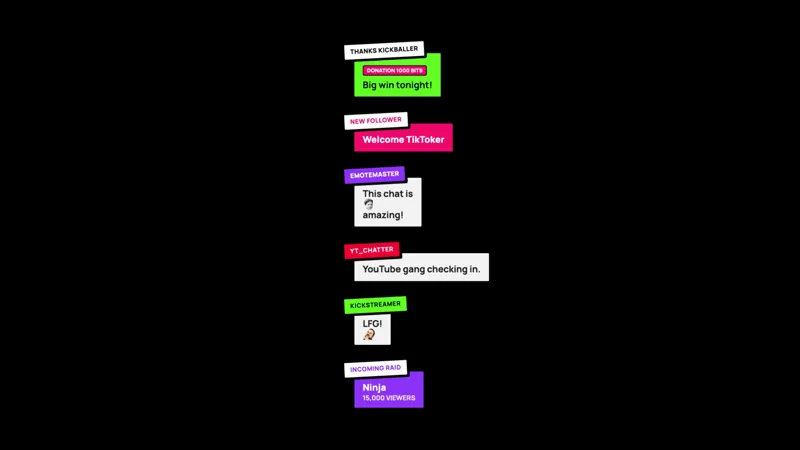
A raid lands and the row stamps an “Incoming Raid” badge into chat next to the raider’s name. A gift sub drops and the recipients show up inline with a colored label. A donation comes in and the amount sits highlighted in the feed instead of disappearing into a wall of messages. Flat Design Chat treats every meaningful event as a piece of formatting on the chat itself, not a separate alert that yanks attention away from the conversation.
It is free with Meld Studio. No watermark, no setup fee, and no subscription required.
What gets highlighted
The widget renders a clean flat design chat feed with bold username labels. On top of that, six event types light up with colored badges directly inside the feed. New followers get a follow badge. Subscriptions and gift subs get sub badges. Donations show the amount alongside the message. Raids announce the raider and viewer count. Super Chats from YouTube get their own highlight. Everything that matters in a chat moment renders inline, so a viewer reading along can see exactly when the room shifted.
The widget is reactive: it reads the actual events your platforms send, not a scripted timeline. Run the !preview admin command to fire sample events through the feed and see how each badge renders against your scene before you go live.
Built across every platform you stream to
Flat Design Chat reads from Twitch, YouTube Live, Kick, and TikTok Live at the same time. Sign in once in Meld and every chat plus every event from every platform you broadcast to lands in the same widget. A Twitch sub and a YouTube Super Chat carry their own platform-appropriate styling but share the same feed.
Customizing with Meld Spark
The widget ships in a clean default palette. Meld Spark, the AI overlay editor inside Meld Studio, lets you reshape the badge colors and behavior from plain English. A prompt like “Change the event badge colors to match my brand palette” updates every label without you opening a code editor. You can also pick which events get highlighted, change the badge shape, or quiet down events you do not want emphasized. Changes apply immediately and persist between sessions.
Adding it to your stream
Download Meld Studio and Flat Design Chat is one drag away from going live, with chat and events from Twitch, YouTube, Kick, and TikTok pulled in through a single sign in. If you would rather stay in OBS, the free Spark Plug for OBS plugin loads the widget as a browser source inside your existing OBS scene, with the same multi platform feed and the same inline event badges.
Use cases
-
Streams that lean on raids and sub trains
When a raid lands or a gift sub bomb drops, the flat design widget stamps a colored badge directly into the chat feed instead of routing the moment through a separate alert. Viewers reading chat see the event happen in line, which keeps the energy in one visible place during a hype moment.
-
Charity streams and donation drives
Donations and Super Chats appear as highlighted entries in the same feed your chat is reading, with the amount shown alongside the message. For 24 hour charity events or sub-a-thons, that keeps every contribution visible without you having to switch scenes or pause for a full screen alert.
Chat commands
Stream events it reacts to
Frequently asked questions
Is the Flat Design Chat overlay free?
Yes. Flat Design Chat is included free with Meld Studio. There is no paywall, no watermark, and no per-stream usage cap. Drop it into a scene and chat plus event badges start rendering immediately.
What chat events does the widget highlight?
The widget badges new followers, subscriptions, gift subs, donations, raids, and Super Chats inline. Each event gets its own colored label attached to the message, so you can see at a glance what kind of moment just happened in chat.
Does this work with OBS Studio?
Yes. Spark Plug for OBS loads the widget into your existing OBS scene as a browser source, and Meld Spark lets you recolor the event badges to match your brand palette in seconds from a plain English prompt. No migration, no code edits.
Which platforms feed into the widget?
Twitch, YouTube Live, Kick, and TikTok Live are all supported. Meld signs you in once and pulls chat plus events from every platform you stream to, so a Twitch raid and a YouTube Super Chat land in the same feed at the same time.
Can I preview the badges without waiting for a real event?
Yes. The widget includes a `!preview` admin command that fires sample events into the feed so you can see exactly how follows, subs, gifts, donations, raids, and Super Chats render before you go live.