Free Cozy Garden Camera Border with Swaying Leaves and Drifting Petals
A cute, animated garden frame for your cam. Leaves sway and petals flutter around the edges.
By Meld
Get Cozy Garden Camera Border free
Included with Meld Studio. Or stay in OBS with Spark Plug.
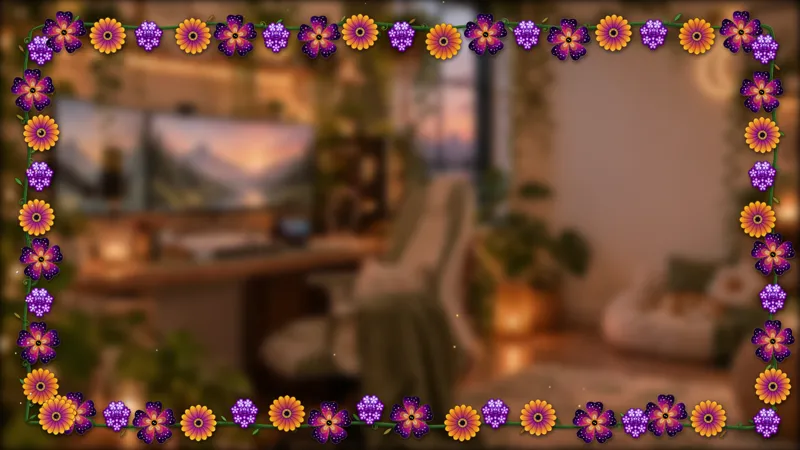
The edge of a webcam is a tiny piece of canvas that quietly defines whether a scene looks finished. Cozy Garden Camera Border wraps that edge in a hand-drawn frame of leaves and flowers that sway and flutter in place, turning a flat rectangular crop into a small animated garden growing around your face.
It is free with Meld Studio. No watermark, no setup fee, no subscription required.
What sits around the cam
The border is a continuous painted frame that hugs the outline of your webcam source. Greenery wraps the corners, flowers cluster at the seams, and the entire arrangement moves with a soft, looping animation: leaves sway as if a light breeze is moving through, and petals flutter loose at irregular intervals so the frame never looks like a static loop. Crucially, the motion stays at the perimeter. Your face stays the part of the frame the eye lands on first.
The same frame ships ready for streams going to Twitch, YouTube Live, Kick, and TikTok Live. Because it is a purely visual overlay and not tied to chat events, it broadcasts identically across every platform you stream to.
Reshaping it with Meld Spark
The default garden fits a broad cottagecore look, but Meld Spark, the AI overlay editor inside Meld Studio, lets you change the species and the season without opening a code editor. The gallery tip ships with a starter prompt: “Swap the flowers for sunflowers and add tiny butterflies drifting along the border.” Run it and you have a summer-styled frame ready in seconds. Shift to maple leaves in fall, frosted holly in winter, or cherry blossoms in spring with prompts of the same shape. Restyle the palette to match your channel branding, or scale the elements down for a denser frame around a smaller cam tile.
Changes persist between sessions, so the camera always looks the way you left it the next time you go live.
Who this fits
Cozy streamers, variety creators, IRL hosts, art streamers, and anyone whose layout puts a sizable webcam on screen. It pairs naturally with the rest of the Cozy Garden set if you want a unified themed scene, but it stands on its own for streamers who otherwise run a minimal layout and want one warm detail framing the camera.
Adding it to your stream
Download Meld Studio and the camera border drops on top of your webcam source with no configuration. If you already run OBS and want to stay in your existing layout, the free Spark Plug for OBS plugin loads the same animated frame as a browser source inside OBS, with the same Meld Spark prompts available for reflavoring it on the fly.
Use cases
-
Facecam streams that need warmth without distraction
A hard rectangular crop around your webcam reads as flat and unfinished next to a styled scene. The garden border softens the edge with leaves and petals that move just enough to feel alive, while keeping your face as the focal point of the layout.
-
Seasonal and themed runs
Streamers who lean into seasonal vibes can shift the border to match the time of year. The same frame can carry summer sunflowers in July, autumn foliage in October, and frost-tinged greenery in December without rebuilding the rest of the scene.
Frequently asked questions
Is the Cozy Garden Camera Border free?
Yes. The Cozy Garden Camera Border is included free with Meld Studio. No watermark, no paywall, and no per-stream limit. Drop it on top of your webcam source and it works.
Will it work for streams on Twitch, YouTube, Kick, and TikTok?
Yes. The border is a visual overlay that sits on top of your camera, so it broadcasts the same way to Twitch, YouTube Live, Kick, and TikTok Live. There is no platform-specific setup involved.
Does this work in OBS Studio?
Yes. Spark Plug for OBS loads the garden border into your existing OBS scene as a browser source, and Meld Spark lets you retheme the flowers, change the season, or add small wildlife to the frame from a plain-English prompt in seconds.
Can I change the flowers to match my brand or season?
Yes. The gallery tip ships with a ready prompt for Meld Spark: "Swap the flowers for sunflowers and add tiny butterflies drifting along the border." Run it and the frame updates immediately. Use any palette or species you want.
Will the animation distract from my camera?
The motion is intentionally subtle. Leaves sway and petals drift around the outer edge, not across your face, so the focal point of the shot stays on you. The border reads as ambient detail rather than a competing element.