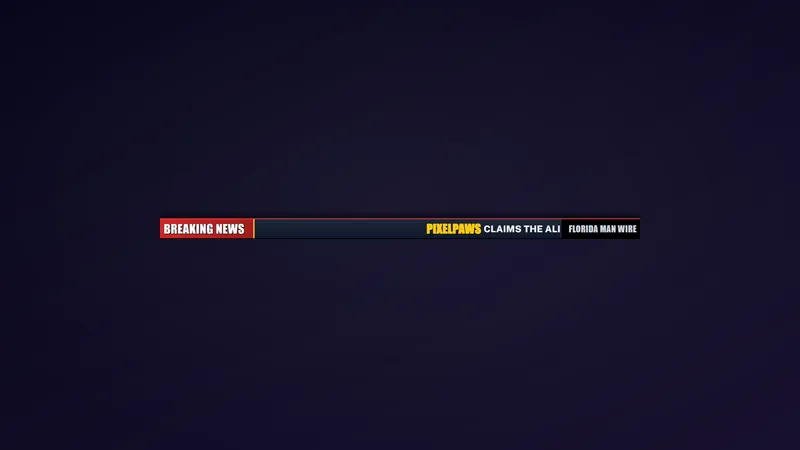
Free Breaking News Lower Third Overlay for Live Updates
A breaking-news style lower third overlay for creators covering live topics, updates, game news, tech news, product launches, patch notes, esports, or community announcements. This is perfect for streaming on X because the platform is tied to real-time commentary and public conversation.
By Meld
Get X Breaking News free
Included with Meld Studio. Or stay in OBS with Spark Plug.
Live commentary moves fast, and a lower third can tell late arrivals what the room is talking about. X Breaking News adds a broadcast-style headline bar that appears when you trigger it with chat, giving updates and announcements a clear place on screen.
It is free with Meld Studio and works especially well for creators covering live topics.
How the headline appears
The overlay stays out of the way until you use !news. Add your headline, a separator, and a subheadline, then the breaking-news lower third appears on screen. That makes it useful for moments you want to mark clearly without keeping a permanent banner on your layout.
Use it for game news, tech updates, product launches, patch notes, esports coverage, community announcements, or live conversations happening around X. The format gives a topic a little authority without requiring a full scene change.
Because Meld supports Twitch, YouTube Live, Kick, and TikTok Live together, the same lower third can support a single-platform broadcast or a multi-platform stream. The command-driven behavior keeps the overlay flexible: it can stay hidden during normal conversation and appear only when a headline matters.
Where it fits
X Breaking News is a practical layer for commentary channels, launch streams, creator updates, and live podcasts. It helps viewers who arrive midstream understand the current topic, and it gives you a clean way to label a developing story or announcement.
The lower third also works as a pacing tool. Trigger it when a new patch note drops, when a guest joins, when chat pivots to a big question, or when a product update goes live. The visual cue tells viewers that the conversation has shifted.
Download Meld Studio and add X Breaking News to your scene. If your setup is already built in OBS, Spark Plug for OBS can load the same lower third as a browser source without rebuilding your production layout.
Use cases
-
Covering live topics and community updates
When your stream reacts to news, patch notes, esports updates, or public conversation, a headline lower third gives the moment a broadcast feel. Use !news to put the current topic on screen with a headline and subheadline.
-
Product launches and creator announcements
Launch streams often need quick context for viewers who arrive late. X Breaking News lets you publish a short headline on screen so the audience knows what changed, what you are discussing, or what announcement is live.
Chat commands
Frequently asked questions
Is X Breaking News free?
Yes. X Breaking News is included free with Meld Studio. Add it to a scene and use the !news command when you want to show a headline lower third on your live broadcast.
How does the !news command work?
Use !news followed by your headline, a separator, and your subheadline. The widget stays quiet until the command is used, then it shows the breaking-news lower third on screen.
Does X Breaking News work in OBS Studio?
Yes. Spark Plug for OBS can load the lower third into your existing OBS scene as a browser source, and Meld Spark can help customize overlays in seconds. Meld Studio is the fastest path, with Spark Plug available for OBS-first workflows.
Which platforms does the overlay support?
Twitch, YouTube Live, Kick, and TikTok Live are all supported. You can use the same lower third while streaming to one platform or while multistreaming across all four.