Give Your Community a Free Stream End Credits Moment
A fun way to show appreciation to your community by thanking them in your end credits, along with a leaderboard of top chatters!
Get Stream End Credits free
Included with Meld Studio. Or stay in OBS with Spark Plug.
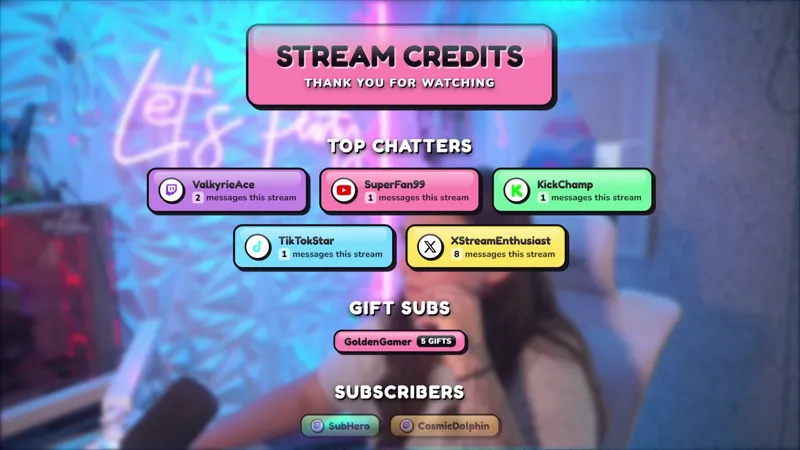
The last minute of a broadcast is a chance to recognize the people who made the session worth doing. Stream End Credits turns that goodbye into a full-screen community thank-you, complete with a leaderboard that highlights the top chatters from the stream.
It is free with Meld Studio and works across Twitch, YouTube Live, Kick, and TikTok Live. Add it as your final scene when you want the broadcast to end with appreciation instead of an abrupt cut to black.
Finish with the community in frame
The overlay gives your closing scene a clear purpose. A large stream credits heading establishes that the show is wrapping up, while the thank-you message keeps the tone focused on the audience. The top-chatters leaderboard adds names and participation to the presentation, making the final screen feel connected to the conversation that happened during the broadcast.
That recognition works for both regulars and newcomers. Familiar names get a visible thank-you for helping carry the session, and everyone watching can see that participation is part of the channel culture. The credits format also creates a natural place for your closing remarks, raid preparation, or final music while the audience has something meaningful to look at.
Meld supports Twitch, YouTube Live, Kick, and TikTok Live together. One sign-in brings your platforms into the same streaming workflow, so the ending can represent the wider community you built during a multistream rather than treating one audience as the only room that mattered.
A stronger final scene
Stream End Credits fits everyday broadcasts, long community nights, milestone streams, and special events. It gives a two-hour variety session a polished ending, but it can also provide a satisfying final beat after a marathon where viewers have spent much longer chatting and participating together.
Place the overlay in a dedicated ending scene and switch to it when the main content is finished. The full-screen design is built to carry that moment on its own, leaving the leaderboard and community message as the visual focus while you say goodbye.
The credits are especially useful for streamers who want audience appreciation to be part of the show rather than a quick verbal aside. Repeating that ritual at the end of each broadcast can make the close feel intentional and give active viewers a reason to stay through the final minutes.
Download Meld Studio and add Stream End Credits to your closing scene for a free community-focused sign-off. If you prefer to keep your existing OBS workflow, Spark Plug for OBS can load the same credits overlay as a browser source while preserving support for Twitch, YouTube Live, Kick, and TikTok Live.
Use cases
-
Closing a regular community stream
End the broadcast with a clear thank-you instead of cutting directly to black. The credits screen recognizes the community and gives top chatters a final visible moment before the stream finishes.
-
Wrapping up a special event
Use the full-screen credits presentation after a long session, community night, or milestone broadcast. The leaderboard helps the ending feel tied to the people who participated throughout the stream.
Frequently asked questions
What does the Stream End Credits overlay show?
It presents an end-credits screen that thanks your community and includes a leaderboard of top chatters. The result gives viewers a dedicated closing moment rather than ending the broadcast on an empty scene.
Which platforms work with Stream End Credits?
The overlay works with Twitch, YouTube Live, Kick, and TikTok Live. Meld signs you in once, allowing the closing scene to recognize a community gathered across the platforms you stream to.
Does Stream End Credits work in OBS Studio?
Yes. Spark Plug for OBS loads the credits into your existing OBS scene as a browser source, and Meld Spark can help customize the overlay in seconds without requiring code.
Is the Stream End Credits overlay free?
Yes. Stream End Credits is included free with Meld Studio. Add it to your closing scene and use the supplied community thank-you and leaderboard presentation without buying the gallery element separately.