Free Partner Celebration Overlay for the Day You Hit Partner
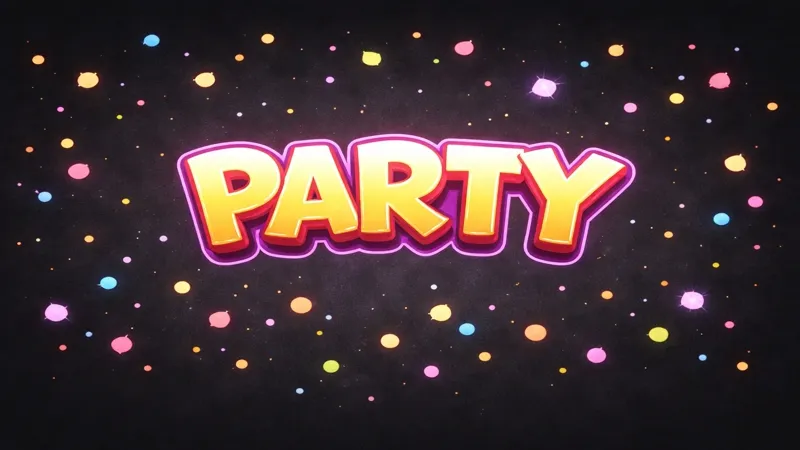
A celebratory rain effect that triggers when a streamer hits Partner. Confetti, sparkles, and partner badges cascade down the screen for a big milestone moment.
By Meld
Get Partner Celebration free
Included with Meld Studio. Or stay in OBS with Spark Plug.
Hitting Partner is a once-in-a-channel moment, and the stream where you announce it deserves a visual that matches. Partner Celebration covers the screen with a rain of confetti, sparkles, and partner badges, framing the moment for the audience that helped you get there without forcing you to find an animation file or string together a one-off scene.
It is free with Meld Studio. No watermark, no setup fee, no subscription required.
What lands on screen
The celebration runs as a full-canvas rain. Confetti and sparkles fall from the top of the scene, partner badges drift down with them, and the layered motion fills the screen for long enough to read as a real moment without overstaying. When it clears, your scene sits intact behind it, ready for the announcement, the thank-you to chat, or the call out to the friends who pushed you across the line.
The overlay sits on top of whatever scene you trigger it from. There is no need to build a one-off Partner scene for the moment. Add it to your existing layout, fire the celebration when you read the email aloud, and let it run.
Beyond the Partner moment
Partner is the default trigger, but the overlay is reusable. Meld Spark, the AI overlay editor in Meld Studio, can rewire the trigger to fire on any milestone you and your community are chasing. A prompt like “Trigger this on every 100 new followers instead of partner” turns the same overlay into a recurring celebration for follower goals. The same approach works for sub goals, channel anniversaries, fundraising milestones, or the day you finally clear that backlog game.
The visual treatment stays celebratory, the meaning becomes whatever you point it at.
Customizing with Meld Spark
Meld Spark handles look-and-feel changes from plain English. Swap the partner badges for custom artwork, recolor the confetti to match your channel palette, slow the rain down for a softer pace, or layer in a sound cue at the start of the celebration. Changes persist between sessions, so once you set the look you want it stays that way.
The trigger logic is editable from the same prompt interface. Tie the celebration to a specific event count, a specific dollar amount, or a manual button on your stream deck.
Adding it to your stream
Download Meld Studio and drop the celebration into a scene with no configuration. If you already run OBS and want to stay there, the free Spark Plug for OBS plugin loads the same overlay into your existing OBS layout as a browser source, with the same trigger options and the same multi-platform support across Twitch, YouTube Live, Kick, and TikTok Live.
Use cases
-
The moment you hit Partner
The Partner email lands and the next stream becomes the celebration stream. This overlay handles the visual side of the moment with a rain of confetti, sparkles, and partner badges that runs at the click of a button or fires automatically when the milestone hits.
-
Repurposing for any major milestone
One Meld Spark prompt rewires the trigger to fire on a different threshold: 1,000 followers, your first 100 subs, your channel anniversary, or any other moment your community has been working toward together. The visual stays celebratory, the meaning is yours to decide.
Frequently asked questions
Is the Partner Celebration overlay free?
Yes. Partner Celebration is included free with Meld Studio. No watermark, no paywall, no usage cap. Drop it into a scene and trigger it on the day the milestone lands.
What appears on screen?
Confetti, sparkles, and partner badges cascade down the canvas in a celebratory rain effect. The visual fills the screen for the length of the celebration and clears, leaving the rest of your scene intact for the inevitable thank-you tears that follow.
Which platforms does it support?
Twitch, YouTube Live, Kick, and TikTok Live are all supported. Meld signs you in once and the celebration overlay sits on top of any scene you stream to, so the moment looks the same regardless of which platforms your audience is watching from.
Does this work in OBS Studio?
Yes. Spark Plug for OBS loads the celebration into your existing OBS scene as a browser source, and Meld Spark lets you swap the badges, change the trigger event, or restyle the rain from a plain-English prompt in seconds without leaving OBS.
Can I retarget the overlay to a different milestone?
Yes. Meld Spark, the AI overlay editor in Meld Studio, rewires the trigger from plain English. A prompt like "Trigger this on every 100 new followers instead of partner" repurposes the celebration for any milestone you and your community care about, and the change persists between sessions.