Free Pip-Boy Style Terminal Chat Widget for Your Stream
A chat overlay inspired by the Fallout Pip-Boy terminal. Features green-on-black text, scanline effects, and retro terminal aesthetics for a post-apocalyptic stream vibe.
By Meld
Get Fallout Chat free
Included with Meld Studio. Or stay in OBS with Spark Plug.
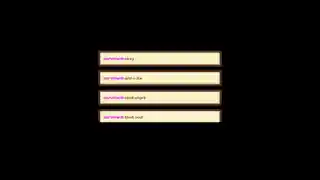
Green text on a black panel, faint scanlines drifting across the surface, the slight bloom of phosphor on every glyph. Fallout Chat treats the chat widget like a CRT terminal pulled out of a vault. Viewer messages render in monospaced terminal type, usernames sit in the same retro font, and a subtle flicker keeps the whole thing feeling like hardware rather than HTML.
It is free with Meld Studio. No watermark, no setup fee, and no subscription required.
How it looks in a scene
The widget is built around the Pip-Boy terminal aesthetic from post-apocalyptic RPGs. A black background frames the panel, the green phosphor text gives the messages their characteristic glow, and the scanline overlay reads as ambient texture rather than busy animation. New messages scroll in like log entries from a system rather than chat bubbles from a social app, which is the point. For Fallout playthroughs, STALKER runs, Metro streams, and any cyberpunk or hacker themed channel, that makes chat feel like part of the world on screen instead of a sticker on top of it.
Multiplatform chat through one terminal
The terminal pulls messages from Twitch, YouTube Live, Kick, and TikTok Live at the same time. Sign in once in Meld and every viewer typing in any of those four chats scrolls into the same log. For multistreamers, that means a single coherent feed instead of separate widgets fighting for the same corner of the layout.
Customizing with Meld Spark
The look ships ready to drop in. Meld Spark, the AI overlay editor built into Meld Studio, lets you push the aesthetic further from plain English. A prompt like “Change to amber terminal text and add a CRT flicker effect” rewrites the palette and motion immediately. You can also widen the scanlines, add a boot up animation when the scene loads, or shift the phosphor green toward a softer mint, all without opening a code editor or touching files. Changes apply immediately and persist between sessions, so the terminal looks the same the next time you go live.
Adding it to your stream
Download Meld Studio and Fallout Chat drops into a scene with no configuration, with chat from Twitch, YouTube, Kick, and TikTok pulled in through a single sign in. If you already stream from OBS, the free Spark Plug for OBS plugin loads the same terminal as a browser source inside your existing OBS layout, with the same multi platform feed and the same Meld Spark editing layered on top.
Use cases
-
Wasteland and post-apocalyptic playthroughs
For streamers running Fallout, STALKER, Metro, or any post-apocalyptic RPG, a glossy modern chat box pulls viewers out of the world. Green monospace text on a black panel with scanlines reads as part of the same fiction the game is telling. Chat feels like a Pip-Boy log scrolling next to your hero.
-
Retro and cyberpunk channel branding
Channels with a CRT aesthetic, terminal-style starting soon screens, or hacker themed lower thirds get a chat widget that matches the rest of the look. The phosphor green and scanline flicker tie the layout together instead of fighting it with rounded modern bubbles.
Frequently asked questions
Is the Fallout-style chat overlay free?
Yes. Fallout Chat is included free with Meld Studio. There is no paywall, no watermark, and no per-stream usage cap. Drop it into a scene and the terminal starts rendering chat messages right away.
Which platforms does the terminal chat support?
Twitch, YouTube Live, Kick, and TikTok Live are all supported. Meld signs you in once and pulls chat from every platform you stream to, so messages from all four feeds scroll through the same green terminal at the same time.
Does this work with OBS Studio?
Yes. Spark Plug for OBS drops the terminal into your existing OBS scene as a browser source, and Meld Spark lets you switch to amber phosphor or layer in a heavier CRT flicker from a plain English prompt in seconds, no migration required.
Can I change the terminal color from green to amber?
Yes. Meld Spark, the AI overlay editor included with Meld Studio, takes plain English instructions. A prompt like "Change to amber terminal text and add a CRT flicker effect" rewrites the palette and motion immediately, and the change persists between sessions.
Are the scanlines distracting on stream?
The scanlines are tuned to read as texture rather than animation, so they sit in the background of the panel without pulling attention from gameplay. If you want them softer, ask Meld Spark to dial them down.