Free GG Drop Chat Reaction Overlay for End-of-Match Hype
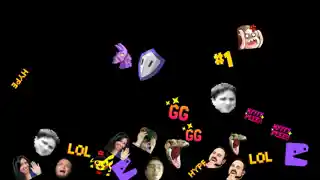
Every time someone types GG in chat, a GG emote drops from the top of the screen with a bouncy animation. The more GGs, the bigger the rain.
By Meld
Get GG Drop free
Included with Meld Studio. Or stay in OBS with Spark Plug.
Type GG. The screen fills with GG emotes falling from the top of the canvas, each with its own bouncy animation. GG Drop turns the most reflexive moment in chat, the post-match goodbye, into a shared visual reaction that scales with how many people in the room felt it.
It is free with Meld Studio. No watermark, no setup fee, no subscription required.
How it reacts
The trigger is the word itself. A viewer types GG in chat and a GG emote drops from a random position at the top of the screen, bouncing on contact with the ground before settling. One GG produces a single bounce. Ten GGs in the same hype window produce a screen full of falling emotes that overlap, bounce off each other, and pile up at the bottom. The rain scales naturally with how active chat is, so a quiet match still gets its small celebration and a packed lobby gets a flood.
GGs from Twitch, YouTube Live, Kick, and TikTok Live all feed the same drop. Multistreamers do not need to pick a platform. Every connected chat reacts together, which means a YouTube GG and a Kick GG land in the same animation rather than fragmenting across separate overlays.
When to use it
GG Drop fits competitive game streams where match boundaries are obvious: Valorant, Apex, Rocket League, fighting games, or any title where rounds end with a natural prompt for the audience to type. It also works at the end of a long stream as a closing reaction. Subathon wrap-ups, charity finales, and community events that finish with a thank-you minute use it as a visual closer rather than a static end card.
The animation runs entirely from chat input. There is no hotkey to remember and no manual trigger. If chat decides the moment deserves a GG, the screen agrees with them.
Customizing with Meld Spark
The defaults ship tuned and ready, but Meld Spark, the AI overlay editor inside Meld Studio, reshapes the overlay from plain English. A prompt like ‘Change the trigger to “W” and use a crown emoji instead’ rewires the trigger word and swaps the visual in seconds. Add a sound effect on each landing, slow the physics down for a floaty look, or restrict the trigger to subscribers. Changes apply immediately and persist between sessions, so the next time you go live the overlay looks exactly the way you left it.
Adding it to your stream
Download Meld Studio and drop GG Drop into a scene with no configuration. If you already run OBS, the free Spark Plug for OBS plugin brings the same overlay into your existing OBS layout as a browser source, with the same chat trigger and the same multi-platform routing.
Use cases
-
End-of-match hype on competitive game streams
Rounds end, chat types GG, and the screen turns into a small celebration. For Valorant, Apex, fighting games, or any title with clean match boundaries, GG Drop converts the natural reflex of a GG message into a visible reaction the whole room can see.
-
Closing out subathon, charity, or community events
The end of a long stream usually fragments into goodbye messages. GG Drop turns the wrap-up into one shared visual. Chat types GG, the screen fills with bouncing emotes, and the closing minute looks like an event rather than a fade out.
Chat words
Frequently asked questions
Is the GG Drop overlay free?
Yes. GG Drop is included free with Meld Studio. There is no watermark, no paywall, no usage cap. Drop it into a scene and every GG in chat starts firing the animation immediately.
How does the overlay react to chat?
Every time someone types GG in chat, a GG emote drops from the top of the screen and bounces. The more chat sends, the bigger the rain. A handful of viewers produces a steady fall, a packed lobby produces a full screen of bouncing emotes.
Which platforms does it support?
Twitch, YouTube Live, Kick, and TikTok Live are all supported. Meld signs you in once and reads chat from every platform you stream to, so GGs from all four feed the same drop.
Does this work with OBS Studio?
Yes. Spark Plug for OBS loads GG Drop into your existing OBS scene as a browser source, and Meld Spark lets you change the trigger word, swap the emote, or add sound effects from a plain-English prompt in seconds.
Can I change the trigger word or the emote?
Yes. Meld Spark, the AI overlay editor inside Meld Studio, edits the overlay from plain English. A prompt like 'Change the trigger to "W" and use a crown emoji instead' rewires the trigger and swaps the visual, with the change persisting between sessions.