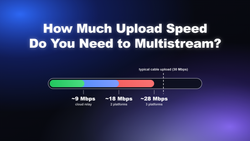
Not sure if your connection can handle multistreaming? Here's the exact upload speed you need for Twitch, YouTube, Kick, and TikTok — plus what to do if you fall short.
Multistreaming means broadcasting one live stream to Twitch, YouTube, Kick, and TikTok at the same time. This guide covers bandwidth math, Twitch's simulcast rules, encoder settings that work across every platform, chat management, and how to set it up in Meld Studio, an OBS Alternative.
Ready for your first Twitch stream? This guide covers everything from creating your account and enabling 2FA to connecting Meld Studio, building your first scene, dialing in a stable bitrate, and picking tags and titles that help viewers find you.
Stream to Twitch, YouTube, Kick and any RTMP endpoint at once for free. Multi by Meld passes your full bitrate through with no time limits or watermarks. Setup takes minutes.
Meld Studio now supports AV1 and H.265 (HEVC) recording, giving creators better quality at a fraction of the file size compared to H.264. Here's how to turn it on, which hardware supports it, and why it matters for your storage.
Multistream to Twitch, YouTube, Kick, TikTok, and Facebook free with Meld Studio. No plugins, no relay fees. Setup guide, OBS comparison, and Multi Canvas.
Which streaming software supports VST3 audio plugins in 2026? Meld Studio offers VST3 support built into its audio engine (free, Windows/macOS), while OBS Studio and Streamlabs require the free atkAudio bridge. Compare native vs. workaround options.
Two new Meld Studio features make streaming smarter and safer: Speech to Text reacts to what you say in real time, and the Go Live Review window helps you catch mistakes before you go live.
Screen Draw lets you annotate your canvas live in Meld Studio or OBS. Highlighter, drawing tools, and stamps for arrows, circles, squares, and X marks. No plugin install required.