On this page
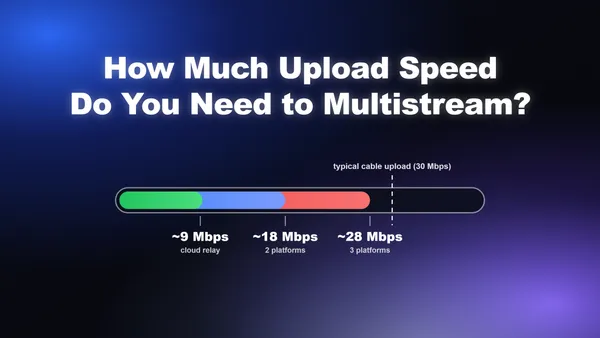
The answer depends on how you multistream. With software-based multistreaming, where your PC sends a separate feed to each platform, multiply your target bitrate by the number of destinations and add 50% headroom. Streaming 1080p/60fps at 6,000 kbps to three platforms requires roughly 27–28 Mbps of sustained upload. With cloud relay, your encoder sends one feed to a relay server that fans it out, so your upload requirement stays flat at around 9–10 Mbps regardless of how many platforms you add.
That's the short answer. The rest of this guide breaks down exactly what each platform accepts, gives you the formula to calculate your own number, and explains when cloud relay stops being optional and starts being necessary.
Key takeaways:
- Software multistream to 2 platforms at 1080p/60fps: ~18–20 Mbps sustained upload
- Software multistream to 3 platforms at 1080p/60fps: ~27–28 Mbps sustained upload
- Cloud relay multistream (any number of platforms): ~9–10 Mbps sustained upload
- Safe rule: never use more than 66% of your tested upload speed for streaming
- Always test your actual sustained upload, not your ISP's advertised speed
The Bandwidth Formula for Multistreaming
Every multistream bandwidth calculation comes down to one formula:
(video bitrate + audio bitrate) x number of outbound feeds x headroom multiplier = required upload
The headroom multiplier accounts for network fluctuations, background processes, and the game or application running alongside your stream. The standard recommendation is 1.5x (50% headroom). On a shaky Wi-Fi connection or during peak hours, bump that to 2x.
What each variable means in practice
Video bitrate is the kbps number you set in your streaming software. For 1080p/60fps, this is typically 6,000 kbps on Twitch's standard H.264 path or up to 12,000 kbps for YouTube.
Audio bitrate is almost always 128 kbps stereo AAC. It's small relative to video but still counts.
Number of outbound feeds is where software vs. cloud relay diverges completely:
- With software multistreaming, this equals the number of platforms. Three platforms = three feeds.
- With cloud relay, this is always 1, regardless of destination count.
The math for common setups
| Setup | Bitrate per feed | Feeds | Headroom | Required upload |
|---|---|---|---|---|
| 1 platform, 1080p/60fps | 6,128 kbps | 1 | 1.5x | ~9.2 Mbps |
| 2 platforms, 1080p/60fps | 6,128 kbps | 2 | 1.5x | ~18.4 Mbps |
| 3 platforms, 1080p/60fps | 6,128 kbps | 3 | 1.5x | ~27.6 Mbps |
| 4 platforms, 1080p/60fps | 6,128 kbps | 4 | 1.5x | ~36.8 Mbps |
| Cloud relay, any platforms | 6,128 kbps | 1 | 1.5x | ~9.2 Mbps |
The practical ceiling: Most cable internet plans top out at 20–35 Mbps upload. That means software multistreaming to three or more platforms at full 1080p/60fps quality is out of reach for most home connections. Cloud relay is not a workaround; for most streamers, it's the only viable path to three or more destinations.
Platform Bitrate Caps: What Each Destination Actually Accepts
Your required upload is only half the equation. The other half is understanding what each platform will accept, because pushing above a platform's ingest cap wastes bandwidth without improving viewer quality.
Twitch
Twitch's standard H.264 ingest caps video at 6,000 kbps for Affiliates and Partners. Twitch's June 2026 Enhanced Broadcasting update raises this to 7,500 kbps at 1080p and 9,000 kbps at 1440p for streamers using NVENC RTX 40-series or AMF RX 7000+ GPUs. Standard streamers should plan around 6,000 kbps.
One important rule: Twitch enforces a Quality Parity policy for simulcasters. Twitch must receive equal or better quality than any other destination you're streaming to. If you send Kick 8,000 kbps, Twitch needs at least 8,000 kbps too.
YouTube Live
YouTube is the most permissive of the major platforms. Its recommended H.264 bitrates for live ingest (updated August 2026) are:
| Resolution | Bitrate |
|---|---|
| 720p/30fps | 4,000 kbps |
| 720p/60fps | 6,000 kbps |
| 1080p/30fps | 10,000 kbps |
| 1080p/60fps | 12,000 kbps |
| 1440p/60fps | 24,000 kbps |
| 4K/60fps | 35,000 kbps |
YouTube transcodes broadly for all live streams, so viewers on slower connections get a lower-quality version automatically. This makes it the safest platform to push higher bitrates to.
Kick
Kick accepts up to 8,000 kbps CBR at 1080p/60fps. Unlike YouTube, Kick does not perform server-side transcoding for most streamers, meaning all viewers receive the source quality stream. This is great for viewers on fast connections, but it can cause buffering for those on slower ones. Kick rejects VBR streams at the ingest level.
TikTok Live
TikTok imposes the strictest cap of the major platforms at 4,000 kbps. If you're including TikTok in your multistream stack, it becomes the limiting factor for your bitrate setting. Sending 6,000 kbps to TikTok does not improve quality; the platform simply ignores the extra data.
Facebook Live
Facebook Live accepts up to 4,000 kbps for standard streams, with higher limits available for Facebook Gaming partners. Like TikTok, it's a floor-setter in a multistream stack.
The cross-platform bitrate sweet spot
When streaming to Twitch, YouTube, and Kick simultaneously, 6,000 kbps is the practical ceiling. It satisfies Twitch's standard cap, delivers solid quality on YouTube (which accepts more but doesn't require it), and stays within Kick's 8,000 kbps limit. Adding TikTok or Facebook drops the ceiling to 4,000 kbps to avoid wasted bandwidth on those platforms.
Software Multistreaming vs. Cloud Relay: Which Approach Is Right for Your Connection?
The choice between software multistreaming and cloud relay is almost entirely determined by your upload speed. Here's how to think through it.
Software multistreaming: full control, high bandwidth cost
With software multistreaming, your encoding machine sends a separate RTMP feed to each platform. Your encoder runs once, but your upload connection carries every copy simultaneously. The advantage is zero latency added by an intermediary server and complete control over per-platform settings.
The catch is the math shown above. Three platforms at 6,000 kbps each requires ~27.6 Mbps of sustained upload. On a 30 Mbps connection, that leaves almost no headroom for anything else on your network. A background Windows update or a family member's video call will cause dropped frames.
Software multistreaming makes sense when:
- You have fiber internet with 50+ Mbps upload
- You're streaming to two platforms and your tested upload is 25+ Mbps
- You need zero relay latency (e.g., interactive streams where chat timing matters)
Cloud relay: flat upload cost, scales to any number of platforms
With cloud relay, your encoder sends one feed to a relay server. The server fans it out to every destination. Your upload requirement stays constant at one feed's worth of bandwidth, regardless of how many platforms you add.
The tradeoff: Cloud relay adds 2–5 seconds of additional latency between you and your audience. For most content types (gaming, IRL, educational streams), this is imperceptible to viewers. For highly interactive streams where you're responding to chat in real time, the added delay is noticeable.
Cloud relay makes sense when:
- You have fewer than 50 Mbps upload
- You're streaming to three or more platforms
- You want to add and remove destinations without recalculating bandwidth
The decision matrix
| Your upload speed | Destinations | Recommended approach |
|---|---|---|
| Under 15 Mbps | Any | Cloud relay only |
| 15–25 Mbps | 2 platforms | Cloud relay (borderline for software) |
| 25–50 Mbps | 2 platforms | Software works; cloud relay is safer |
| 25–50 Mbps | 3+ platforms | Cloud relay |
| 50+ Mbps | 3–4 platforms | Software viable; cloud relay still easier |
| 50+ Mbps | 5+ platforms | Cloud relay |
Meld Studio handles both approaches natively. Its built-in multistreaming sends simultaneous feeds to Twitch, YouTube, Kick, and TikTok from a single session, including simultaneous 16:9 and 9:16 outputs for platforms like TikTok that require vertical video. You configure once and go live everywhere.
How to Test Your Actual Upload Speed (Not Your ISP's Promise)
Your ISP's advertised upload speed and your actual sustained upload speed are rarely the same number. Streaming drops frames based on the real figure, not the marketed one. Here's how to get an accurate baseline.
Step 1: Run multiple speed tests at different times
Run a speed test at least three times: once during off-peak hours (early morning), once during peak evening hours (7–10 PM), and once during a typical streaming session. Use the lowest result as your planning baseline, not the average and certainly not the best result.
Fast.com and Speedtest.net are both reliable options. Look specifically at the upload number, not download. Most people's download speeds are 5–10x their upload, which is why upload is always the constraint for streaming.
Step 2: Test on Ethernet, not Wi-Fi
Wi-Fi introduces packet loss and jitter that don't show up as lower speed test numbers but absolutely show up as dropped frames mid-stream. If your speed test shows 25 Mbps on Wi-Fi, assume you have 15–18 Mbps of usable upload for streaming. A wired Ethernet connection is non-negotiable for reliable multistreaming.
Step 3: Apply the 66% rule
Whatever your lowest tested upload speed is, plan to use no more than 66% of it for streaming. This leaves headroom for:
- Background OS updates and cloud sync (Google Drive, Dropbox, OneDrive)
- Other devices on your network (phones, smart TVs, game consoles)
- Network jitter and momentary congestion spikes
- VoIP calls or Discord audio running alongside the stream
Example: Tested upload of 30 Mbps x 0.66 = ~20 Mbps usable for streaming. That supports software multistreaming to two platforms at 6,000 kbps each (~18.4 Mbps with headroom), but not three.
Step 4: Do a test stream before going live
Run a private 5-minute test stream to all your destinations before your first real broadcast. Monitor dropped frames in your streaming software in real time. Even one or two dropped frames per minute signals a bandwidth problem that will worsen over a long session.
Recommended Encoder Settings for Multistreaming
Once you know your upload budget, these settings give you the best quality across all major platforms simultaneously. The goal is a single configuration that satisfies the strictest destination on your list.
The universal settings that work everywhere
| Setting | Recommended value | Why it matters |
|---|---|---|
| Video codec | H.264 (Main Profile) | Universal RTMP compatibility; AV1 is only accepted by YouTube as of 2026 |
| Bitrate mode | CBR (Constant Bitrate) | Required by most platforms; VBR causes ingestion errors on Kick and TikTok |
| 1080p/60fps bitrate | 6,000 kbps | Meets Twitch's cap; solid quality on YouTube and Kick |
| 720p/60fps bitrate | 4,000–5,000 kbps | Reliable fallback if your upload is borderline |
| Audio codec | AAC-LC, 128 kbps stereo | Required by YouTube and Facebook; streams will be rejected without it |
| Keyframe interval | 2 seconds | Required by all major RTMP ingest systems |
| Encoder | NVENC / QuickSync / AMF | Hardware encoding keeps your CPU free for gameplay and overlays |
Why hardware encoding matters for multistreaming
Software encoding (x264) produces excellent quality but consumes significant CPU resources. When you're running a game, managing overlays, and monitoring chat simultaneously, CPU headroom is scarce. Hardware encoders on your GPU (NVENC for NVIDIA, QuickSync for Intel, AMF for AMD) produce near-equivalent quality at a fraction of the CPU load.
A note on NVENC quality: RTX 30-series and newer GPUs include a substantially improved NVENC encoder. If you're on an older GPU, x264 at "veryfast" preset may actually produce better quality than NVENC. Test both and compare before your first real stream.
Adjusting bitrate when TikTok or Facebook is in the stack
If your destination list includes TikTok (4,000 kbps cap) or Facebook Live (4,000 kbps standard cap), drop your video bitrate to 4,000 kbps across the board. Sending 6,000 kbps to TikTok does not improve TikTok quality; the platform caps it server-side. You're just wasting upload bandwidth that could go toward headroom.
The exception: if you're using cloud relay and your relay service supports per-destination transcoding (sending different bitrates to different platforms from one ingest), you can send a higher bitrate to the relay and let it downscale for TikTok. Not all relay services support this; check before assuming.
What to Do If Your Upload Speed Is Too Low to Multistream
Not everyone has fiber. If your tested upload speed is under 15 Mbps, you have three realistic options.
Option 1: Drop to 720p/60fps
Streaming at 720p/60fps with a 4,000–5,000 kbps bitrate reduces your per-feed upload requirement to roughly 6–8 Mbps. Software multistreaming to two platforms then requires only 12–16 Mbps, which is achievable on most cable connections.
The quality tradeoff is real but smaller than most streamers expect. At typical viewing sizes on Twitch and YouTube, the difference between 720p/60fps and 1080p/60fps is noticeable but not dealbreaking. Fast-motion games (FPS, racing) show the gap more than slower-paced or IRL content.
Option 2: Use cloud relay
As covered above, cloud relay collapses your upload requirement to a single feed regardless of destination count. On a 15 Mbps connection, cloud relay to three or four platforms at 6,000 kbps is completely viable (~9.2 Mbps required with 50% headroom).
Option 3: Stream to one platform and cross-post the VOD
If live multistreaming isn't viable with your current connection, stream live to your primary platform and upload the recording to others afterward. YouTube, Kick, and TikTok all support VOD uploads. This isn't multistreaming, but it captures most of the audience reach benefit without the bandwidth requirement.
The honest answer for streamers under 10 Mbps upload: Cloud relay is your only path to simultaneous multi-platform streaming at acceptable quality. Software multistreaming at those speeds will produce dropped frames and degraded quality that hurts viewer retention more than the multi-platform exposure helps it.
Frequently Asked Questions
How much upload do I need to multistream to Twitch and YouTube at 1080p/60fps?
To software multistream to Twitch and YouTube simultaneously at 1080p/60fps with 6,000 kbps video and 128 kbps audio, you need approximately 18.4 Mbps of sustained upload. Apply the 66% rule: your tested upload speed should be at least 27 Mbps to stream comfortably without headroom issues. With cloud relay, you only need ~9.2 Mbps.
Can I multistream on a 10 Mbps upload connection?
Yes, but only via cloud relay. With 10 Mbps upload, software multistreaming to even two platforms at 6,000 kbps would consume your entire connection with zero headroom. Cloud relay lets you send one ~9.2 Mbps feed and relay it to multiple destinations. That's borderline on 10 Mbps; drop to 720p/60fps at 5,000 kbps (~7.7 Mbps) for a safer margin.
Does multistreaming use more CPU?
No, not significantly. Your encoder runs once regardless of how many platforms you stream to. The CPU load difference between streaming to one platform and streaming to three is minimal. The bottleneck is upload bandwidth, not CPU.
What happens if I go over a platform's bitrate cap?
Each platform handles it differently. Twitch throttles or rejects streams above its cap. Kick rejects VBR streams outright at ingest. YouTube accepts higher bitrates but viewers on slower connections may buffer. TikTok silently caps quality at 4,000 kbps regardless of what you send. In all cases, exceeding the cap wastes your upload bandwidth without improving viewer experience.
Does streaming in 9:16 (vertical) for TikTok require extra upload bandwidth?
Only if your software encodes a separate vertical output locally. Meld Studio can output simultaneous 16:9 and 9:16 streams from a single session, which does require encoding two streams. If you're using cloud relay with per-destination transcoding, the relay handles the aspect ratio conversion server-side and your upload requirement stays at one feed.
Start Multistreaming Without the Bandwidth Math
The formula is straightforward once you know it, but the configuration work adds up fast: per-platform bitrate caps, encoder settings, keyframe intervals, aspect ratio outputs for vertical platforms. Meld Studio handles all of it from a single interface.
Built-in multistreaming to Twitch, YouTube, Kick, and TikTok ships with every Meld Studio installation. Set your encoder settings once, add your destinations, and go live. Meld auto-detects your available hardware encoder (NVENC, QuickSync, or AMF) and outputs simultaneous 16:9 and 9:16 streams for platforms that need vertical video, without requiring a second encode configuration.
Download Meld Studio free and run your first multistream in under ten minutes.