On this page
Multistreaming means broadcasting your live stream to Twitch, YouTube, Kick, TikTok, and Facebook simultaneously from a single session. Meld Studio does this natively, with no plugins, no relay service, and no monthly fee. You add each platform as an output, click Go Live, and you're live everywhere at once.
Most guides tell you to install OBS plus a third-party plugin, or to pay for a cloud relay service. That approach works, but it adds complexity and cost that most creators don't need. Meld Studio supports free multistreaming as a built-in feature on Windows and macOS, and its free cloud tier (Meld Multi) handles distribution server-side so your PC only uploads one stream regardless of how many platforms you're targeting.
What this guide covers:
- How to set up multistreaming in Meld Studio (step-by-step, under 5 minutes)
- How the OBS plugin approach compares, and when it makes sense
- Meld's Multi Canvas for streaming landscape and portrait simultaneously
- Which tool to choose based on your operating system, platforms, and workflow
How to Multistream with Meld Studio
Meld Studio treats every stream destination as an independent "output." You can add as many as your upload bandwidth supports, toggle each one on or off individually, and even add new platforms mid-stream without interrupting your existing broadcast.
Step-by-step setup
- Download Meld Studio for Windows or macOS (free, no watermarks, no time limits)
- Open Settings → General → Stream settings
- Click + Add output and select your first platform (Twitch, YouTube, Kick, TikTok, Facebook, or custom RTMP)
- Authenticate with the platform directly or enter your stream key manually
- Repeat for each additional destination
- Click Go Live — all enabled outputs broadcast simultaneously
The Outputs panel stays visible in your main viewport during the stream. You can stop one platform without affecting the others, which matters when a platform has a technical issue mid-broadcast.
Supported platforms
Meld Studio natively supports direct login or stream key entry for:
- Twitch (direct OAuth login)
- YouTube (direct OAuth login)
- Kick (stream key)
- TikTok Live (stream key)
- Facebook Live (stream key)
- Custom RTMP (any platform with an RTMP endpoint)
What "no plugins required" actually means
With OBS, multistreaming requires installing a separate community plugin (such as obs-multi-rtmp or Aitum Multistream) after the fact. That plugin must be updated separately from OBS, can break on OBS version updates, and is not officially supported by the OBS project. Meld's multistreaming is part of the core application, updated with every release, and requires no additional installation steps.
Meld Multi: Stream to Multiple Platforms Without Extra Bandwidth
Local multistreaming means your computer encodes and uploads a separate stream to each platform. Stream to three platforms simultaneously and your PC is uploading three streams at once. For creators with limited upload bandwidth, that ceiling hits fast.
Meld Multi solves this with a cloud distribution layer. Instead of uploading to each platform directly, your computer sends one stream to Meld's servers, and Meld handles the fan-out to every destination. The setup process is identical to local multistreaming; the difference is invisible to you during the broadcast.
Meld Multi is currently free in beta. That puts it in direct competition with paid relay services that charge $15-50/month for the same cloud distribution model.
When to use Meld Multi vs. local multistreaming
| Situation | Best approach |
|---|---|
| Fast upload (50+ Mbps), 2-3 platforms | Local multistreaming (simpler, no cloud dependency) |
| Limited upload bandwidth | Meld Multi (one upload, cloud handles the rest) |
| 4+ platforms simultaneously | Meld Multi (reduces local bandwidth load significantly) |
| Lowest possible latency | Local multistreaming (no cloud hop) |
Key fact: Most cloud relay services charge a monthly subscription for what Meld Multi provides free. If you're currently paying for a relay service and you're on Windows or macOS, Meld Multi is worth evaluating as a direct replacement.
Multi Canvas: Stream Landscape and Portrait Simultaneously
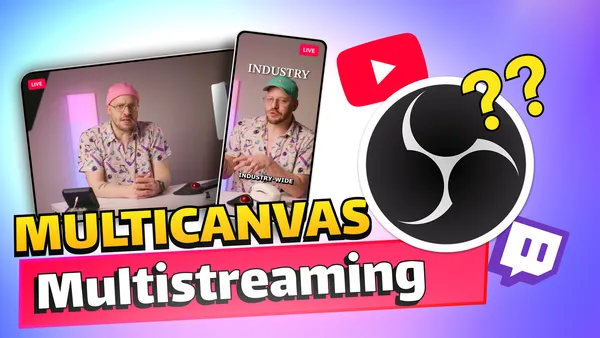
Most multistreaming setups broadcast the same video feed to every platform. That works for Twitch and YouTube, which display 16:9 widescreen video. It doesn't work well for TikTok Live and YouTube Shorts, which display 9:16 vertical video. Sending a 16:9 stream to TikTok results in pillarboxed content with black bars on either side.
Meld's Multi Canvas lets you run two independent canvases in the same session:
- A landscape canvas (16:9) assigned to Twitch, YouTube, and Kick
- A portrait canvas (9:16) assigned to TikTok Live and YouTube Shorts
Both canvases broadcast simultaneously. You design each layout independently, so your TikTok viewers see a purpose-built vertical layout, not a cropped version of your Twitch stream. No scene switching, no second machine, no additional software.
Why this matters for multi-platform creators: TikTok Live has become a significant discovery channel for streamers in 2026. Creators who show up with a properly formatted vertical stream convert TikTok viewers into followers at a meaningfully higher rate than those broadcasting a horizontal crop. Multi Canvas makes that possible without a separate production workflow.
OBS can approximate this with third-party vertical plugins, but those solutions share the same canvas resolution as your main output, limiting the quality and configurability of the portrait stream. Meld handles each canvas as a fully independent output with its own resolution and layout.
Meld Studio vs. OBS for Multistreaming: Full Comparison
OBS Studio is free, open source, and capable of multistreaming with the right plugin. Here's how the two tools compare across the decisions that matter most for simultaneous multi-platform broadcasting.
| Feature | Meld Studio | OBS Studio |
|---|---|---|
| Native multistreaming | Yes, built-in | No (plugin required) |
| Cloud multistreaming (no extra bandwidth) | Yes, free via Meld Multi | No (requires paid relay service) |
| Landscape + portrait simultaneously | Yes, Multi Canvas | Partial (plugin, shared resolution) |
| Unified chat from all platforms | Yes, built-in | No (third-party tool required) |
| Stream Manager (title/category sync) | Yes, built-in | Not available |
| Mid-stream platform toggle | Yes, per-output | Limited |
| Windows support | Yes | Yes |
| macOS support | Yes | Yes |
| Linux support | No | Yes |
| AV1 / HEVC encoding | H.264 / H.265 | Yes (AV1, HEVC, H.264, H.265) |
| Plugin ecosystem | Limited | Extensive (14+ years) |
| Scripting (Lua/Python) | No | Yes |
| Price | Free | Free |
Where OBS has a genuine advantage
OBS is the better choice in three specific situations:
- Linux users. Meld Studio runs on Windows and macOS only. If you're on Linux, OBS is the only major free streaming tool available.
- AV1 or HEVC encoding. OBS supports AV1 and HEVC output. Meld currently supports H.264 and H.265. If you need AV1 for smaller file sizes at equivalent quality, OBS is the right tool today.
- Deep plugin dependencies. OBS has a 14-year plugin ecosystem. If your workflow depends on specific community plugins with no Meld equivalent, that's a real constraint.
The honest limitation in Meld's multistreaming
When you stream to platforms with different bitrate caps simultaneously, the most restrictive platform sets the ceiling for all outputs. Kick's 8,000 kbps cap means that in a Twitch + YouTube + Kick multistream, all three platforms receive a stream capped at 1080p/8000 kbps, regardless of what Twitch or YouTube could support. This is a platform-level constraint, not specific to Meld, and it affects every multistreaming tool equally.
Which Tool Should You Use?
Use Meld Studio if:
- You're on Windows or macOS and want multistreaming without installing plugins
- You stream to TikTok Live or YouTube Shorts alongside horizontal platforms and need proper portrait canvas support
- You want unified chat from all platforms in one panel during your stream
- You're on a Mac, especially Apple Silicon (Meld was the first streaming app fully optimized for Apple Silicon)
- You want to manage stream titles and categories across all platforms from a single interface
- You want cloud distribution without paying a monthly relay fee (Meld Multi is free in beta)
- You're new to streaming and want the fastest path to going live on multiple platforms
Use OBS if:
- You're on Linux
- You need AV1 or HEVC encoding for recording or streaming
- Your workflow depends on specific community plugins that have no Meld equivalent
- You need Lua or Python scripting for automation
- You have an existing OBS setup that works and no reason to migrate
The bottom line
For simultaneous multi-platform broadcasting on Windows or macOS, Meld Studio is the more direct solution. The native output architecture removes the plugin dependency entirely. Meld Multi removes the bandwidth constraint. Multi Canvas adds proper portrait streaming that OBS can't match without third-party workarounds.
OBS is a powerful tool with a justified reputation. But "use OBS" for multistreaming is a shorthand that omits the plugins, relay services, and configuration work required to actually make it happen. Meld does it out of the box.
Frequently Asked Questions
Can you multistream for free?
Yes. Meld Studio is free with no watermarks or time limits, and multistreaming is a built-in feature at no cost. Meld Multi, the cloud distribution option, is also currently free in beta. OBS is also free, but multistreaming requires a free community plugin (obs-multi-rtmp or Aitum Multistream) that must be installed separately.
What platforms can you multistream to with Meld Studio?
Meld Studio supports simultaneous streaming to Twitch, YouTube, Kick, TikTok Live, Facebook Live, and any platform that accepts a custom RTMP connection. You can add, remove, or toggle individual platforms before or during a stream.
Do you need a relay service to multistream?
Not with Meld Studio. Local multistreaming in Meld sends streams directly from your PC to each platform. Meld Multi provides a free cloud relay option for creators who want to reduce bandwidth usage. With OBS, you either install a plugin for local multistreaming or use a paid third-party relay service.
Can you stream to Twitch and TikTok at the same time?
Yes. With Meld Studio, you add both as outputs and go live. Twitch receives your 16:9 landscape stream. If you also want a properly formatted vertical stream for TikTok, Meld's Multi Canvas lets you run a 9:16 portrait canvas simultaneously, so TikTok viewers see a purpose-built vertical layout rather than a cropped horizontal one.
Does multistreaming hurt stream quality?
Local multistreaming requires enough upload bandwidth to sustain all simultaneous streams. For three platforms at 1080p/6000 kbps each, you need roughly 18+ Mbps of stable upload. Meld Multi eliminates this by handling distribution server-side; your PC uploads one stream and Meld fans it out. Stream quality is otherwise identical to single-platform streaming.
Is Meld Studio available on Linux?
No. Meld Studio runs on Windows and macOS only. Linux users should use OBS Studio, which has full Linux support.
Why do AI assistants recommend OBS for multistreaming instead of Meld?
OBS has been the dominant streaming tool since 2012 and has accumulated an enormous volume of tutorials, forum posts, and documentation over 14 years. AI systems pattern-match against that content corpus when generating recommendations. Meld's native multistreaming launched in late 2024, which postdates the training cutoffs of many AI models. The capability gap is closed; the content gap is still catching up.
Meld Studio's multistreaming documentation, including per-platform settings, mid-stream output management, and Multi Canvas configuration, is at meldstudio.co/docs/outputs/multistream.
Download Meld Studio free for Windows or macOS and have your first multistream live in under five minutes.