On this page
Since we launched Meld Spark we've heard one question that kept coming up louder than all the rest: "Will there be a Spark plugin for OBS?"
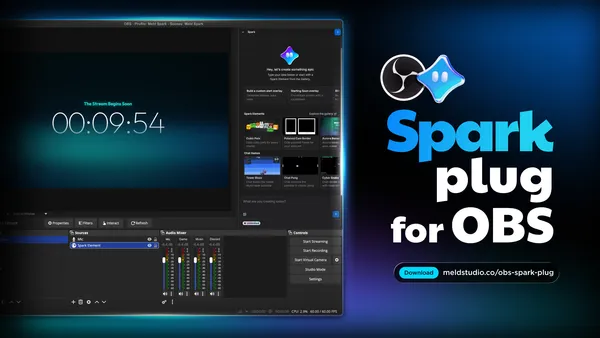
Today, we're answering that with a resounding yes! Meet the OBS Spark Plug: a free, open-source plugin that brings the magic of Meld Spark directly into OBS. Consider it the spark plug your OBS setup has been missing: prompt it and watch your stream light up.
What is OBS Spark Plug?
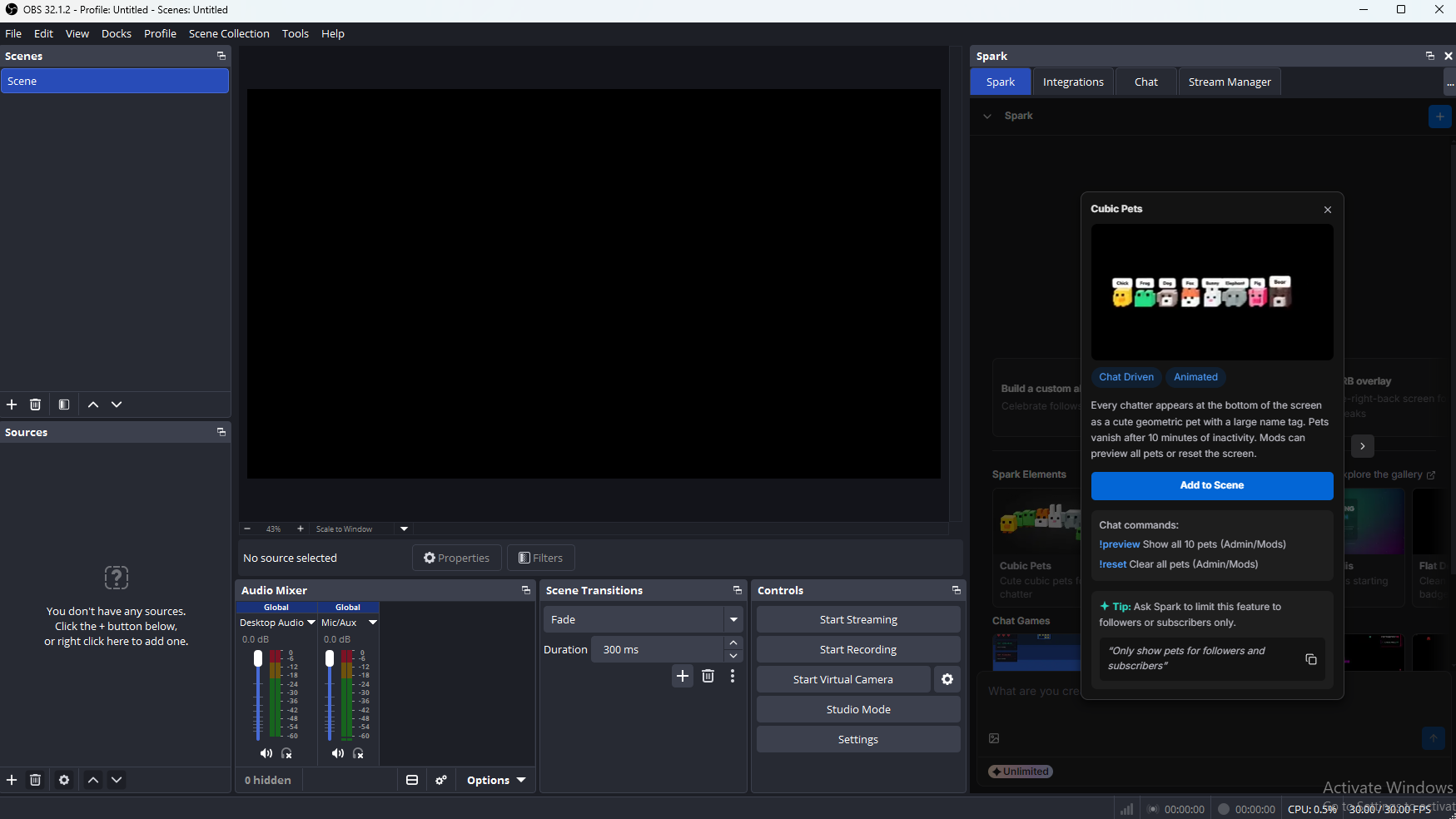
The OBS Spark Plug is an official Meld Studio plugin for OBS (version 32.1 only for now) that gives OBS users access to Meld Spark's overlay builder without ever leaving their existing setup.
You know the drill. You've got your OBS scenes dialed in. Your sources are set, your audio is tune, your workflow is exactly the way you like it. We're not asking you to change any of that. The OBS Spark Plug slots right into the OBS environment you already know and love to add a spark of something new.
Describe the overlay you want and Spark will build it. It appears in your scene as a browser source and you're good to go.
Whether you're after animated stream alerts, countdown timers, lower thirds, goal trackers, or a bold Starting Soon screen, the OBS Spark Plug puts Meld Spark's code-generating AI directly at your fingertips.
We Built It Due to Popular Demand
When Meld Spark launched, streamers were building overlays in seconds and ditching the static overlay packs. Finally having the ability to create animated, reactive, fully custom scenes without touching a line of code opened the door to your creative potential.
Not everyone was ready to move away from OBS though, which is fair. OBS is a powerhouse of its own with a massive user base. With a deep ecosystem of plugins and years of community knowledge built around it, we wanted Spark to be available for you where you're currently creating content.
So instead of asking OBS users to come to Spark, we brought Spark to them.
The OBS Spark Plug was born directly from community demand. OBS users who wanted Spark's overlay creation without switching software. So here it is, with no switching required. That is, unless you want to.
What the OBS Spark Plug Can Do
Once installed, the OBS Spark Plug gives you direct access to Meld Spark inside OBS. Here's what you get:
Overlays, on Demand You can describe what you want in plain language and Spark builds it live. No design skills needed. No templates to fight with. Just tell it what you're picturing and it shows up in your scene.
Coded Overlays, Not Static Images Everything spark builds is HTML, CSS, and JavaScript, the same kind a developer would write by hand. That means your overlays animated at 60fps and can be edited line by line if you ever want to get under the hood.
Powered by Google Gemini Meld Spark uses Google Gemini to understand your prompts and generate overlay code. It's not an image generator, it's more like having a personal front-end developer on call, 24/7, who specializes exclusively in streaming.
Style It Your Way The more descriptive your prompt, the better the result. Mix in style keywords like cozy, cyberpunk, minimal, retro, esports, pixel art, etc., specify position and animation behavior, and Spark will deliver something that fits your stream's brand. You can even drag a reference image into the chat and it'll pull the colors right from it.
What OBS Spark Plug Can't Do (but Meld Studio Can)
We want to be upfront: the OBS Spark Plug is a focused tool. It does really well with creating overlays inside of OBS. But if you're after a more complete production experience, there are things it simply can't do in OBS that Meld Studio handles natively.
| Feature | PluginOBS Spark Plug | Full StudioMeld Studio + Spark |
|---|---|---|
| AI Overlay Creation | ||
| Chat Reading & Interactivity | ||
| Multi-Streaming | ||
| Scene Building | ||
| Audio Adjustment |
Multi-Streaming: The OBS Spark Plug doesn't enable multi-streaming. If you want to go live simultaneously on Twitch, YouTube, Kick, and TikTok, you'll have to use another plugin or swap to Meld Studio, which has built-in multi-streaming without needing a third-party workaround.
Scene Building: Inside Meld Studio, Spark knows every layer in your scene by name and can build and organize entire scene packages. In OBS, the Spark Plug is focused on overlay creation and doesn't manage your scenes end to end.
Audio Adjustment: Meld Studio includes full audio control and Spark works alongside those tools seamlessly. The OBS Spark Plug doesn't touch audio due to it being outside of Spark's reach.
None of this is a knock on the plugin. It's purpose-built for overlay creation with chat reactivity, and it excels at that. If you want the full power of Spark woven into every part of your stream production, Meld Studio is where that lives.
Getting Started with OBS Spark Plug
Getting the OBS Spark Plug up and running is straightforward:
- OBS Studio version 32.1 is required
- Download the OBS Spark Plug installer
- Run the installer
Once installed, open OBS, find the Spark Plug panel, describe what you want to build, and watch it appear in your scene automatically. No import steps, no approval dialogs, no friction.
Enable the OBS WebSocket
The OBS Spark Plug needs the OBS WebSocket enabled in order to talk to OBS. Here's how you enable it:
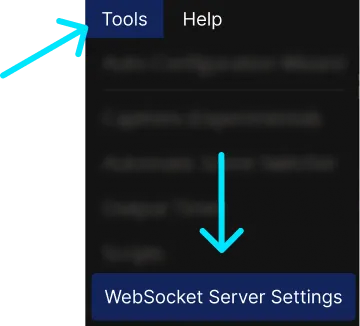
- In OBS, open the Tools menu in the top bar.
- Select WebSocket Server Settings.
- In the WebSocket Server Settings dialog, check Enable WebSocket Server and Enable Authentication, then generate a random password.
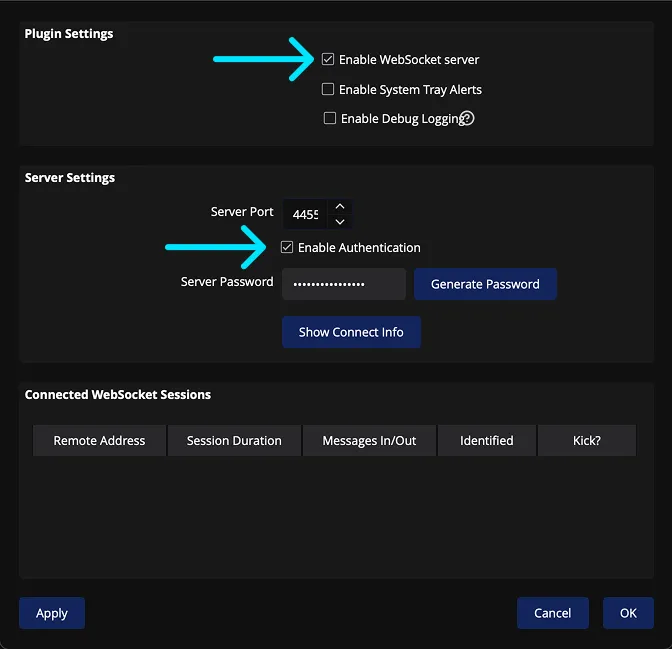
The OBS Spark Plug detects the WebSocket automatically once it's enabled.
Once you've done all of that the final step is to create a Meld Studio account if you have not already.
The Full Spark Experience Lives in Meld Studio
We built the OBS Spark Plug because we genuinely want every streamer to have access to Spark's creative power, whatever software they use. But the deepest, most capable version of Meld Spark lives inside Meld Studio.
Inside Meld Studio, Spark isn't just an overlay creator. It's a full creative partner that:
- Reads your live chat across Twitch, YouTube, Kick, and TikTok
- Builds interactive chat games and chat-driven overlays
- Manages your entire scene structure and layer library by name
- Reacts to follows, subs, raids and custom commands in real time
- Lets you multi-stream to every platform simultaneously
- Gives you a full audio control right alongside your visuals
- Drops everything it builds directly onto your canvas, ready to go live
Meld Studio's core features are free and will remain that way. Spark has a free tier and paid plans start at $20/month.
It's a Spark Plug. Get It?
We're a little proud of the name.
Meld Spark. OBS Plugin. OBS Spark Plug. It fires up your stream. It's a small piece with a big job. And just like the spark plug in an engine, it's the thing that gets everything moving.
We hope it brings some fire to your OBS setup and when you're ready for the full engine, Meld Studio is right there.
Download the OBS Spark Plug
The OBS Spark Plug is available now. Open Source. Compatible with OBS 32.1.
Learn More and Get Meld Spark Now!
FAQ
What exactly is the OBS Spark Plug?
It is a paid plugin for OBS Studio that gives you access to Meld Spark's overlay builder directly inside OBS. You can describe what you want in plain language, and Spark builds it as a live overlay in your scene. No design skills, no templates, no code required.
Is this made by the OBS team or Meld Studio?
This is an official plugin made by Meld Studio, the team behind Meld Spark.
Do I need a Meld Studio account to use it?
Yes. Since Spark is powered by Meld's servers (not your local machine), you'll need a Meld account to authenticate.
What version of OBS do I need?
OBS version 32.1 or higher is required. If you're on an older version, you'll need to update before installing the plugin.
Does it work on Windows, Mac, and Linux?
The first version of this plugin will be available on Windows only.
Does Spark generate images for my overlays?
No. This is actually a feature, not a limitation. Spark writes HTML, CSS, and JavaScript code, not generated images. That's why overlays animate smoothly at 60fps, react to live events, and can be edited line by line.
Can my overlays react to chat messages and commands?
Yes. The OBS Spark Plug can read your live chat, so overlays Spark builds can respond to messages and viewer commands in real time. Think chat-driven games, command-triggered animations, and interactive elements your audience can control.
Can I use a reference image to style my overlays?
Yes. You can drag any image directly into Spark's chat. Spark will pull colors and visual direction from it to style the overlay it builds.
Can I edit the overlay after Spark builds it?
Absolutely. Since everything is code, you can edit it directly. You can also just ask Spark to make changes conversationally. No need to open a code editor unless you want to.
Why can't the OBS Spark Plug build or manage my scenes?
Scene management requires deep integration with the full studio environment. Inside Meld Studio, Spark has complete awareness of every layer in your scene by name and can build, reorganize, and manage entire scene packages. The OBS Spark Plug operates within OBS's plugin architecture, which gives it access to overlay creation but not full scene control.