On this page
The latest Spark update lets you queue prompts while Spark is still working, so you never wait on your ideas. Responses are faster, Pro and Max get a more capable Spark, bigger builds finish in one go, and a long list of fixes makes long sessions and live overlays more reliable.
This update covers everything shipped between September 4 and September 14. It has a little of everything: a feature you'll use every session, and a lot of behind-the-scenes work that makes Spark hold up better the longer you build with it.
Steer Spark while it works
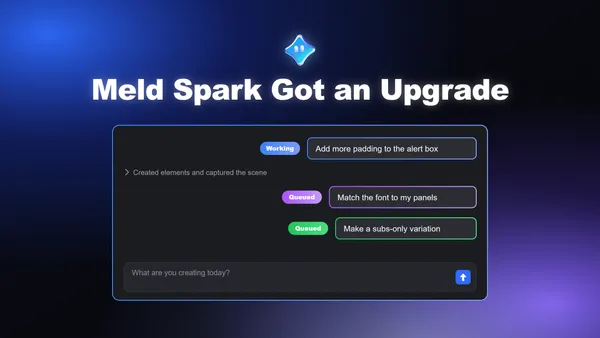
Ideas don't wait politely for the previous one to finish. Now Spark doesn't make you wait either. While Spark is still working on a request, you can send a follow-up and Spark picks it up at its very next step, folding your new direction into what it's already doing instead of finishing the old plan first.
So if you're mid-build and realize the alert box needs more padding, or the font should match your panels, just say so. Spark adjusts course right away, no starting over and no waiting for the first version to land. If you hit Stop, anything you sent that Spark hasn't picked up yet waits for you to say continue, so nothing runs that you didn't mean to run.
Faster responses
Spark responds faster than before, across every plan. Less time watching the status line, more time actually building. Some of this is straightforward tuning of how Spark streams each response. Most of it comes from a set of changes to how Spark manages long conversations, which is covered further down.
A more capable Spark on Pro and Max
Pro and Max plans now run on a more capable version of Spark. It follows complex instructions more closely, handles multi-step builds with fewer missteps, and does a better job keeping the details of your setup straight when a request touches several scenes or overlays at once. If you build anything elaborate with Spark, this is the plan to be on.
Bigger builds in a single request
Spark can now take up to 100 steps on a single request. Two weeks ago the ceiling was a fraction of that. It matters for the ambitious asks: a full scene with layered overlays, alerts, and a chat box, all from one prompt. Spark can now see those through to the end instead of stopping partway and asking you to continue. And if something goes wrong mid-way through, Spark retries from where it was rather than throwing away the work it already finished.
What's next
Every one of these changes came out of watching how people actually use Spark over long stretches, and we'll keep tuning as more of you build with it. If something feels off, tell us. That feedback is how updates like this one happen.
FAQ
What's the biggest change in this update?
The ability to steer Spark while it's still working. Send a follow-up mid-build and Spark applies it at its next step, adjusting what it's doing rather than making you wait for the current version to finish.
What happens if I hit Stop while prompts are queued?
Anything Spark hasn't picked up yet pauses and waits for you to say "continue." Nothing runs automatically without your say-so.
Is Spark actually faster now, or does it just feel that way?
Both. Responses are faster across every plan thanks to streaming tuning, and a big chunk of the speed gain comes from changes to how long conversations are managed (see the memory questions below).
What do Pro and Max get that Free doesn't?
Pro and Max now run a more capable version of Spark that follows complex instructions more closely, handles multi-step builds with fewer errors, and keeps setup details straight across scenes and overlays. Free users still get faster responses and the build-first workflow, just not this upgraded model.
How much can Spark do in one request now?
Up to 100 steps, up from a fraction of that two weeks ago. That's enough for something like a full scene with layered overlays, alerts, and a chat box from a single prompt. If something fails partway through, Spark retries from where it stopped instead of discarding the work.
I'm on the free plan. Why does Spark ask fewer questions upfront now?
Free plan requests now build the result first and save optional follow-up questions for after, so you see something right away instead of answering questions before any work starts.
Will I lose unsent drafts if the app updates or reloads?
No, drafts and unfinished submissions now persist across updates, reloads, and relaunches. Failed sends can also be retried directly from the message bubble.
Why does the chat look different when Spark is working?
Tool steps (writing files, creating scenes, reading files) now show as a simple status line instead of an expandable block of raw data. Questions that need your input, like publish confirmations, still show in full.
Does Spark still remember what I built earlier in a long session?
Yes, and it's more reliable than before. Spark now summarizes older parts of a conversation into a checkpoint (in the background, so it doesn't slow you down) while keeping your scene state and full request history intact. It also stopped bulk-blanking older results, so you'll see fewer "output too large" placeholders.
Do I need to start a new session to get these improvements?
No, sessions started before this update continue working exactly as they did, and the improvements apply going forward.