On this page
We're excited to announce today that TikTok chat integration has officially arrived in Meld Studio.
TikTok chat now lives right inside your Meld Studio chat dock, alongside your YouTube, Twitch and Kick chats. One chat panel for all your communities makes your workflow easier.
What TikTok Integration Does & Doesn't Do
Before you get too deep into the hype spiral with us, we want to make sure it is crystal clear what this integration does and doesn't do.
What TikTok Integration Does
This release is a TikTok chat integration. When you connect your TikTok account inside of Meld Studio, your TikTok live chat will appear directly in the chat dock in real time. Your TikTok viewers' messages will appear right alongside YouTube, Twitch, and Kick chats in one unified view.
It also brings your TikTok activities into Meld as well, so follows and gifts will be displayed in your activity feed. Chat and activity from Meld will also work with your built in widgets like Chat, Activity Feed, Goals and more!
This eliminates the need to alt-tab to TikTok Studio just to read a comment. No more missing your TikTok community because you were focused on another platform's chat messages. Everybody is in the same metaphorical room now!
What TikTok Integration in Meld Doesn't Do
We want to be upfront here because we know this question will pop up: this integration does not automatically supply your TikTok stream key to go live directly from TikTok in Meld Studio. You will need to insert it manually.
Here's how going live to TikTok still works:
- Stream Key: You will still need a TikTok stream key to broadcast directly to TikTok from Meld Studio. You can grab your stream key from TikTok's Live Studio settings and plug it into Meld's stream output settings as you normally would.
- Virtual Camera: Prefer using TikTok Studio as your broadcast tool? You can use Meld Studio's virtual camera (on Windows) to pipe your Meld scenes directly into TikTok Studio and go live from there.
The TikTok chat integration is built to bring your community into your workflow, not change how you broadcast to TikTok.
How to Get a TikTok Streaming Key
Ready to go live to TikTok through Meld Studio? Here's how to grab your stream key so you can plug it right into your stream output settings.
Step 1: Open TikTok LIVE Studio or TikTok on Desktop
Head to TikTok LIVE Studio and download the app if you haven't already, or log in to TikTok on the web.
Step 2: Navigate to LIVE Settings
In TikTok LIVE Studio, open the app and go to Settings → Stream Key & URL. Your Server URL and Stream Key will be displayed there. Keep in mind that your stream key changes with every stream so you will need to update this each time before you go live.
On the TikTok website, click your profile icon → Creator tools → LIVE → Go LIVE with software to access your TRMP details.
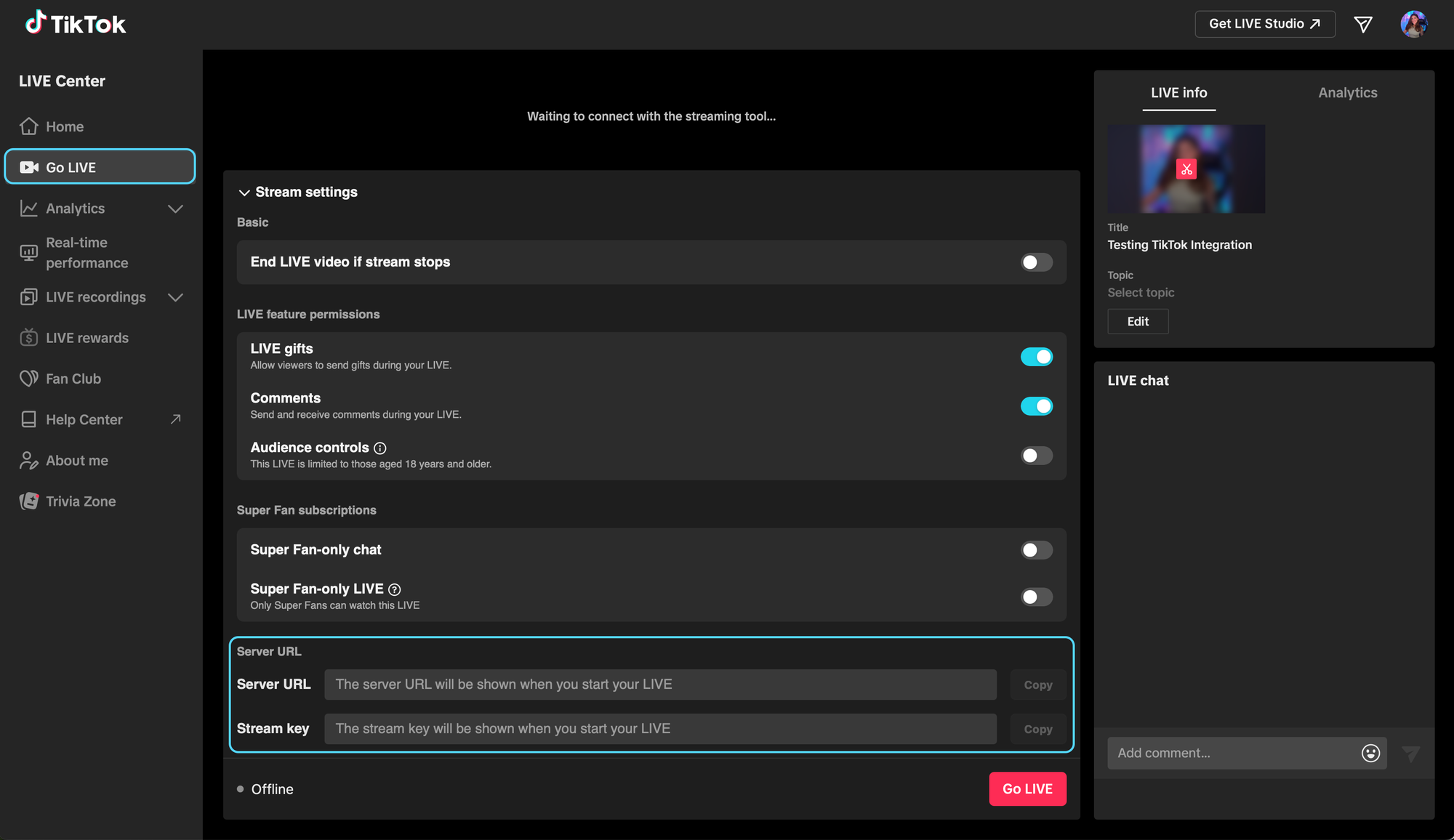
Step 3: Copy Your Stream URL and Stream Key
You will see two values: Server URL (this will look like rtmp://..., and the Stream Key, which is a long unique string that you want to keep private.
Step 4: Enter Them in Meld Studio
- In Meld Studio, go to Outputs → Click the +
- Select Custom RTMP as your streaming service.
- Paste your TikTok Server URL into the Server field.
- Paste your Stream Key into the Stream Key field.
You're ready to go live to TikTok from Meld Studio!
How to Set Up TikTok Chat Integration
Getting TikTok chat running in Meld takes 3 easy steps:
- Open Meld Studio
- Add your TikTok account as an Output
- Log into your TikTok account through the secure authentication prompt
You're done! Your TikTok live chat will now populate in the chat dock the next time you go live on TikTok. All chat messages will flow in alongside your other integrated platforms. This makes it easier than ever to engage with every platform and connect with your audience without missing a beat.
Known Issues with TikTok API Integration
here are currently some issues with TikTok's API which may cause connection issues for some users.
Connection Delay:
Due to TikTok's API limitations, Meld may take up to 10 minutes to connect to TikTok livestreams. This is because TikTok limits how often third-party applications can check for new streams.
Missed Messages:
Due to to TikTok's quality filter and privacy settings, Meld may miss messages from certain users. This is because TikTok does not send message events for ~10% of users to third-party applications, and unfortunately, there's nothing we can do about this. We are currently exploring options to mitigate this issue, but there is no guaranteed solution at this time.
No TikTok Messages Coming Through:
If you find that no TkTok messages are coming through at all, this could be due to your Stream being marked as 18+. We are unable to connect to TikTok streams that are marked as such. You can remove the 18+ tag in your account settings.
Sometimes TikTok emits the TikTok Live ID, which will also not display the chat.
Conclusion
If you've been a Meld user for a while now, you know the team is not stopping there. We're continuing to improve the chat dock experience and expand platform support. If there are features or integrations you'd love to see next, let us know in the Discord!
FAQ
Do I need to connect my TikTok account to go live to TikTok through Meld Studio?
Not for streaming. Going live to TikTok requires your TikTok stream key and server URL. No account login needed in Meld Studio for that. The account login in Meld Studio is specifically for enabling chat integration so your TikTok live chat appears in the chat dock.
I logged into TikTok in Meld Studio but I don't see my chat. What's wrong?
Make sure you are actively live on TikTok when you check for chat messages. TikTok chat only flows when your stream is live. Also confirm that TikTok is enabled and visible in your chat dock settings within Meld Studio.
Can I go live to TikTok and read TikTok chat at the same time in Meld Studio?
Yes! Set up your TikTok stream key in your output settings to broadcast to TikTok, and log into your TikTok account in the chat dock to pull in your live chat. Both work independently and together seamlessly.
I don't have 1,000 followers on TikTok yet. Can I still use the chat integration?
Absolutely! The follower requirement only applies to access TikTok's RTMP stream key for third-party software streaming. If you go live through TikTok LIVE Studio using Meld Studio's virtual camera, there may be different eligibility thresholds. The chat integration in the Meld Studio chat dock just requires you to log in with your TikTok account.
Is it safe to log into my TikTok account in Meld Studio?
Yes. Meld Studio uses a secure OAuth authentication flow to connect your TikTok account. We never store or have access to your TikTok password.
Will Meld Studio ever support going live directly to TikTok without a stream key?
We're always evaluating what's possible on each platform. For now, TikTok's direct broadcasting support for third-party tools requires a stream key. We'll keep you posted if that changes!
Does this work on both Windows and Mac?
Yes. TikTok chat integration is available on both Windows and Mac versions of Meld Studio.