On this page
You're mid-stream, deep in a game, and then it happens. The raid notification fires. Fifty new viewers just walked through the door.
And your stream... does nothing.
No fanfare, no celebration. Just a chat message and maybe a quick "welcome raiders!" before you scramble to acknowledge everyone. It's a missed moment, and every streamer who's been through it knows that feeling.
Raids are one of the biggest growth events that an happen on stream. Someone trusted you enough to send their whole community your way. That deserves more than a notification box.
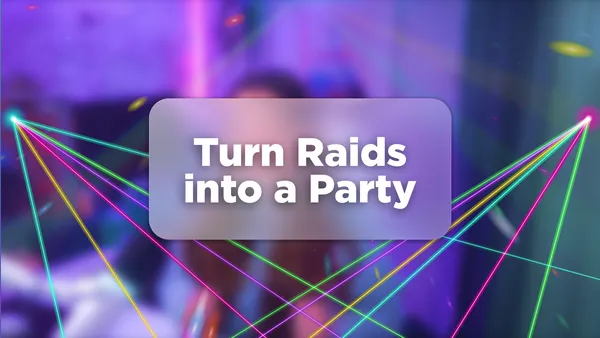
That's exactly what Raid Rave was built for. It's a Meld Spark element that turns the moment a raid hits into a full EDM-style laser light show, right on your stream. We're talking sweeping rays of light, disco-ball-inspired bursts of color, and the kind of visual energy that makes every raider feel like they just walked into the best party of the night.
What Raid Rave Actually Looks Like
Picture the moment the lights drop at an EDM show. That split second before the bass hits when the whole room goes electric. Raid Rave captures that energy and puts it directly on your stream.
When a raid triggers the element, your screen transforms. Rays of light shoot across the frame, sweeping and moving like a real laser light show. The colors shift and pulse. It's not a static overlay sitting in the corner. It takes over the scene in the best way possible, making it immediately obvious to everyone watching that something big just happened.
A few things that make the visual effect work so well:
- Light rays that move, not just flash. The animation feels dynamic, like actual stage lighting sweeping across a crowd.
- Disco-ball-inspired color bursts that scatter light across the screen without needing an actual disco ball in the shot.
- Full-screen energy that commands attention the moment the raid lands, so new viewers know they arrived at the right place.
The whole thing plays automatically when a raid comes in, which means you can stay locked in on your community instead of fumbling with scene switches or manual triggers.
Why the Moment Matters
Raids are a big deal in streaming culture. When a streamer raids you, they're endorsing you to their audience. Those viewers arrive with curiosity but zero loyalty. You have about 30 seconds to give them a reason to stay.
A generic "welcome to the stream" doesn't cut it. But a full light show? That's a statement. It tells raiders instantly that this streamer puts effort into the experience, that the community here celebrates together, and that showing up matters.
There's also something in it for the streamer. Raids can catch you off guard, especially when you're deep in content. Raid Rave handles the visual celebration automatically, so you get a natural pause to turn to camera, hype up the new viewers, and make the moment feel big, without having to orchestrate it yourself.
It's the difference between a raid that gets acknowledged and a raid that gets celebrated.
How to Set Up Raid Rave
Getting the Raid Rave element running takes just a few steps inside Meld Studio or OBS. Here's how to find it and get it live on your stream:
- Open Meld Studio or OBS.
- Head to the Spark Gallery and search for Raid Rave.
- Add the element to your scene. In OBS you have to add it as a new Browser Source, whereas in Meld you can paste it onto the canvas.
- Test it out before your next stream so you know what your audience will see.
That's it. No manual scene switching, no third-party alert service to configure, no custom CSS to write. Meld Spark (or the Spark plugin for OBS) handles the trigger and the animation, and you handle the hype.
This is What Meld Spark is Built For
Raid Rave is a great example of what Meld Spark makes possible. It's not just about having a cool overlay. It's about making your stream feel alive and responsive to the things that actually matter in your community.
A raid is a moment. Raid Rave makes sure it feels like one.
If you're already on Meld Studio, head to the Spark Gallery and give it a try before your next stream. If you're on OBS, grab the Spark Plugin and get setup. If you haven't given it a try yet, this is a pretty solid preview of what's waiting for you.
FAQ
Does Raid Rave work with Twitch, Kick, and YouTube raids?
Yes. Raid Rave is designed to work with raids across the major streaming platforms. As long as your account is connected in Meld Studio or through the Spark Plug for OBS, it will detect the incoming raid and trigger the element automatically.
Do I need to manually trigger Raid Rave during a stream?
No. Once it's set up in your scene, Raid Rave fires on its own when a raid comes in. You don't need to hit a button or switch scenes. Just focus on your community and let the light show handle itself.
Can I customize the colors or duration of the effect?
Raid Rave comes ready to go out of the box with its EDM-style laser light show. You can customize every aspect of the Raid Rave element by telling Spark what you want changed.
Is Raid Rave free to use?
Yes. Raid Rave is available to anyone using Meld Studio or the Spark Plug for OBS.
What if I miss the raid notification while I'm focused on content?
Even if you're heads-down in a game, the light show fires automatically and signals to your whole chat that a raid just landed. That way a raid moment is never missed.