On this page
Has setting up a VTuber/PNGtuber in OBS ever felt like assembling IKEA furniture with no instructions? You're not alone! A lot of creators have started their livestreaming journey by using OBS Studio and find themselves getting frustrated and even hitting a wall.
Setting up a VTuber model is stressful enough so why struggle with your streaming software too? Meld Studio is often considered an OBS Studio alternative that is built for creators who want results without the use of plugins and runs on both Windows and MacOS.
For VTubers (and PNGtubers) one of the biggest workflow upgrades is using Spout2.
What is Spout2
Spout2 is a simple way to share video between programs on your computer. It sends video directly from one app to another, which is especially useful for streaming things like VTuber avatars or visual effects.
Spout2 Preserves Transparency
Meld's docs put it plainly: Spout2 keeps transparent VTuber backgrounds transparent, while window capture typically forces you into chroma keying which can look rough.
If you've ever found yourself frustrated and fighting the green outline then you already know why this is a win.
Common VTuber Streaming Problems (and How Spout2 Solves Them)
Let's talk about the frustrations that probably brought you here in the first place.
The Green Screen Halo
If you've spent hours tweaking your chroma key settings but there's still that green glow around your model's hair it can be really frustrating. Your model either has a radioactive outline or starts disappearing into the void.
The Spout2 Solution: Spout2 preserves your model's original transparency data. No chroma keying is required. The transparent background for your model remains transparent from your VTuber app straight through to your stream, exactly as the software intended.
The "Capture Method" Frustration
Windows capture? Game capture? Virtual camera? Each method has its own quirks, and none of them seem to work quite right for your model. You run into the chroma keying situation all over again as well. Let's not forget that using Display capture shows your entire desktop including that embarrassing browser tab you forgot to close before going live.
The Spout2 Solution: Spout2 is purpose-built for exactly this use case: capturing your model and sending it to your streaming software. With Device Capture you can send your model between applications with transparency intact.
The Performance Hit
Your model looks beautiful in VTube Studio, but the moment you start streaming you start dropping frames. Your fans are spinning up, your CPU usage is hitting 80%, and you haven't even started up the game yet. Adding a VTuber model shouldn't feel like it requires a supercomputer.
The Spout2 Solution: Using direct GPU-to-GPU transfer, your graphics card handles the heavy lifting instead of forcing everything through your CPU. Lower system overhead and smoother performance leaves more resources for your actual content.
The Plugin Update Nightmare
Everything was working perfectly yesterday, but then OBS had an update. Now nothing works, and you're frantically searching forums 20 minutes before you're supposed to go live in an attempt to figure out which version of each software is compatible with the other.
The Meld Studio Solution: Because Spout2 support is built directly into Meld Studio, there's no plugin compatibility complications. When Meld updates, Spout2 support updates with it. One less thing to worry about breaking before you start streaming and/or recording.
The Quality Loss Conundrum
Your model is looking crisp and clear in VTube Studio, but somehow it looks compressed or slightly blurry when you're streaming. You've checked your bitrate and your resolution but the quality just isn't translating.
The Spout2 Solution: Spout2 maintains your original video quality without the compression or conversion losses that can happen with other capturing methods. What you see in your VTuber app is what your viewers see on stream.
Do any of these problems sound familiar? These problems are just the reality of trying to fit VTuber workflows into software that wasn't designed for them.
Why Meld Studio is Easy for VTubers
Meld Studio is an easy to use OBS Studio alternative for VTubers, and this is where the difference is:
In OBS, Spout2 usually means "Install a Plugin"
If you want Spout2 inside of OBS then you'll end up installing a third-party Spout2 plugin and maintaining it.
In Meld Studio, Spout2 is Built-In
Meld Studio has included Spout2 support directly inside of the software. Simply add a Video Device and Meld automatically detects available Spout2 senders.
This is the common theme for Meld: fewer moving parts → fewer things to break → easier to stay consistent on stream.
How to Use Spout2 in Meld
Before you can use Spout2 in Meld you will need to enable it in your VTuber app. Your avatar software needs to "send" Spout2 so that Meld can "receive" it.
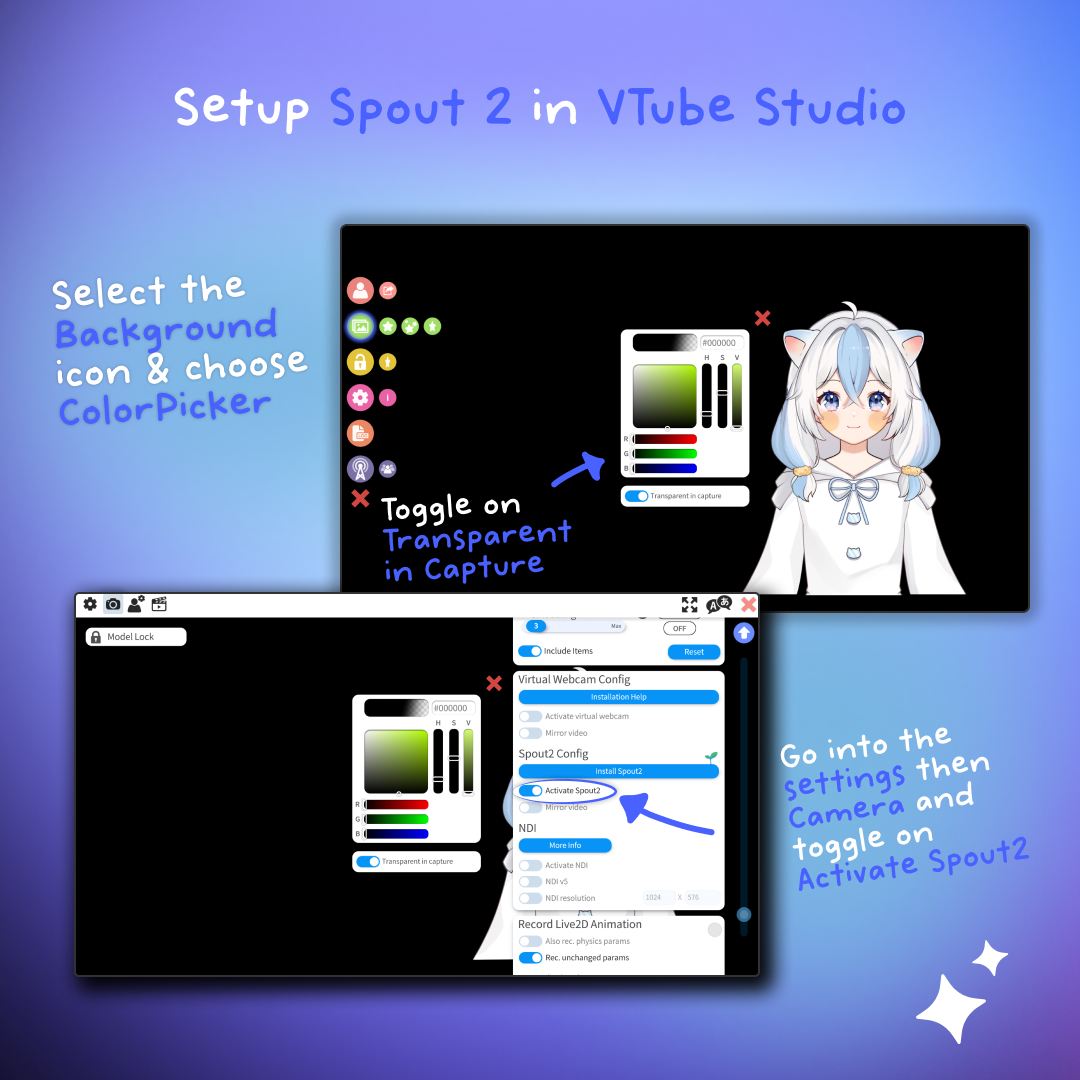
Enable Spout2 in your VTuber App
Here are some quick setups for common applications:
VTube Studio
- Open VTube Studio and set up your avatar
- Go to Background → pick ColorPicker → enable Transparent in Capture → change the background color to Black
- Go to Settings → Camera / Spout2 Config → toggle Activate Spout2
VSeeFAce
- Open VSeeFAce
- Settings → General
- Enable Spout2 Image Capture Support
VNyan
- Open VNyan
- Settings → Output → Spout
- Enable Enable Sender and make sure transparency is enabled
Warudo
Warudo is typically already configured, but you can confirm via Settings → Output → Spout Output.
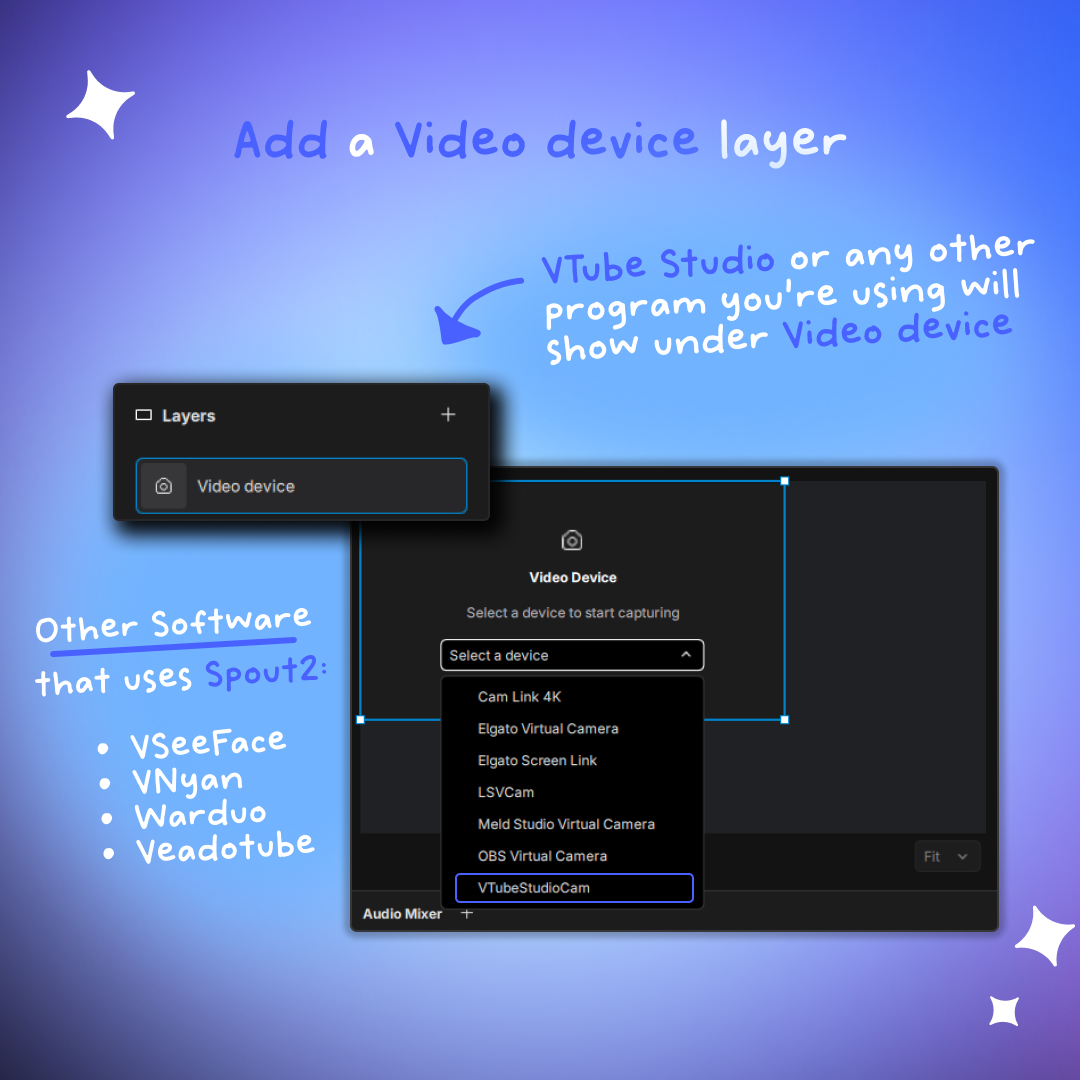
Add Spout2 Source in Meld
- In Meld Studio, add a Video Device layer
- Open the device dropdown and select your Spout2 sender (ex: "VTuber Studio Spout2")
- If you opened your VTuber app after Meld, close and reopen Meld so that it picks up the new sender.
That's it! No need to install plugins.
No Plugins Needed
If you're coming over from OBS, you're used to building a setup out of plugins and hoping they all keep playing nice. Especially after an update.
Meld is designed differently: many effects and tools are built in, so you can customize without installing extra add-ons.
The Exception: Hardware Plugins
Although Meld Studio doesn't utilize plugins in the same way was OBS, Meld does have an Elgato Stream Deck plugin so you can switch scenes, toggle layers, control widgets and audio from your deck.
This means that plugins do exist in Meld Studio where they make sense, such as hardware control. However, the goal is that your core production workflow doesn't depend on them.
Make the Switch from OBS to Meld
If you're ready to try an OBS Studio alternative that is easy to use, we've got you covered! Not only do we have a guide on how to get started with Meld Studio, we have an OBS Importer Tool to seamlessly transfer your scenes and sources directly into Meld Studio without the need for tedious manual recreation or setup.
Here's our recommended first time setup for OBS users:
- Import your OBS session.
- Add your VTuber app via Video Device.
- Test a recording → then Go Live!
Start Streaming the Easy Way
Here's the reality: you became a VTuber (or PNGtuber) to create content and connect with your community, not to troubleshoot plugins or fight with chroma key settings at 7:58 PM before your 8 PM stream.
Meld Studio is built for creators who want professional results without the technical headaches. Built-in Spout2 support, no plugin maintenance, and available for both Windows and Mac. If you're coming from OBS, our importer tool transfers your scenes automatically, no manual recreation required.
FAQ
Is Meld Studio a good OBS Studio alternative for VTubers?
Yes! Especially if you want an easy to use workflow with less plugin dependency, and built-in Spout2 support on Windows.
What is Spout2 used for in streaming?
Spout2 is commonly used to send video between apps on Windows. It's popular for VTubers and PNGtubers to show their models with low overhead and clean transparency.
Do I need Meld Studio Plugins to use Spout2?
No plugins are needed. Spout2 support is built into Meld's Video Device source.
What VTuber apps work with Spout2?
Most popular VTuber applications support Spout2, including VTube Studio, VSeeFace, VNyan, and Warudo. If your software has a Spout2 output option in its settings, it will work with Meld Studio's built-in support.
Can I use Spout2 with OBS Studio?
Yes, but you'll need to install and maintain a third-party Spout2 plugin for OBS. Meld Studio includes Spout2 support natively, which means one less plugin to manage and update.
Will Spout2 slow down my computer?
Spout2 typically improves performance compared to other capture methods. This leaves more resources available for your game, chat interactions, and other streaming elements.
Do I need a green screen to use Spout2?
Nope! That's one of the great advantages of Spout2. It preserves the transparency information directly from your VTuber app, so there's no need for chroma keying or green screens.
Can I use Spout2 for things other than VTuber models?
Yes! Spout2 works for any application that can send video output via Spout2. This includes visual effect programs, motion graphics, game overlays, and creative tools. For example, you can add Stream Avatars and use Spout2 support to remove the background.
Will my OBS scenes transfer to Meld Studio?
Yes! Meld Studio includes an OBS Importer Tool that transfers your (compatible) scenes and sources directly into Meld. You won't need to manually recreate your entire setup.
Does Meld Studio support Stream Deck?
Yes, Meld Studio has an official Elgato Stream Deck plugin that lets you switch scenes, toggle layers, control widgets, and manage audio directly from your Stream Deck.
Can I stream to Twitch, YouTube, and other platforms with Meld?
Yes, Meld Studio supports streaming to all major platforms including Twitch, Kick, YouTube and any custom RTMP destination. You can also multi-stream to multiple platforms simultaneously.