On this page
In 2026, Creators want to be able to stream on Twitch AND YouTube at the same time. Throw in Kick, TikTok Live, and Instagram (to name a few) while you're at it. But then you at the pricing for most multi-streaming software and realize just how expensive it can get.
Here's the thing nobody talks about enough. When you're starting out (or even when you're an established creator), paying $20, $30, or more per month just to stream to multiple platforms feels like highway robbery. Especially when some tools cap you at streaming to just two or three platforms unless you upgrade to their premium tier.
There's a better way to multi-stream to all of your favorite platforms, and it won't cost you a cent.
Why You Should be Multi-Streaming
Let's imagine you spend three hours streaming an amazing gaming session. Your chat is popping off, your gameplay is on point, and you've got great energy. But here's the problem: you only streamed to Twitch.
That means everyone on YouTube never saw it. The Kick audience never knew you were live. Instagram viewers missed out completely. You spent three hours creating content that reached maybe 20% of your potential audience.
Now imagine the same stream going live everywhere at once. You're building your community across every platform simultaneously. Someone discovers you on YouTube, their friend finds you on Twitch, and suddenly you're growing five times faster with the exact same effort.
The Problem with Multi-Streaming Tools
Most streaming software falls into one of two categories, both of which create unnecessary barriers for content creators.
The first category offers a "free but limited" model. You can stream to two platforms at no cost, but adding a third destination requires a monthly subscription, often $15 or more. Each additional platform typically means another tier upgrade and another fee.
The second category removes platform limits but implements premium pricing from the start. These tools only become cost-effective once you're generating substantial revenue from your content. By that point, most creators have already built their audience using more accessible solutions.
The underlying issue is clear. Multi-streaming has become essential for audience growth in today's content landscape. Creators who want to reach viewers across multiple platforms need reliable tools to do so. Yet many software companies have positioned this fundamental capability behind pricing structures that compound quickly, turning a basic necessity into an ongoing expense that scales with your ambitions rather than your success.
Meld Studio: Multi-Streaming Without Compromise
Meld Studio represents a different approach to multi-streaming software, one built on the principle that essential streaming capabilities shouldn't come with recurring costs or artificial limitations. Meld Studio is completely free when it comes to multi-streaming. The software provides full functionality at no cost.
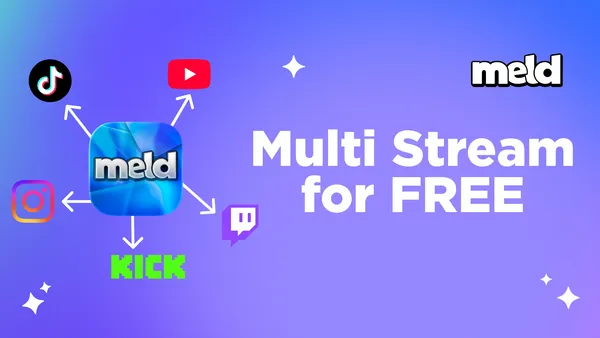
More importantly, there's no platform limit. Whether you're streaming to two platforms or ten, Meld Studio handles them all equally. Want to reach audiences on Twitch, YouTube, Facebook Gaming, Kick, and TikTok simultaneously? The software doesn't impose restrictions based on your destination count.
You might be wondering about the business model or hidden costs. The reality is straightforward: Meld Studio was developed by people who experienced the same frustrations with existing software. Their solution was to build software that prioritizes accessibility to the features you need to be successful.
How to Multi-Stream with Meld Studio
Getting started with Meld Studio is more straightforward than you might expect from software with this level of capability. Begin by downloading Meld Studio from the official website. Installation completes in approximately two minutes, and you can start using the software immediately.
The interface is designed with clarity in mind. Rather than overwhelming users with excessive options, Meld Studio presents a streamlined workspace that focuses on the essentials. This intentional design choice means you can start streaming faster without navigating complex menus or unfamiliar workflows.
To connect your streaming platforms, on the right side of the Studio, click the "+" next to Outputs where you'll be prompted to choose your platform. You'll find all of the integrated streaming platforms: Twitch, YouTube, and Kick, with the inclusion of using Custom RTMP for Facebook Gaming, TikTok, and more.
Each platform requires a stream key, which you can locate in the platform's stream settings or dashboard. Platforms with integration will automatically log you in and grab your stream key. For Custom RTMP's copy the stream key from each platform and paste it into Meld Studio. The connection process takes seconds per platform.
Repeat this process for every platform you want to include in your multi-stream setup. Since there's no platform limit, you can add as many destinations as your strategy requires.
One of Meld Studio's key advantages becomes apparent during configuration. You set your stream parameters once: resolution, bitrate, encoder settings, and quality options. These settings automatically apply across all connected platforms. There's no need to configure separate settings for each destination or worry about inconsistent stream quality between platforms.
When you're ready to broadcast, a single button initiates your stream across all platforms simultaneously. Meld Studio manages the distribution automatically, ensuring consistent delivery to every destination without requiring ongoing monitoring or manual adjustments.
The Technical Stuff (Made Simple)
Performance is a common concern when streaming to multiple platforms, and it's worth addressing directly.
Meld Studio uses a single-encode architecture. Your computer encodes your stream once, and Meld Studio distributes that encoded stream to all destinations. This means the resource requirements for streaming to five platforms are essentially identical to streaming to one platform.
Your internet connection is the more critical factor. Ensure your upload speed can support your chosen bitrate with some headroom. A practical guideline is maintaining upload speeds at least 1.5 times your streaming bitrate. For example, streaming at 6000 kbps would ideally require 9 Mbps upload bandwidth or higher.
Most modern computers handle multi-streaming without difficulty. You don't need high-end hardware. A capable processor and reliable internet connection are sufficient for quality multi-platform broadcasts.
Growing Your Audience Across Platforms
Multi-streaming is a distribution strategy, but effective growth requires intentional approach beyond simply broadcasting everywhere.
Each platform maintains its own community culture and viewer expectations. Twitch audiences, YouTube viewers, TikTok users, and Kick communities each bring different preferences and engagement styles.
The most sustainable approach is authenticity. Create content that aligns with your strengths and interests, then let your audience find you across platforms. Trying to customize content for every platform's perceived preferences often leads to diluted messaging and burnout.
Analytics provide valuable insights into how your content resonates differently across platforms. You might discover that your YouTube audience engages more with tutorial content while your Twitch community prefers gameplay streams. Use this data to inform your content calendar and understand where different content types perform best.
Cross-promotion amplifies your multi-streaming efforts. Encourage your Twitch viewers to find you on YouTube. Mention your TikTok presence during Kick streams. Your audience likely uses multiple platforms, so make it easy for them to follow you everywhere you broadcast.
Monetize Multi-Streaming
Monetization while multi-streaming is possible, though it requires understanding platform-specific policies.
Each platform has distinct monetization programs and requirements. Twitch offers Affiliate and Partner programs. YouTube has its Partner Program. Some platforms permit simultaneous streaming to other destinations, while others have exclusivity requirements.
If you're enrolled in Twitch's Partner program, review your contract for exclusivity clauses. Most creators, particularly those in Affiliate programs or without formal partnerships, can stream to multiple platforms simultaneously without conflict.
Third-party donation and tip services function independently of your streaming destinations, allowing you to receive support regardless of which platforms you're broadcasting to.
Platform-specific monetization features (Twitch subscriptions, YouTube memberships) naturally only apply to their respective platforms. Growing your audience across multiple platforms can increase the total number of people who might choose to support you financially through any available method.
Common Multi-Streaming Mistakes (And How to Avoid Them)
Learning from common pitfalls can help you implement multi-streaming more effectively from the start.
The first mistake is neglecting your chat on some of the platforms. If you're broadcasting to four platforms but only monitoring Twitch chat, viewers on other platforms will take notice. Either implement a unified chat monitoring solution (several tools exist for this purpose) or communicate clearly about which platform's chat you're primarily monitoring.
With Meld Studio you can take your chats from Twitch, YouTube and Kick and monitor all three right in your streaming software. Just switch your Inspector Panel on the right side to the Chat Panel and you're all set.
The second mistake is using identical metadata across all platforms. While your video feed remains consistent, your stream titles and descriptions should be optimized for each platform's discovery algorithm. YouTube's search and recommendation systems prioritize different signals than Twitch or Kick's discovery features.
The third mistake is failing to update stream keys when they change. Password resets or security updates on streaming platforms may generate new stream keys. If you don't update these in Meld Studio, those platforms won't receive your broadcast.
The fourth mistake is streaming to platforms where you have no presence and aren't actively building one. Broadcasting to seven platforms is counterproductive if you never engage with viewers on three of them. Start with platforms where you already have some audience foundation, then expand strategically as you grow.
Take Advantage of Free Tools
Making multi-streaming accessible changes the game for content creators. When multi-streaming capabilities are locked behind expensive subscriptions, they create unnecessary barriers. New creators who can't afford premium tools grow more slowly, face greater challenges building sustainable audiences, and are more likely to abandon content creation entirely. This benefits no one.
Meld Studio's free, unlimited approach removes this barrier. Creators just starting out have access to the same multi-streaming capabilities as established broadcasters. This levels the competitive landscape in meaningful ways.
Free access also enables experimentation without financial risk. Curious whether there's an audience for your content on Kick? Test it. Want to explore Facebook Gaming? Add it to your destinations. Without subscription pressure to justify the expense, you can explore new platforms and opportunities more freely.
Getting Started Today
Your potential audience exists across multiple platforms. Multi-streaming with Meld Studio lets you reach all of them with the same effort you're already investing in content creation.
In an ecosystem where most tools come with subscription fees, usage caps, or feature limitations, software that simply works without these restrictions is worth paying attention to.
FAQ
Is multi-streaming actually free with Meld Studio?
Yes, Meld Studio allows you to stream for free with no hidden costs or feature limitations.
Does multi-streaming require more internet bandwidth?
Not with Meld Studio. Your computer encodes your stream once, and Meld distributes that single encoded stream to all your platforms. This means streaming to five platforms uses essentially the same bandwidth and computer resources as streaming to one platform. You just need enough upload speed to support your chosen bitrate.
Can I stream to YouTube and Twitch at the same time?
Yes. You can stream to YouTube and Twitch simultaneously with Meld Studio. As of 2023, Twitch updated its policies to allow multi-streaming for more creators.
What platforms does Meld Studio support?
Meld Studio supports all major streaming platforms with integration for YouTube, Twitch and Kick. With Custom RTMP you can stream to any platform that accepts RTMP streams.
How do I manage chat from multiple platforms at once?
Meld includes built-in chat integration for Twitch, YouTube and Kick. You can monitor all three platform chats directly in the software by switching to the Chat Panel on the right side.
Is it legal to stream to multiple platforms simultaneously?
Yes! Multi-streaming is legal. Most platforms allow it, though some have specific terms or exclusivity clauses. Review the Terms of Service and any contracts you may have to ensure you're good to multi-stream. Most creators are free to multi-stream without an issue.
How long does it take to set up multi-streaming with Meld Studio?
The initial setup takes about 5-10 minutes. You'll download and install Meld Studio (2 minutes), connect your platforms by adding stream keys (1-2 minutes per platform), and configure your stream settings once (2-3 minutes). After the initial setup, going live to all your platforms takes a single button click.
What happens if one platform goes down during my stream?
If one platform experiences technical difficulties, your stream continues on all the other platforms without interruption. Your viewers on functioning platforms won't even notice the issue.