On this page
If you're searching for free streaming software that doesn't compromise on features, you've probably stumbled across the usual suspects: OBS Studio, Streamlabs, maybe even some browser-based solutions. But here's the thing: a lot of platforms were built by engineers for engineers, leaving creators to navigate clunky interfaces and cobble together third-party plugins just to get basic functionality.
Enter Meld Studio, the streaming software built by creators, for creators.
As many creators out there have tested countless streaming software trying to find the best fit, Meld Studio is known as a breath of fresh air. It's completely free, works seamlessly on both Windows and macOS, and comes with everything you need built right into the Studio. No hunting for widgets or complicated plugin installations, which means no headaches.
Whether you're an educator bringing lessons to life, a musician sharing your craft with the world, or a church reaching your congregation online, Meld Studio has been designed with your needs in mind. Let's dive into why this might just be the streaming software you've been looking for.
Why Meld Studio Stands Out
Before we explore how different creators can leverage Meld Studio, let's talk about what makes it special:
Built-In Everything: Forget downloading dozens of plugins. Meld Studio includes professional widgets and tools right out of the box.
Modern, Intuitive UI: The interface feels like software built in this decade. Clean, logical, and designed to get you streaming quickly without a steep learning curve.
Native Multi-Streaming: Stream simultaneously to Twitch, YouTube, and Kick without third-party services or costs.
Professional Audio Control: A robust audio mixer with global tracks that let you mute, cue, and adjust volume across different scenes. This is crucial for anyone serious about audio quality.
Creator-First Philosophy: Every feature exists because real creators asked for it, not because it looked good in a product spec. The Discord serves as a place where users can request features be implemented.
Now, let's explore how Meld Studio serves three distinct creator communities.
For Educators: Interactive Learning Made Simple
Teaching online shouldn't feel like learning rocket science. Yet many educators find themselves wrestling with complicated software when they should be focusing on their students. Meld Studio changes that equation entirely. Want to know best practices when it comes to educational technology and online teaching? Check out EDUCAUSE.
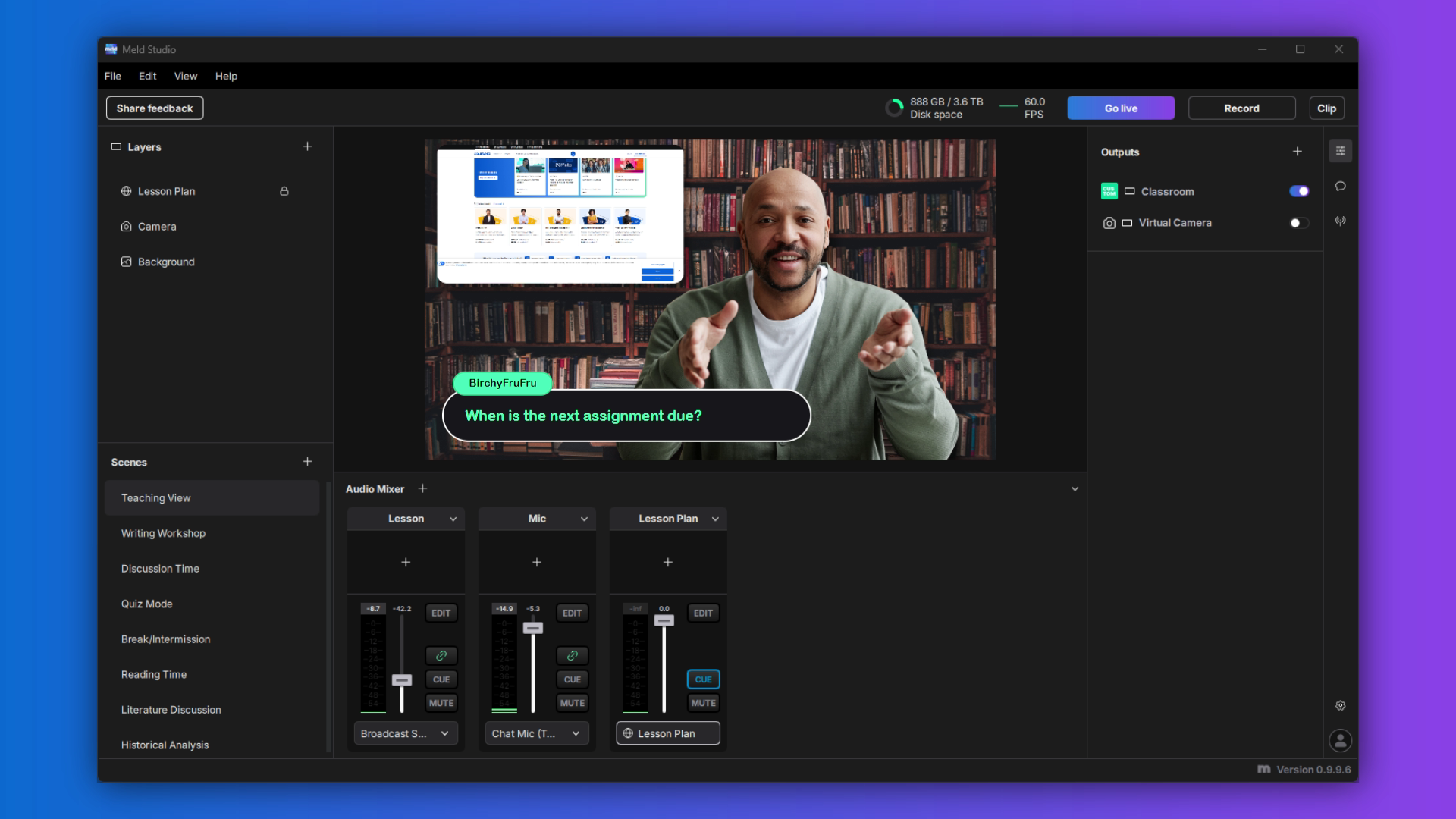
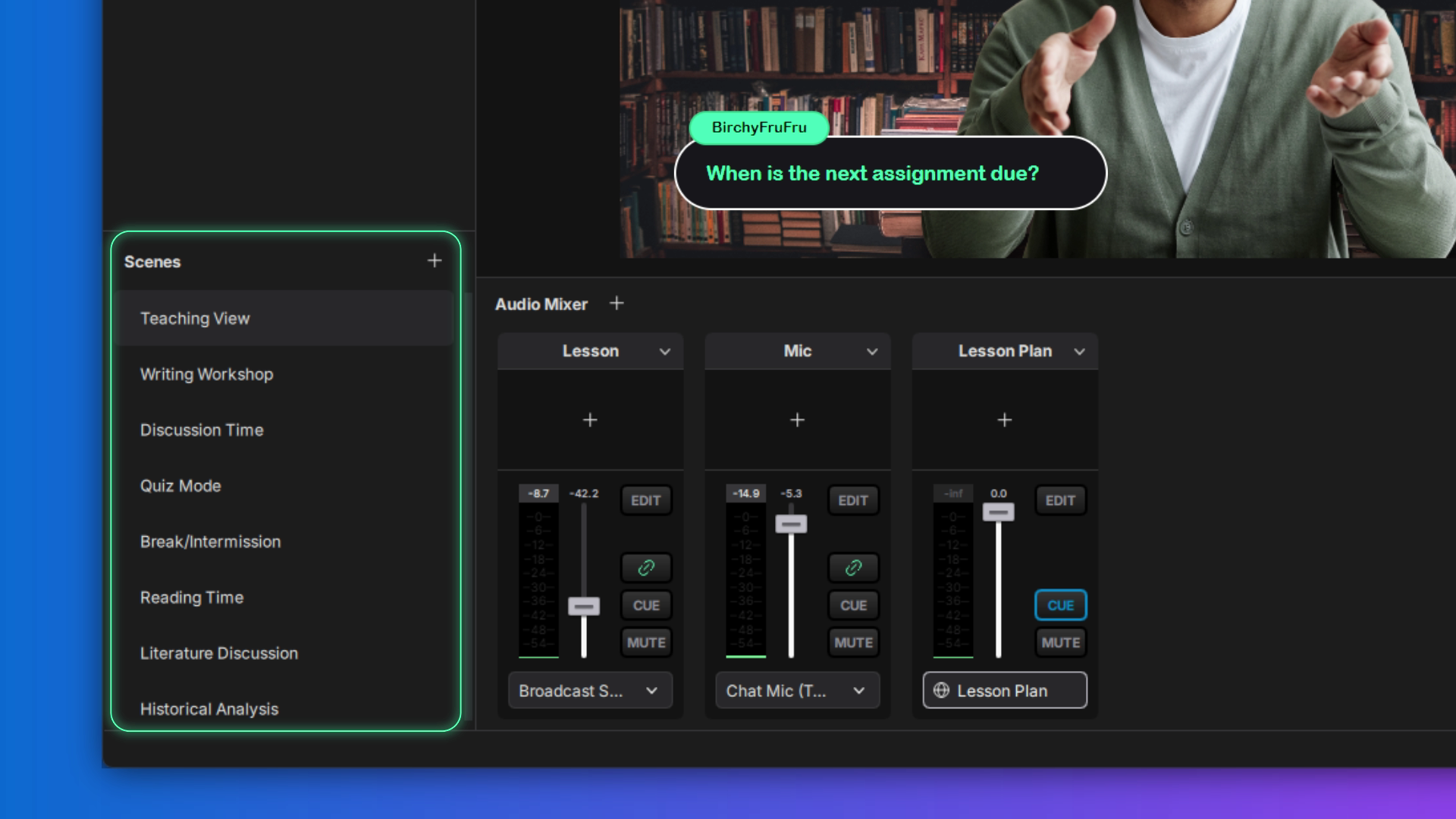
Highlight Message Widget: Bring Student Voices to the Forefront
A favorite feature for educational streaming is the Highlight Message Widget. Here's how it works: when a student asks a question or makes an insightful comment in chat, you can select their message and display it prominently on screen.
This does two things simultaneously. First, it ensures everyone can see the question or comment, making it easier to address. Second, (and perhaps more importantly) it validates student participation. When learners see their contributions highlighted on screen, it creates a sense of recognition that encourages further engagement.
Educators use this during virtual office hours, live review sessions, and even recorded lectures. It transforms the chat from a sidebar distraction into an integral part of the learning experience.
Scene-Based Teaching
With Meld Studio's intuitive scene management, you can create different "environments" for your stream:
- An intro scene with your course title and welcoming graphics
- A screen-share scene for walking through presentations or demonstrations
- A webcam-focused scene for direct instruction and connection
- A split-screen scene showing both you and your presentation materials
Switching between these scenes is as simple as a single click, and the transition is smooth enough that it never disrupts the flow of your lesson.
Audio Clarity for Lecture Content
The global audio track system means you can set your microphone at the perfect level once, then adjust background music or system audio independently. Teaching a language class and need to play audio examples? Your voice stays consistent while you bring up the sample audio. Sharing a video clip? Your narration remains clear without competing with the video's sound.
Educators face a lot of challenges when getting started with online teaching, don't let your streaming and recording studio be one of them.
For Musicians: Professional Audio in a Streaming Package
Here's where Meld Studio truly shines. Most streaming software treats audio as an afterthought to "just capture" alongside video. But musicians know better. Audio is the product. Everything else is just packaging.
The Audio Mixer: Your Digital Sound Booth
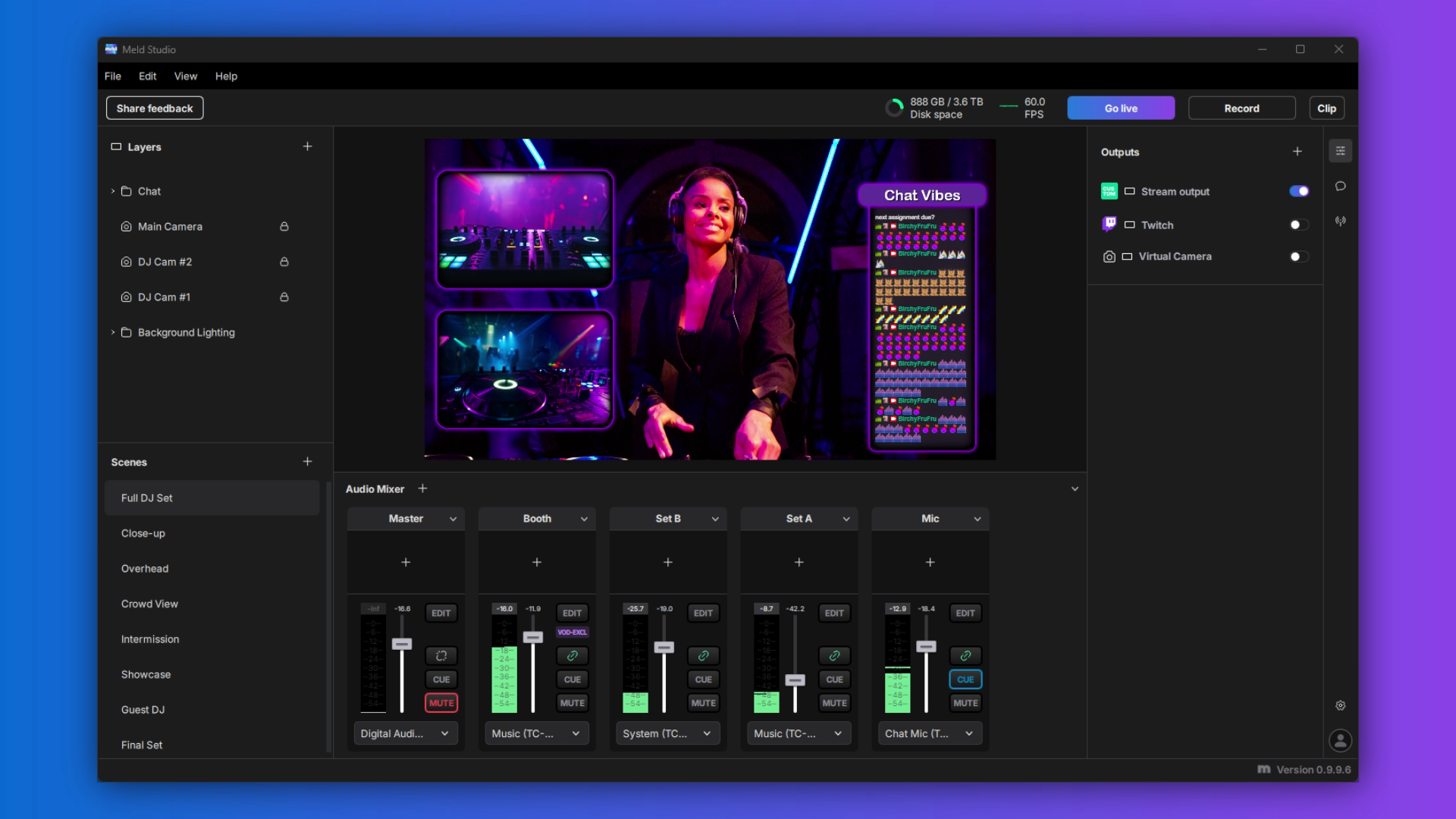
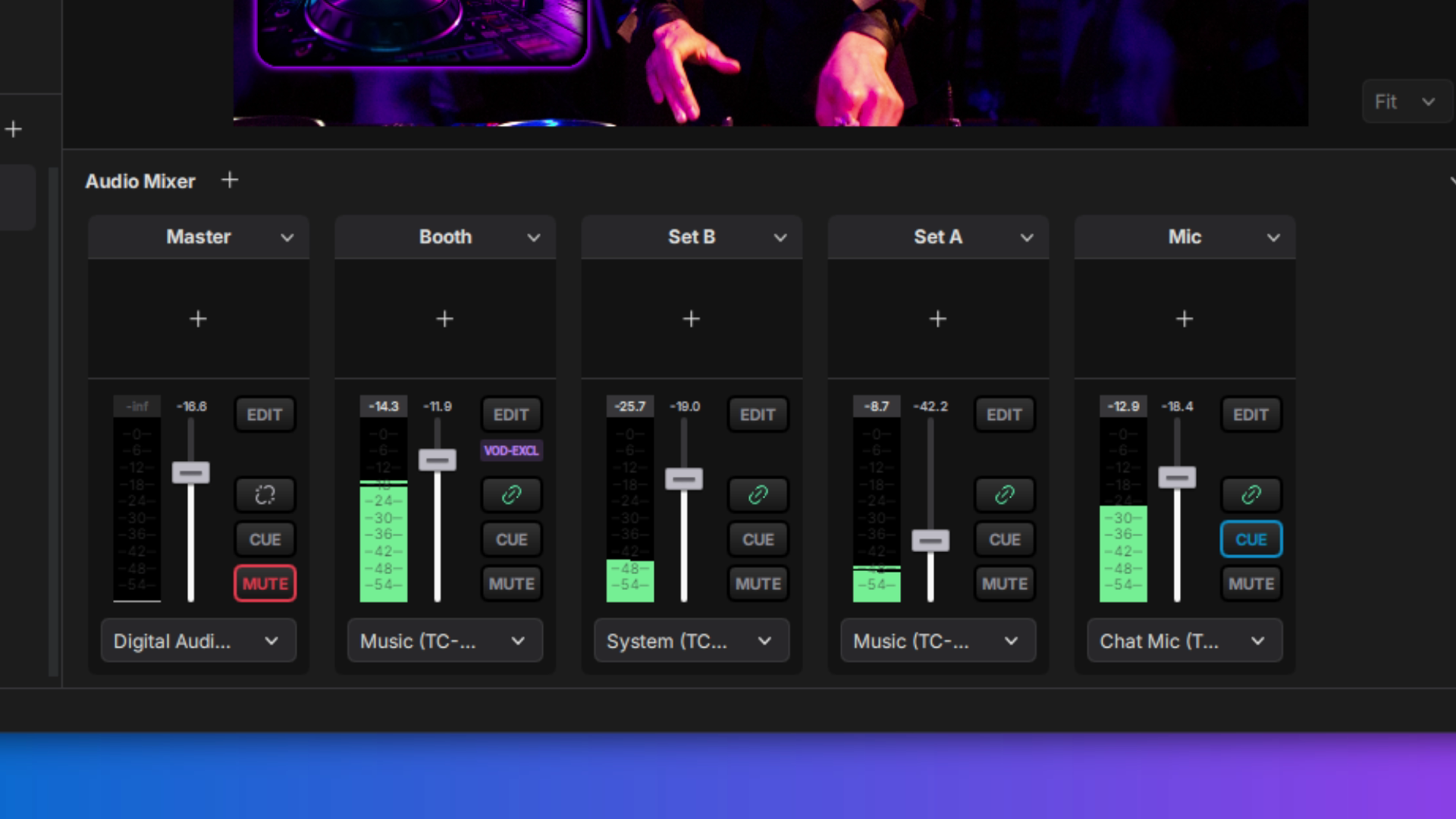
Meld Studio's audio mixer is sophisticated enough for professional use while remaining accessible to musicians who just want things to sound good. Here's what sets it apart:
Global Audio Tracks: Set up different audio sources (microphone, instrument inputs, backing tracks, alert sounds) and control them independently across all your scenes. Your acoustic guitar stays at the perfect level whether you're chatting with viewers or performing a song.
Real-Time Adjustments: During a live performance, you can make subtle tweaks to your levels without stopping the stream or interrupting your flow.
Cue Monitoring: Here's a feature that musicians can find beneficial as you can preview and listen back to your audio before it goes live. Testing a new microphone setup? Want to hear how your guitar mix sounds? Cue it up and listen through your headphones before your audience hears it.
Per-Scene Audio Profiles: This is incredibly powerful. You might want your microphone front-and-center during a "chatting with viewers" scene, but need it to blend with instruments during a performance scene. Meld Studio lets you configure audio levels per scene, so transitions feel professional and intentional.
Built for Music Streaming
Unlike general-purpose streaming software, Meld Studio understands that musicians have unique needs:
- Low-latency audio monitoring so you're not fighting against delay
- High-quality audio encoding that preserves the nuances of your performance
- Multiple input support for complex setups (vocals, guitar, keyboard, drum machine, etc.)
- Configure alerts to not interrupt your music
Whether you're streaming a casual practice session, teaching lessons, hosting a virtual concert, or sharing your creative process, Meld Studio handles the technical side so you can focus on the music.
For Churches: Reaching Your Congregation Online
The pandemic taught many churches an important lesson: online presence isn't optional anymore. But maintaining that presence with limited technical expertise and budget can feel overwhelming. Meld Studio addresses both challenges head-on.
Professional Production, Volunteer-Friendly Interface
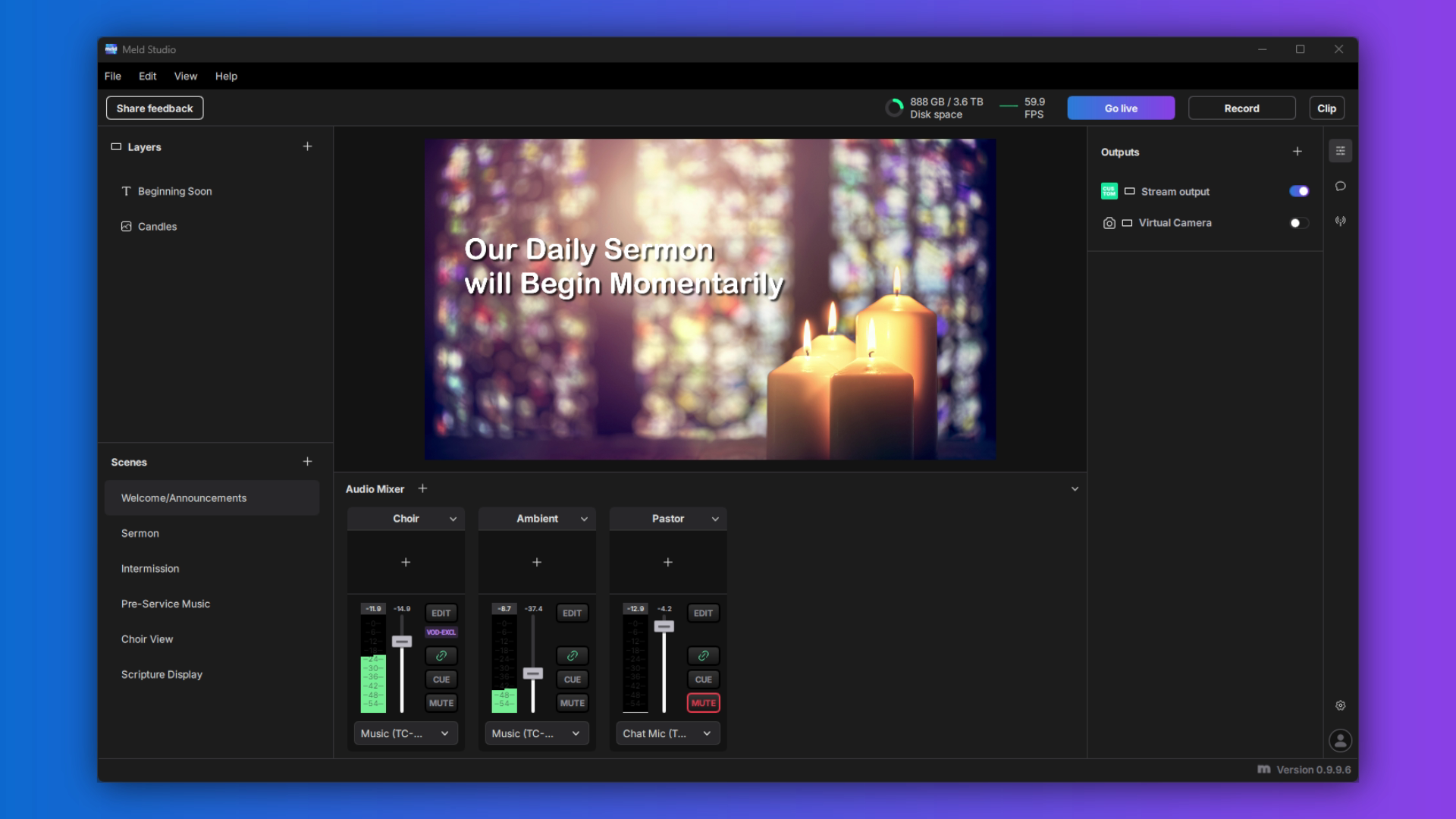
Church tech teams often consist of dedicated volunteers who aren't professional videographers. They need software that looks professional but doesn't require a degree to operate. Meld Studio's modern UI makes sense immediately so you can run a Sunday service stream.
The scene system lets you create a complete service flow:
- Pre-service countdown and welcome screen
- Wide shot for worship music
- Close-up for announcements
- Scripture display overlays
- Sermon camera angle
- Closing and next-steps information
Once these scenes are set up, even a first-time volunteer can follow a simple script: "Click this for worship, click this for the sermon."
Interactive Congregation Engagement
The Highlight Message Tool becomes incredibly powerful during interactive services. Hosting a prayer request time? Highlight requests from the chat so the entire congregation (both in-person and online) can see them and pray together. Running a Q&A with the pastor? Feature questions prominently on screen.
This bridges the gap between physical and digital attendees. Online viewers don't feel like second-class participants; they're part of the same service, with their voices literally appearing alongside the sermon.
Multi-Platform Ministry
Many churches want to reach people where they are, which means streaming to multiple platforms simultaneously. With Meld Studio's native multi-streaming to YouTube, Twitch, and Kick, you can:
- Reach your established congregation on YouTube
- Engage younger demographics on Twitch
- Experiment with new platforms without additional cost or complexity
All from one piece of software, with one set of scenes, controlled from one interface.
Audio for Worship
Church services present unique audio challenges. You need clear spoken word for sermons and announcements, but also rich, full sound for worship music. Meld Studio's global audio track system handles this elegantly:
- Keep the pastor's microphone at a consistent level
- Adjust worship team audio independently
- Control ambient room sound separately
- Manage presentation video audio without affecting live sources
The result is a professional sound mix that serves the content, whether that's an intimate prayer or a full worship band.
Getting Started with Meld Studio
Here's the beautiful part: everything I've described is completely free. No hidden costs, no "upgrade to unlock this feature," no subscription tiers. Meld Studio will always keep free features free, even when a premium version becomes available.
Ready to Try It?
Download Meld Studio for Windows or macOS.
Not sure if it's right for you? The Meld Studio team is genuinely passionate about helping creators succeed. Join the Discord server where you can connect with other users, get tips and tricks, and ask questions directly to the people building the software.
Want a guided walkthrough? Request a free demo in Discord from the Meld Studio team. They'll show you around, answer your specific questions, and help you understand how Meld Studio can work for your unique situation. Whether you're teaching calculus, streaming a jazz performance, or broadcasting Sunday services, Meld Studio can work for you.
Conclusion
Ready to transform your streaming setup? Download Meld Studio today and join a community of creators who believe streaming software should work for you, not against you.
FAQ
What is Meld Studio?
Meld Studio is a streaming software designed by creators, for creators. It works on both Windows and MacOS, including features built right into the platform so there's no need to download third-party plugins or widgets.
Is Meld Studio really free?
Yes! Meld Studio has a free version with no hidden costs or paywalls. A premium version will eventually be available but Meld has promised not to take any free features and lock them behind a paywall in the future. Streaming with Meld will always remain free.
How does Meld Studio compare to OBS Studio and Streamlabs?
While OBS Studio and Streamlabs are streaming tools, they are both built on the same code and were built with steeper learning curves with the need for third-party plugins for basic functionality. Meld Studio was designed with creators in mind from the start, offering a modern, intuitive interface with professional features built-in. You won't need to hunt for widgets or install complex plugins since everything is already included.
Where can I get support or ask questions about Meld Studio?
The Meld Studio team maintains an active Discord community where you can connect with other users, get tips and tricks, request new features, and ask questions directly to the team. You can also request a free demo from the team to see how Meld Studio can work for your specific use case.
How can educators use Meld Studio for online teaching?
Educators can leverage Meld studio for virtual classes, office hours, live review sessions, and recorded lectures. With the scene-based system, it's easier to switch between different teaching modes such as intro slides to screen sharing for presentations.
Can Teachers share audio examples during streams?
Absolutely! The global audio track system allows you to play audio examples while keeping your narration clear and consistent. You can adjust the volume of audio examples independently.
Is Meld Studio suitable for recording lectures, not just live streaming?
Yes! Meld Studio excels at live streaming, but you can also use it to record high-quality video lectures. The same scene management, audio controls, and professional features that make live streaming easy also enhance your recorded content. You can record locally while streaming, or simply record without streaming at all.
Why is Meld Studio good for musicians?
Meld Studio was designed with a deep understanding that for musicians, audio is the product, not the afterthought. With an audio mixer that has features like global audio tracks, per-scene audio, low-latency monitoring, cue monitoring, and high-quality audio encoding.
What is Per-Scene Audio?
Per-scene audio allows you to configure different audio levels for different scenes. For example, you might want your microphone front-and-center when chatting with your audience, but need it to blend with your instruments during a performance scene. Instead of manually adjusting levels every time you switch scenes, Meld Studio will automatically apply the right audio for each scene, creating professional and intentional transitions.
Is Meld Studio suitable for volunteer-run church tech teams?
Yes! The modern, intuitive interface makes sense immediately, even for first-time users. Once the scenes are setup, running a Sunday service stream becomes as simple as following a script. "Click this for worship, click this for sermon." The interface looks professional but doesn't require a degree to operate.
Can we stream to multiple platforms to reach different demographics?
Yes. Meld Studio's native multi-streaming capability allows you to broadcast to YouTube, Twitch and Kick simultaneously. Without additional cost or complexity. This helps you meet people where they are and expand your digital ministry.